
Introduction
This manual provides essential information for the setup, operation, maintenance, and troubleshooting of your Magellan eXplorist 510 Waterproof Hiking GPS. Please read this manual thoroughly to ensure proper use and to maximize the device's capabilities.

Figure 1: Front view of the Magellan eXplorist 510 GPS device.
Setup
1. Battery Installation
The eXplorist 510 requires two (2) AA batteries for operation. These batteries provide up to 16 hours of use. To install:
- Locate the battery compartment on the rear of the device.
- Open the battery compartment cover.
- Insert two AA batteries, ensuring correct polarity (+/-).
- Securely close the battery compartment cover to maintain the device's waterproof seal.
2. Memory Card Installation (Optional)
The device features a microSD slot for expandable memory, located under the batteries. This allows for additional storage of maps, photos, videos, audio recordings, and geocache data. To install a microSD card:
- Remove the batteries from the device.
- Locate the microSD card slot.
- Insert the microSD card into the slot until it clicks into place.
- Reinsert the batteries and close the compartment cover.
3. Initial Power-On
Press and hold the power button until the Magellan logo appears. The device will perform an initial setup, which may include language selection and time zone settings.
4. Computer Connectivity
The eXplorist 510 connects to a PC via USB. For managing maps, waypoints, and media, the device is compatible with Magellan's VantagePoint software (compatible with Windows XP, Vista, and 7). The device connects as an external drive for easy file transfer.
Operating Instructions
1. Device Overview and Controls
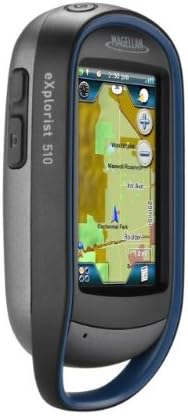
Figure 2: Side view of the eXplorist 510, highlighting external buttons.
The eXplorist 510 features a 3-inch vibrant touchscreen display that is readable in direct sunlight. It also includes two programmable external hard buttons on the side of the device. These buttons can be customized to access your most frequently used features or functions.
2. Touchscreen Interface (4-Corners)
The device utilizes a 4-Corners touchscreen interface. Tapping the screen reveals quick access to:
- Dashboard: Customizable display of key navigation data.
- OneTouch Menu: Quick access to common functions.
- Main Menu: Access to all device settings and features.
- Options Menu: Context-sensitive options for the current screen.
3. GPS Navigation
The eXplorist 510 is equipped with an internal SiRFstarIII GPS receiver, providing reception accuracy of up to 3-5 meters. It comes preloaded with the World Edition Map, offering an accurate road network for over 200 countries.
4. Experience Capture & Share

Figure 3: Rear view of the eXplorist 510, showing the integrated camera and speaker.
The device includes a built-in 3.2-megapixel camera with autofocus, a microphone, and a speaker. These features allow you to capture geo-referenced video footage, digital photos, and voice memos during your outdoor activities. Captured media can be reviewed on the device or transferred to a computer for sharing.
5. Geocaching Features
The eXplorist 510 is designed for geocaching, capable of storing up to 10,000 paperless geocaches. This includes detailed information such as location, difficulty levels, terrain data, past explorer logs, descriptions with photos, and hints. The device supports GPX file format for seamless connection to Geocaching.com, allowing you to record field notes and upload your finds after your hunt.
6. Additional Features
- Waypoint Storage: Stores thousands of waypoints.
- Custom User Profiles: Up to 8 customizable user profiles for different activities (e.g., Hiking, Geocaching, Marine, Vehicle, Pedestrian).
- Coordinate Systems: Supports UTM plus hundreds of coordinate system and map datum combinations.
- Day & Night Modes: Optimized display settings for various lighting conditions.
- Sun & Moon Schedules: Provides astronomical data.
- Hunt & Fish Calendar: Offers relevant scheduling information.
- Proximity Alarms: Audible and silent alarms for approaching waypoints or off-course conditions.
- Vertical Profiling: Displays elevation changes along your track.
- Area Calculation: Measures the area of a tracked path.
- Track Summaries: Provides detailed statistics for your recorded tracks.
7. Official Product Video
Video 1: An overview of the Magellan eXplorist 510, demonstrating its key features and capabilities. This video provides visual guidance on the device's interface, recording functions, and outdoor applications.
Maintenance
1. Waterproofing
The eXplorist 510 is IPX-7 certified, meaning it is waterproof and submersible to 1 meter for up to 30 minutes. Ensure all covers, including the battery compartment, are securely closed to maintain this rating. After exposure to water, especially saltwater, rinse the device with fresh water and dry thoroughly.
2. Battery Conservation
To extend battery life beyond the typical 16 hours, utilize the "Suspend Mode." This mode turns off the device's display while maintaining GPS tracking, conserving power for longer expeditions.
3. General Care
The device features a rugged design for outdoor use. Clean the screen and casing with a soft, damp cloth. Avoid using abrasive cleaners or solvents. Protect the screen from scratches by using a screen protector if desired.
Troubleshooting
1. Device Not Responding / Freezing
If the device becomes unresponsive or freezes, perform a hard reset by removing the batteries for a few seconds, then reinserting them and powering the device back on. This often resolves temporary software issues.
2. Touchscreen Sensitivity
If the touchscreen is not responding as expected, ensure your fingers are clean and dry. For improved precision, a stylus can be used. Calibrate the touchscreen through the device settings if accuracy issues persist.
3. GPS Signal Acquisition
Ensure the device has a clear view of the sky for optimal GPS signal acquisition. Signal strength may be reduced in dense tree cover, deep canyons, or indoors. Allow several minutes for the device to acquire satellites upon power-on.
4. Software Updates
Periodically check the Magellan website for available software updates. Updates can improve performance, add features, and resolve known issues. Connect your device to a computer and use the VantagePoint software to manage updates.
Specifications
| Product Dimensions | 5 x 2 x 6 inches |
| Item Weight | 15.2 ounces |
| Item Model Number | TX0510SGXNA |
| Batteries | 2 AA batteries required (included) |
| Battery Life | Up to 16 hours |
| Connectivity Technologies | USB |
| Special Features | 3-Inch Touch Screen, 3.2 MP Camera with Auto Focus, Online Experience Sharing, Waterproof, World Edition Pre-Loaded Map |
| Other Display Features | Speakers |
| Human Interface Input | Buttons, Microphone, Touchscreen |
| What's in the Box | GPS device |
| Manufacturer | Magellan |
| Screen Size | 3 Inches |
| Map Type | North America (World Edition Map preloaded) |
| Audio Output Mode | Speaker |
| Mounting Type | Wrist Mount |
Warranty Information
For detailed warranty information regarding your Magellan eXplorist 510, please refer to the warranty card included with your product packaging or visit the official Magellan website. Warranty terms and conditions may vary by region and purchase date.
Support
For technical support, frequently asked questions, and additional resources, please visit the official Magellan support website. You may also find helpful information and community forums at www.magellangps.com.
