
Acorn AZC210-4-POL
Instruction Manual
Acorn Manufacturing AZC210-4-POL Polished Stainless Steel Absolute Zero Cabinet Pull
Model: AZC210-4-POL | Brand: Acorn
1. Introduction
Thank you for choosing the Acorn Manufacturing AZC210-4-POL Polished Stainless Steel Absolute Zero Cabinet Pull. This manual provides detailed instructions for the proper installation, use, and maintenance of your new cabinet pull. Please read this manual thoroughly before installation to ensure correct procedure and optimal performance.
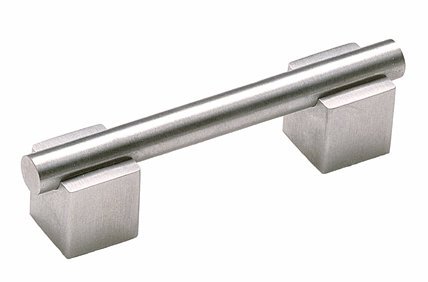
Image 1.1: The Acorn Manufacturing AZC210-4-POL cabinet pull, featuring a polished stainless steel finish and a sleek bar design.
2. Safety Information
- Always wear appropriate personal protective equipment (PPE) such as safety glasses and gloves during installation.
- Keep small parts and hardware out of reach of children and pets to prevent choking hazards.
- Ensure the cabinet surface is clean and free of debris before drilling or mounting.
- Use the correct drill bit size for pilot holes to avoid damaging the cabinet or the pull.
- Do not overtighten screws, as this may strip the threads or damage the cabinet material.
3. Package Contents
Please verify that all components are present before beginning installation. If any parts are missing or damaged, contact Acorn Manufacturing customer support.
- 1 x Acorn Manufacturing AZC210-4-POL Cabinet Pull
- 2 x Mounting Screws (typically 8-32 x 1" or similar, check actual product for exact size)
4. Installation Instructions
Tools Required (not included):
- Measuring Tape or Ruler
- Pencil
- Drill
- Drill Bit (appropriate size for mounting screws, typically 3/16" or 5mm)
- Screwdriver (Phillips or Flathead, depending on screw type)
- Punch or Awl (optional, for marking drill points)
Installation Steps:
- Prepare the Surface: Ensure the cabinet door or drawer front is clean and dry.
- Mark Drill Points:
- Measure the distance between the center of the two mounting holes on the cabinet pull. This pull has 4" (102mm) centers.
- On the cabinet door or drawer, use a measuring tape and pencil to mark the desired location for the pull. Ensure the marks are level and accurately spaced 4 inches apart.
- For best results, use a template or a ruler to ensure precise alignment.
- Drill Pilot Holes:
- Using the appropriate drill bit (e.g., 3/16" or 5mm), carefully drill pilot holes at the marked points. Drill straight through the cabinet material.
- Place a scrap piece of wood behind the drilling area to prevent splintering on the exit side.
- Attach the Pull:
- Align the cabinet pull with the drilled holes.
- From the inside of the cabinet door or drawer, insert the mounting screws through the pilot holes and into the threaded receivers on the back of the cabinet pull.
- Using a screwdriver, tighten the screws until the pull is secure. Do not overtighten.
- Verify Installation: Gently pull on the installed handle to ensure it is firmly attached and does not wobble.
5. Usage
The Acorn Manufacturing AZC210-4-POL cabinet pull is designed for opening and closing cabinet doors and drawers. Apply gentle, even pressure when using the pull to ensure longevity and prevent undue stress on the mounting points.
6. Care and Maintenance
- Cleaning: To clean the polished stainless steel finish, wipe with a soft, damp cloth. For stubborn marks, a mild soap solution can be used, followed by drying with a clean, soft cloth.
- Avoid: Do not use abrasive cleaners, harsh chemicals, or scouring pads, as these can scratch or damage the finish.
- Periodic Check: Periodically check the mounting screws for tightness. If they become loose, gently tighten them with a screwdriver.
7. Troubleshooting
| Problem | Possible Cause | Solution |
|---|---|---|
| Pull feels loose or wobbly. | Mounting screws are loose. | Gently tighten the mounting screws from the inside of the cabinet. Do not overtighten. |
| Scratches or dull finish. | Abrasive cleaning agents or tools used. | Avoid using harsh cleaners. For existing scratches, professional polishing may be required, or consider replacement if severe. |
| Pull does not align with holes. | Incorrect drilling or measurement. | Ensure precise measurements and drilling. If holes are misaligned, they may need to be filled and redrilled, or a different pull with a different center-to-center measurement may be needed. |
8. Specifications
| Feature | Detail |
|---|---|
| Model Number | AZC210-4-POL |
| Brand | Acorn Manufacturing |
| Material | Metal (Polished Stainless Steel) |
| Style | Bar Pull |
| Overall Length | 5-1/2 inches (approx. 140mm) |
| Center-to-Center Spacing | 4 inches (approx. 102mm) |
| UPC | 052763802650 |
9. Warranty and Support
Acorn Manufacturing products are designed for durability and performance. For information regarding warranty coverage, product support, or to purchase replacement parts, please visit the official Acorn Manufacturing website or contact their customer service department. Contact details are typically available on the product packaging or the manufacturer's website.
Note: Specific warranty terms may vary. Please refer to the documentation included with your purchase or the manufacturer's official website for the most current warranty information.
Related Documents - AZC210-4-POL
 |
Acorn 180 Curved Stairlift User Manual Comprehensive user manual for the Acorn 180 Curved Stairlift, covering operation, safety, maintenance, and troubleshooting. Learn how to safely use and care for your stairlift. |
 |
Acorn 180 Curved Stairlift User Manual - Safety, Operation, and Maintenance Guide Comprehensive user manual for the Acorn 180 Curved Stairlift, covering safety instructions, operating procedures, charging, maintenance, and troubleshooting. Learn how to safely use and care for your Acorn stairlift. |
 |
ACORN CNC Controller Rev4: Specifications, Features, and Connections Manual Comprehensive guide to the ACORN CNC controller, detailing its specifications, features, I/O map, connection methods, and mounting information. This low-cost motion control processor, PLC, and drive interface board is designed for entry-level machining equipment. |
 |
Pendant Lighting Instruction Manual - Assembly and Wiring Guide Comprehensive guide for assembling and wiring a pendant light fixture, including product specifications, packaging details, cleaning instructions, and safety information. |
 |
Acorn Archimedes 400/1 & R140 Service Manual Comprehensive service manual for the Acorn Archimedes 400/1 and R140 computers, covering technical specifications, system architecture, disassembly, fault diagnosis, and repair procedures. |
 |
Acorn DC-160 Ceiling Fan Instruction Manual This instruction manual provides detailed guidance for the Acorn DC-160 ceiling fan, including safety precautions, installation steps, wiring diagrams, remote control operation, maintenance tips, and troubleshooting solutions. |