
Introduction
The VDO PM352 Blower Motor is an OE quality component designed for automotive heating, ventilation, and air conditioning (HVAC) systems. This manual provides essential information regarding the installation, operation, maintenance, and troubleshooting of your VDO PM352 Blower Motor to ensure optimal performance and longevity. VDO products are manufactured to high standards, ensuring precise fit, form, and function for specific vehicle applications.
Product Overview
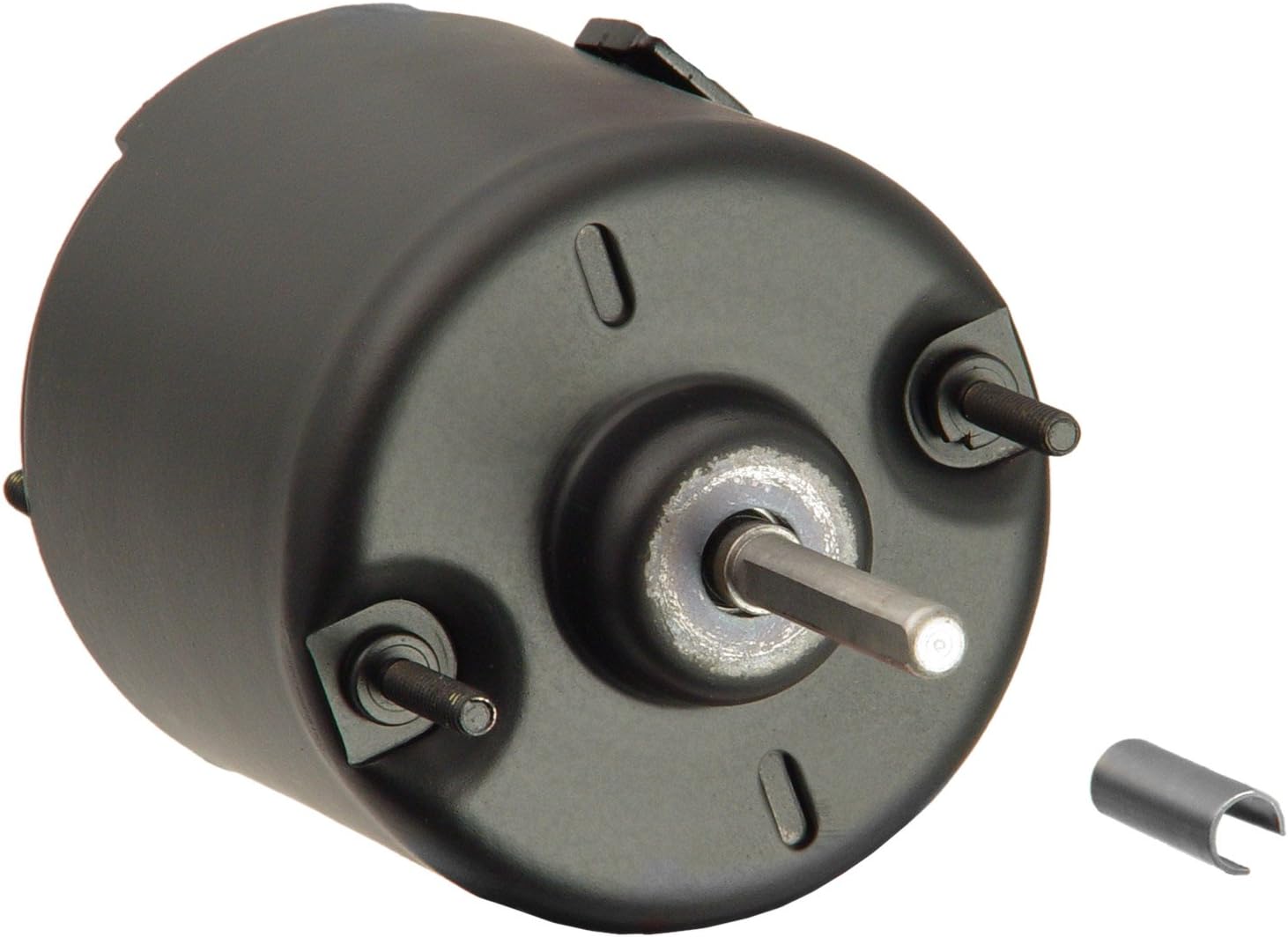
Figure 1: The VDO PM352 Blower Motor. This image displays the main unit, a black cylindrical motor, featuring a central output shaft and two threaded mounting studs on its face. A small, U-shaped metal clip is also visible, likely for securing the shaft.
Key Features
- Manufactured and tested to OEM specifications.
- Designed for specific vehicle fit, form, and function, providing quiet, dependable operation and longer service life.
- Precision assembled and balanced with all new components for vibration-free operation.
- OE design and technology ensures ease of installation right out of the box.
- Manufactured in ISO and TS certified facilities.
Setup and Installation
Installation of the VDO PM352 Blower Motor typically involves replacing an existing blower motor within your vehicle's HVAC system. Due to variations in vehicle models and configurations, specific installation steps may differ. It is highly recommended that installation be performed by a qualified automotive technician or by following a vehicle-specific repair manual.
General Guidelines:
- Safety First: Disconnect the vehicle's battery before beginning any electrical work to prevent accidental shorts or injury.
- Access: Locate the blower motor assembly, which is typically found under the dashboard on the passenger side, or sometimes in the engine bay. Access may require removal of trim panels, glove compartments, or other components.
- Removal: Disconnect the electrical connector from the old blower motor. Remove any mounting screws or clips securing the motor. Carefully extract the old motor from its housing.
- Inspection: Inspect the blower motor housing and fan (if separate) for any debris, damage, or obstructions. Clean as necessary.
- Installation: Insert the new VDO PM352 Blower Motor into the housing, ensuring it seats correctly. Secure it with the original mounting screws or clips. Reconnect the electrical connector, ensuring a snug fit.
- Testing: Reconnect the vehicle's battery. Turn on the ignition and test the blower motor at all fan speeds to confirm proper operation and airflow. Listen for any unusual noises.
- Reassembly: Reinstall any removed trim panels or components.
Note: Always refer to your vehicle's specific service manual for detailed, step-by-step instructions.
Operating Instructions
The VDO PM352 Blower Motor operates as an integral part of your vehicle's HVAC system, controlled by the vehicle's climate control unit. Once installed, its operation is seamless and requires no direct user interaction beyond the standard use of your vehicle's fan speed and mode controls.
Functionality:
- The blower motor draws air from outside or inside the vehicle and pushes it through the HVAC system's evaporator (for cooling) or heater core (for heating).
- Airflow is then directed through the vehicle's vents into the cabin.
- Fan speed is regulated by the vehicle's fan speed switch or automatic climate control settings.
Maintenance
The VDO PM352 Blower Motor is designed for long-term, maintenance-free operation. However, regular inspection of related HVAC components can help ensure its continued performance.
Recommended Checks:
- Cabin Air Filter: Regularly check and replace your vehicle's cabin air filter according to the manufacturer's recommendations. A clogged filter can restrict airflow, causing the blower motor to work harder and potentially shorten its lifespan.
- Debris Removal: Periodically inspect the blower motor housing for any accumulated leaves, dirt, or other debris that could impede the fan's rotation or cause noise.
- Electrical Connections: Ensure all electrical connections to the blower motor remain secure and free of corrosion.
Troubleshooting
If you experience issues with your vehicle's HVAC fan, consider the following common troubleshooting steps:
| Symptom | Possible Cause | Solution |
|---|---|---|
| Blower motor not working at any speed. | Blown fuse, faulty electrical connection, failed blower motor resistor, or failed blower motor. | Check vehicle's fuse box for a blown HVAC fuse and replace if necessary. Inspect electrical connections. Test or replace blower motor resistor. If all else fails, the motor may need replacement. |
| Blower motor only works on high speed. | Failed blower motor resistor. | Replace the blower motor resistor. |
| Blower motor makes unusual noises (squealing, grinding). | Debris in the blower housing, worn motor bearings, or unbalanced fan. | Inspect and clear any debris. If noise persists, the motor may be failing and require replacement. |
| Weak airflow from vents. | Clogged cabin air filter, obstructions in ducts, or partially failing blower motor. | Check and replace cabin air filter. Inspect ducts for obstructions. |
Warning: Electrical system diagnosis and repair can be complex. If you are unsure about any troubleshooting steps, consult a professional automotive technician.
Specifications
| Attribute | Value |
|---|---|
| Manufacturer | VDO |
| Brand | VDO |
| Model | PM352 |
| Item Weight | 4 pounds |
| Package Dimensions | 7.25 x 3.75 x 3.75 inches |
| Item Model Number | PM352 |
| Exterior | Machined |
| Manufacturer Part Number | PM352 |
| ASIN | B003VYH89S |
| Date First Available | July 16, 2010 |
| UPC | 053674003525 |
| Global Trade Identification Number | 00053674003525 |
What's in the Box
- 1 VDO Branded Product (VDO PM352 Blower Motor)
Warranty and Support
For specific warranty information regarding your VDO PM352 Blower Motor, please refer to the documentation provided with your purchase or contact VDO customer support directly. VDO products are designed for quality and durability, backed by the manufacturer's commitment to performance.
For technical assistance, installation queries, or warranty claims, please visit the official VDO website or contact their customer service department. Ensure you have your product model number (PM352) and purchase details available when seeking support.