
Theben SYN161D
Theben SYN 161d Analog Timer User Manual
Model: SYN161D
Brand: Theben
1. Introduction
This user manual provides detailed instructions for the installation, operation, and maintenance of the Theben SYN 161d Analog Timer. The SYN 161d is a reliable 1-channel analog time switch designed for daily programming, featuring a synchronous motor and DIN rail mounting capability. It is ideal for various applications requiring precise time-based control, such as lighting systems, pump control, and more.
Key features include:
- Analogue time switch with 1 channel and daily program.
- 96 switching segments for 15-minute switching intervals.
- Synchronised with mains for accurate timekeeping.
- Clock hands with 12/24 hour recognition.
- Simple summer/winter time correction and reversible time adjustment.
- DuoFix spring terminals for easy and secure wiring.
- Manual switch with three positions: Continuous ON, AUTO, Continuous OFF.

Figure 1.1: The Theben SYN 161d Analog Timer, a compact device designed for precise time control in electrical installations.
2. Safety Information
Please read these safety instructions carefully before installing, operating, or performing maintenance on the Theben SYN 161d Analog Timer. Failure to follow these instructions may result in electric shock, fire, or serious injury.
- Qualified Personnel Only: Installation and maintenance must only be carried out by a qualified electrician in accordance with national and local electrical codes and regulations.
- Disconnect Power: Always disconnect the main power supply before performing any work on the device or its connections. Verify that the power is off using a suitable voltage tester.
- Proper Wiring: Ensure all wiring connections are secure and correctly terminated. Refer to the wiring diagrams provided in this manual.
- Voltage Compatibility: Verify that the supply voltage matches the device's rated voltage (230 Volts AC).
- Environmental Conditions: Do not expose the device to moisture, extreme temperatures, or corrosive environments. Ensure the installation location is dry and well-ventilated.
- Intended Use: Use the device only for its intended purpose as an analog time switch. Do not modify the device in any way.
3. Setup and Installation
The Theben SYN 161d Analog Timer is designed for easy installation on a DIN rail (also known as a top hat rail) within an electrical enclosure.
3.1 Mounting
- Ensure the main power supply to the installation area is disconnected.
- Locate an available space on the DIN rail.
- Align the timer with the DIN rail and press it firmly until it clicks into place. Ensure it is securely fastened.

Figure 3.1: The timer is designed for quick and secure mounting onto a standard DIN rail.
3.2 Wiring Connections
The SYN 161d features DuoFix spring terminals for quick and reliable wiring. These terminals are suitable for two conductors each, with a wire diameter of 0.5 - 2.5 mm² (wire or strand, with or without wire end sleeve).
- Ensure the power supply is disconnected.
- Identify the input (L, N) and output (1, 2, 3) terminals on the timer. Refer to the diagram on the device.
- Prepare the wire ends by stripping approximately 8mm of insulation.
- Insert the prepared wire into the corresponding DuoFix spring terminal. The button next to the terminal can be pressed to release the connection if needed.
- Connect the incoming phase (L) and neutral (N) wires to the designated input terminals.
- Connect the load (e.g., lighting circuit) to the output terminals (typically 1 and 2 or 1 and 3 for switching). The timer provides a changeover contact.
- Double-check all connections for tightness and correctness before restoring power.

Figure 3.2: Close-up view of the DuoFix spring terminals with wires inserted, demonstrating the secure connection method.
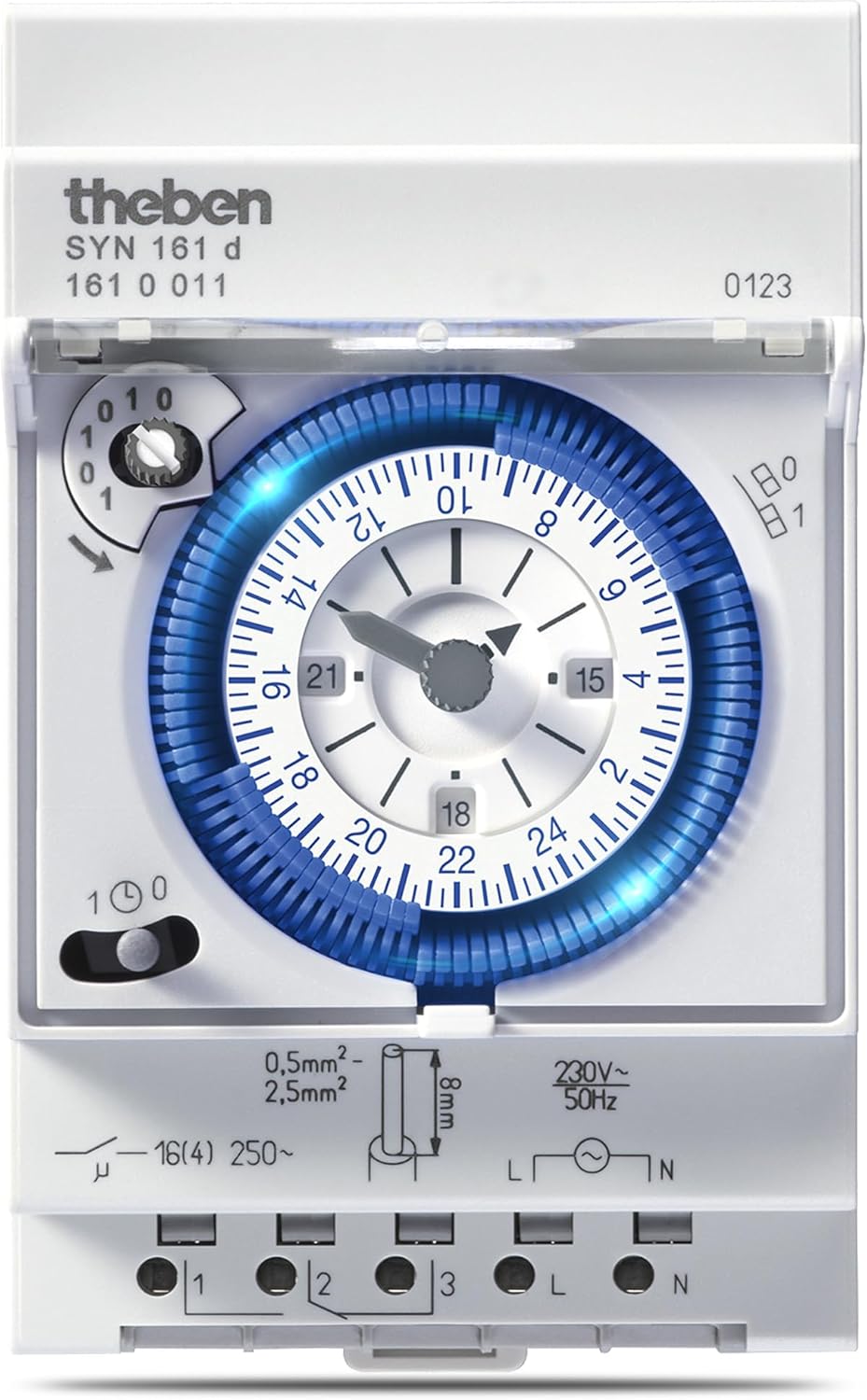
Figure 3.3: The timer with its transparent cover open, revealing the dial and terminal block for wiring access.
4. Operating Instructions
The Theben SYN 161d Analog Timer offers intuitive controls for setting the time and programming daily switching cycles.
4.1 Setting the Current Time
The timer's clock hands indicate the current time, with 12/24 hour recognition. The time can be adjusted both clockwise and anti-clockwise.
- Rotate the central dial (the blue ring with numbers) until the current time aligns with the small arrow indicator on the outer edge of the dial.
- Ensure the AM/PM (or 12/24 hour) indication is correct if applicable to your model.

Figure 4.1: The central dial with 24-hour markings and the clock hands for setting the current time.
4.2 Programming Switching Times
The timer features 96 switching segments, each representing 15 minutes. To program a switching event, push the segments outwards for the desired ON periods.
- Identify the segments corresponding to the times you want the connected device to be ON.
- Using a small, non-metallic tool (like a pen cap), push the desired segments outwards. When a segment is pushed outwards, the device will be ON during that 15-minute interval. When pushed inwards, it will be OFF.
- Repeat for all desired ON/OFF periods throughout the 24-hour cycle.
4.3 Manual Override Switch
The timer is equipped with a manual switch offering three positions for flexible control:
- Continuous ON (I): The connected device remains continuously ON, overriding the programmed schedule.
- AUTO (Clock Symbol): The timer operates according to the programmed schedule. This is the standard operating mode.
- Continuous OFF (0): The connected device remains continuously OFF, overriding the programmed schedule.

Figure 4.2: The manual override switch, allowing selection between Continuous ON, AUTO, and Continuous OFF modes.
4.4 Summer/Winter Time Correction
The SYN 161d allows for simple adjustment for daylight saving time changes. Simply rotate the dial clockwise or anti-clockwise by one hour as required to align with the new time.
5. Maintenance
The Theben SYN 161d Analog Timer is designed for long-term, maintenance-free operation. However, periodic checks and cleaning can help ensure its longevity and reliable performance.
- Cleaning: Disconnect power before cleaning. Use a soft, dry cloth to wipe the exterior of the device. Do not use abrasive cleaners, solvents, or excessive moisture.
- Connection Check: Periodically (e.g., annually) check the wiring connections to ensure they remain secure. Ensure power is disconnected before checking connections.
- Environmental Check: Ensure the installation environment remains free from excessive dust, moisture, and extreme temperatures.
No internal user-serviceable parts are present. Any repairs should only be performed by qualified service personnel.
6. Troubleshooting
If you experience issues with your Theben SYN 161d Analog Timer, refer to the following common problems and solutions:
| Problem | Possible Cause | Solution |
|---|---|---|
| Timer not operating / No power | No power supply to the device. Incorrect wiring. | Check the main power supply and circuit breaker. Verify all wiring connections according to Section 3.2. |
| Device not switching ON/OFF at programmed times | Manual override switch is not in AUTO mode. Incorrect programming of switching segments. Current time not set correctly. | Set the manual switch to the AUTO (clock symbol) position. Review and adjust the pushed-out segments for desired ON times. Re-set the current time accurately. |
| Clock hands not moving | No power supply. Internal malfunction. | Check power supply. If power is present and hands are still not moving, the unit may require professional service. |
If the problem persists after attempting these solutions, please contact a qualified electrician or Theben customer support.
7. Technical Specifications
The following table provides detailed technical specifications for the Theben SYN 161d Analog Timer:

Figure 7.1: Official technical specifications table for the Theben SYN 161d.
| Parameter | Value |
|---|---|
| Operating voltage | 230 V AC |
| Frequency | 50 Hz |
| Number of channels | 1 |
| Width | 3 modules |
| Installation type | DIN rail |
| Type of connection | DuoFix spring terminals |
| Drive | Synchronous motor |
| Program | Daily program |
| Switching capacity at 250 V AC, cos φ = 1 | 16 A |
| Switching capacity at 250 V AC, cos φ = 0,6 | 4 A |
| Incandescent/halogen lamp load | 1100 W |
| LED lamp < 2 W | 20 W |
| LED lamp 2-8 W | 180 W |
| LED lamp > 8 W | 180 W |
| Shortest switching times | 15 min |
| Programmable every | 15 min |
| Time accuracy at 25 °C | Synchronised with mains |
| Type of contact | Changeover contact |
| Switching output | Potential-free and phase-independent |
| Number of switching segments | 96 |
| Stand-by consumption | ~0.5 W |
| Capacity loss max. | 1.3 W |
| Test approval | VDE |
| Housing and insulation material | High-temperature resistant, self-extinguishing thermoplastic |
| Type of protection | IP 20 |
| Protection class | II according to EN 60 730-1 |
| Ambient temperature | -20°C... 55°C |

Figure 7.2: Dimensions of the Theben SYN 161d timer (70.5mm width, 128.2mm height).
8. Warranty and Support
For specific warranty information regarding your Theben SYN 161d Analog Timer, please refer to the documentation included with your purchase or visit the official Theben website. Warranty terms and conditions may vary by region and retailer.
Customer Support
If you require technical assistance, have questions about the product, or need to report a defect, please contact Theben AG directly:
- Manufacturer: Theben AG
- Website: www.theben.de (Please check the website for regional contact information)
When contacting support, please have your product model number (SYN161D) and any relevant purchase information ready.
Related documentsSYN161D

Ask a question about this manual
Ask about setup, troubleshooting, compatibility, parts, safety, or missing instructions. Manuals+ will review the question and use this page’s manual context to help answer it.