
Logitech 980-000402
Logitech Z623 400 Watt Home Speaker System User Manual
Model: 980-000402
Introduction
The Logitech Z623 400 Watt Home Speaker System is a THX-certified 2.1 speaker system engineered to deliver powerful, immersive audio for your music, movies, and games. This manual provides essential information for setting up, operating, and maintaining your speaker system to ensure optimal performance and longevity.
What's in the Box
Your Logitech Z623 speaker system package includes the following components:
- Speakers (2 satellite speakers and 1 subwoofer)
- 3.5 mm audio input cable
- Speaker connector cables
- User documentation
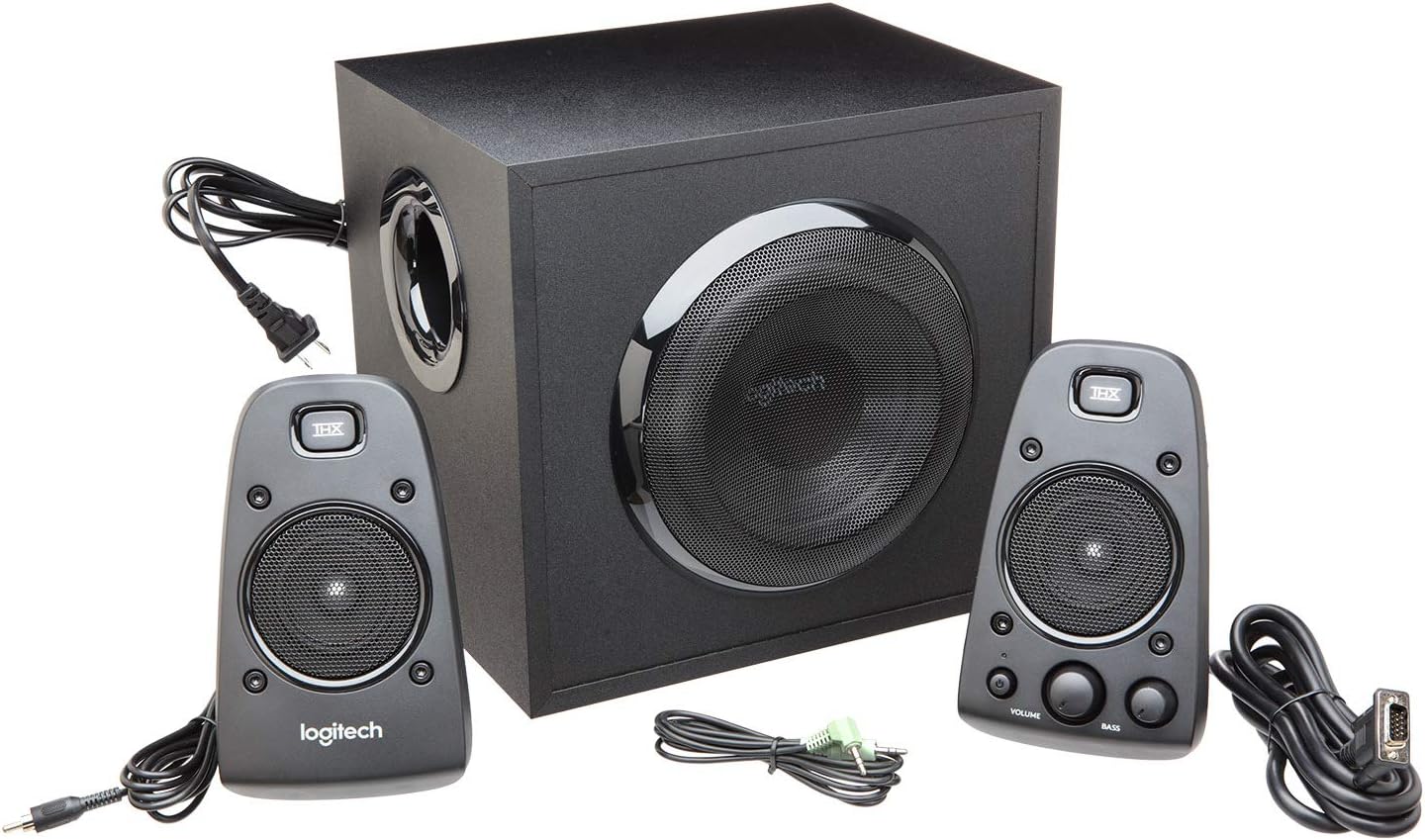
Figure 1: All components included in the Logitech Z623 package.
Setup and Installation
Follow these steps to set up your Logitech Z623 speaker system:
- Unpack Components: Carefully remove all items from the packaging.
- Position Speakers: Place the subwoofer on the floor or a sturdy surface near your computer or entertainment system. Position the two satellite speakers on either side of your monitor or TV for optimal stereo sound.
- Connect Satellite Speakers to Subwoofer: The right satellite speaker (with controls) connects to the subwoofer via a proprietary VGA-style connector. The left satellite speaker connects to the subwoofer via an RCA-style cable.
- Connect to Audio Source: Use the included 3.5mm audio input cable to connect the subwoofer to your computer's audio output (headphone jack) or other compatible devices. Alternatively, use RCA cables for devices with RCA outputs. The Z623 also supports optical input for digital audio sources.
- Connect Power: Plug the subwoofer's power cable into a wall outlet.

Figure 2: Example setup of the Logitech Z623 with a television.
Video 1: A review demonstrating the unboxing and basic setup of the Logitech Z623 speaker system, including connections.
Controls and Connectivity
The primary controls for your Z623 system are located on the right satellite speaker:
- Power Button: Turns the speaker system on or off. An orange LED indicates power status.
- Volume Dial: Adjusts the overall volume of the system.
- Bass Dial: Controls the bass level of the subwoofer.
- Headphone Jack (3.5mm): For private listening with headphones.
- Auxiliary Input (3.5mm): For connecting additional audio devices like smartphones or MP3 players.

Figure 3: Detailed view of the control speaker with power, volume, bass, and input options.
The subwoofer's rear panel provides the main connection points for the satellite speakers and audio sources:
- Right Speaker Input: Proprietary connector for the right satellite speaker.
- Left Speaker Input: RCA connector for the left satellite speaker.
- Auxiliary/RCA Inputs: Red and white RCA jacks for connecting various audio devices.
- Optical Input: For digital audio connections (available on some Z623 variants, though this model is Analog).
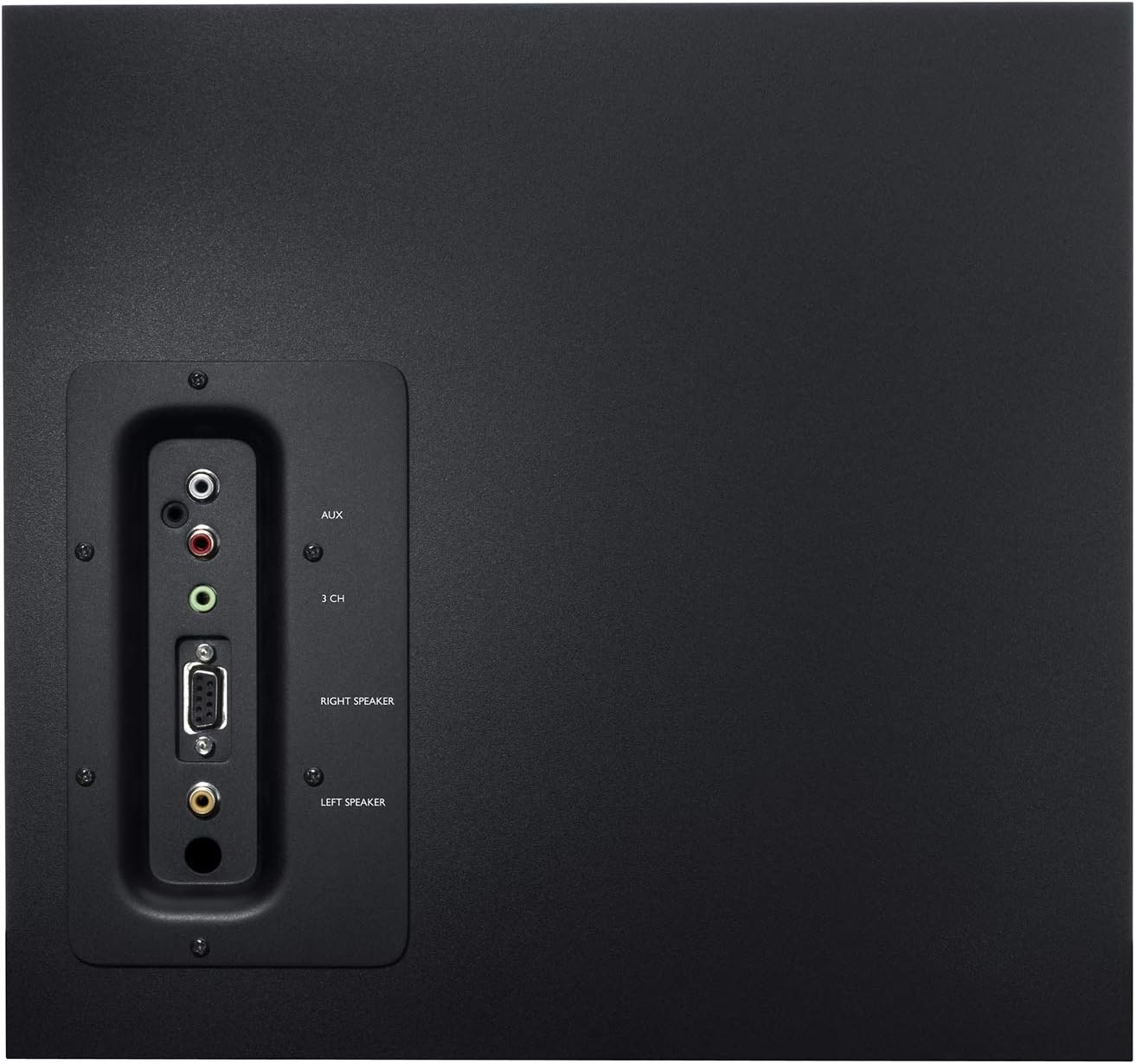
Figure 4: Rear panel of the subwoofer detailing connectivity options.
Video 2: An unboxing and test video for the Logitech Z625, which shares similar connectivity features with the Z623, demonstrating the rear panel connections.
Operation
Once connected, power on the system using the power button on the right satellite speaker. Adjust the volume and bass levels to your preference. The THX certification ensures studio-quality audio for an immersive experience.
Video 3: Official product video highlighting the sound quality and immersive experience of the Logitech Z623 system.
Maintenance
To ensure the longevity and optimal performance of your Logitech Z623 speaker system, follow these maintenance tips:
- Cleaning: Use a soft, dry cloth to clean the speaker surfaces. Avoid using liquid cleaners or abrasive materials.
- Ventilation: Ensure the subwoofer and satellite speakers have adequate ventilation to prevent overheating. Do not block the subwoofer's port or speaker grilles.
- Cable Management: Keep cables organized and untangled to prevent damage and ensure proper connectivity.
- Avoid Extreme Conditions: Do not expose the speakers to extreme temperatures, humidity, or direct sunlight.
Troubleshooting
If you encounter issues with your speaker system, try the following troubleshooting steps:
- No Sound:
- Ensure the power cable is securely plugged in and the system is powered on.
- Check all audio connections (3.5mm, RCA, optical) to ensure they are firmly seated in the correct ports.
- Verify that the volume on the speaker system and your audio source (computer, TV, etc.) is turned up and not muted.
- Test with a different audio source or cable to rule out external issues.
- Distorted Sound:
- Lower the volume on both the speaker system and your audio source.
- Adjust the bass dial on the control speaker.
- Ensure speaker cables are not damaged or loosely connected.
- Static or Buzzing:
- Check for loose cable connections, especially the proprietary speaker cable.
- Ensure the speaker system is not placed too close to other electronic devices that may cause interference.
- Try plugging the speaker system into a different power outlet.
Specifications
| Feature | Specification |
|---|---|
| Model Name | Z623 |
| Speaker Type | Satellite, Subwoofer |
| Connectivity Technology | RCA, Auxiliary |
| Speaker Maximum Output Power | 400 Watts Peak / 200 Watts RMS |
| Audio Output Mode | Stereo |
| Color | Black |
| Material | Metal |
| Item Weight | 8.2 Kilograms (18.04 pounds) |
| Product Dimensions | 17.31"D x 11.87"W x 12.25"H |
| UPC | 097855066466 |
Warranty and Support
Logitech provides a limited warranty for the Z623 speaker system. For detailed warranty information and support, please refer to the official User Guide (PDF) available online or contact Logitech customer support directly.
Please note: As per the legal disclaimer, returns may not be accepted if the unit is fully functional, due to shipping complexities.
For further assistance, you may also consult the User Guide (PDF).
Related documents980-000402


Ask a question about this manual
Ask about setup, troubleshooting, compatibility, parts, safety, or missing instructions. Manuals+ will review the question and use this page’s manual context to help answer it.