
Introduction
This instruction manual provides essential information for the proper setup, operation, and maintenance of your QUANTUM STORAGE SYSTEMS Specialty Cabinet, Model QSC-QIC64IV. Please read this manual thoroughly before using the product to ensure safe and efficient use. Keep this manual for future reference.
Product Overview
The QUANTUM STORAGE SYSTEMS Specialty Cabinet QSC-QIC64IV is a robust storage solution designed for organizing various items. It features a durable cabinet structure, 15 Quick-Install Containers (QICS), and 128 smaller bins, providing extensive storage capacity for parts, tools, or supplies.
Included Components:
- 1 x Specialty Cabinet
- 15 x Quick-Install Containers (QICS)
- 128 x Storage Bins
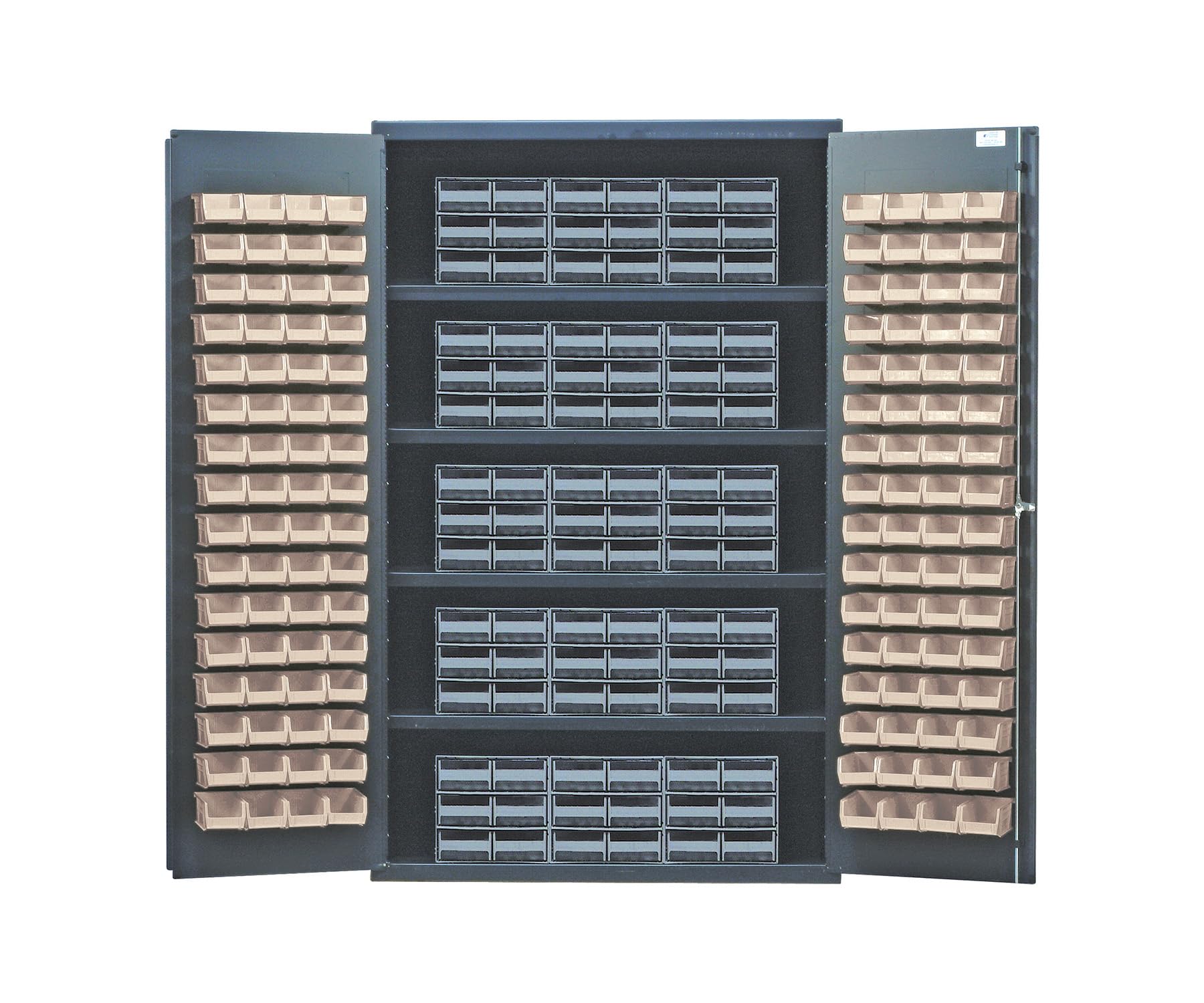
Image: The QUANTUM STORAGE SYSTEMS Specialty Cabinet QSC-QIC64IV, showcasing its grey finish, two doors, and the arrangement of 15 larger Quick-Install Containers and 128 smaller storage bins within its interior.
Setup
The QUANTUM STORAGE SYSTEMS Specialty Cabinet QSC-QIC64IV requires no assembly. Follow these steps for initial setup:
- Unpacking: Carefully remove all packaging materials. Inspect the cabinet for any signs of damage during transit.
- Placement: Position the cabinet on a flat, level, and stable surface. Ensure adequate clearance around the cabinet for door operation. The cabinet is designed for floor mounting.
- Bin Installation: Place the 15 Quick-Install Containers (QICS) and 128 smaller bins into their designated slots within the cabinet. Ensure they are securely seated.
- Leveling (if necessary): If the cabinet is not stable, adjust the leveling feet (if present) to ensure it stands firmly without wobbling.
Operating Instructions
Using your Specialty Cabinet is straightforward:
- Opening/Closing Doors: Gently pull the door handles to open the cabinet doors. Push them firmly to close. Ensure both doors are fully closed to protect contents.
- Organizing Contents: Utilize the various sizes of QICS and bins to categorize and store different items. Labeling bins can enhance organization and retrieval efficiency.
- Accessing Bins: The bins are designed for easy removal and re-insertion. When retrieving items, carefully pull out the desired bin. Return it to its original position after use.
- Weight Distribution: Distribute the weight of stored items evenly across the cabinet shelves and bins to maintain stability and prevent tipping. Avoid overloading any single bin or section.
Maintenance
Regular maintenance ensures the longevity and optimal performance of your cabinet:
- Cleaning: Wipe the cabinet's exterior and interior surfaces with a soft, damp cloth. For stubborn dirt, a mild soap solution can be used. Avoid abrasive cleaners or solvents, as they may damage the finish.
- Bin Care: The plastic bins can be washed with warm, soapy water. Ensure they are completely dry before returning them to the cabinet.
- Door Hinges: Periodically check door hinges for smooth operation. If they become stiff, a small amount of silicone-based lubricant can be applied.
- Inspection: Regularly inspect the cabinet for any loose components or signs of wear. Tighten any loose screws if necessary.
Troubleshooting
Here are solutions to common issues you might encounter:
| Problem | Possible Cause | Solution |
|---|---|---|
| Cabinet doors do not close properly. | Obstruction in the door path; cabinet not level; hinges misaligned. | Check for items blocking the doors. Ensure the cabinet is on a level surface. Inspect hinges for damage or misalignment. |
| Bins do not fit securely. | Incorrect bin placement; bin overloaded. | Ensure bins are placed in their correct slots. Reduce the load in the bin if it is overfilled. |
| Cabinet wobbles. | Uneven floor surface; leveling feet not adjusted. | Adjust the cabinet's leveling feet until it is stable. Ensure the floor surface is even. |
Specifications
| Feature | Detail |
|---|---|
| Brand | QUANTUM STORAGE SYSTEMS |
| Model Number | QSC-QIC64IV |
| Color | Grey |
| Material | Blend |
| Product Dimensions (D x W x H) | 24"D x 48"W x 72"H |
| Mounting Type | Floor Mount |
| Number of Drawers | 6 (Note: This likely refers to internal sections or shelves, not pull-out drawers.) |
| Number of Doors | 2 |
| Required Assembly | No |
| Item Weight | 1 Pounds (Note: This weight appears unusually low for a cabinet of these dimensions. Please verify actual product weight.) |
| UPC | 651588033791 |
Warranty and Support
Warranty Information: The manufacturer's warranty description states "No warranty." Please refer to your purchase documentation or contact your retailer for specific warranty details, if any, provided at the point of sale.
Customer Support: For further assistance, technical support, or inquiries regarding your QUANTUM STORAGE SYSTEMS Specialty Cabinet QSC-QIC64IV, please contact QUANTUM STORAGE SYSTEMS directly or your authorized dealer.
Note: Contact information for QUANTUM STORAGE SYSTEMS is typically available on their official website or product packaging.