1. Introduction
This manual provides comprehensive instructions for the safe and effective use of your F&V HDV-Z96 96 LED Light Kit. This continuous light source is designed for on-camera use, offering consistent and natural illumination for various photographic and videographic applications. Please read this manual thoroughly before operating the device.
2. Safety Information
- Water Resistance: The HDV-Z96 is not water-resistant. Protect the device from moisture, rain, and splashes to prevent damage and electrical hazards.
- Power Source: Use only specified power sources (5xAA batteries or compatible Sony NP-F series batteries). Do not mix old and new batteries, or different types of batteries.
- Operating Temperature: Avoid operating the light in extremely high or low temperatures.
- Ventilation: Ensure adequate ventilation around the unit during operation to prevent overheating.
- Eye Protection: Do not look directly into the LED lights when they are on, as intense light can cause eye strain or damage.
- Cleaning: Disconnect power before cleaning. Use a soft, dry cloth. Do not use liquid cleaners or solvents.
3. Package Contents
Verify that all items are present in your package:
- F&V HDV-Z96 96 LED Light Unit
- Diffusion Filter (White)
- Tungsten Filter (Orange)
- Hot Shoe Mount
- 5x AA Batteries (may be included depending on kit version)
4. Product Overview
The F&V HDV-Z96 is a compact and powerful LED light designed for versatile use. It features 96 high-efficiency LEDs providing a 5600K color temperature for natural illumination.

Figure 4.1: Front view of the HDV-Z96 LED light with both the orange and diffusion filters shown alongside the unit.
Components and Controls:
- LED Panel: Front-facing array of 96 LEDs.
- Dimmer Dial: Located on the side, used to adjust light intensity.
- Battery Compartment: Located on the rear, for AA or Sony NP-F series batteries.
- DC Power Input: For external power adapter (not included).
- Hot Shoe Mount: For attaching to cameras or light stands.
- Filter Slots: Front slots for attaching color and diffusion filters.
- Expansion Slots: Side slots for connecting multiple HDV-Z96 units.
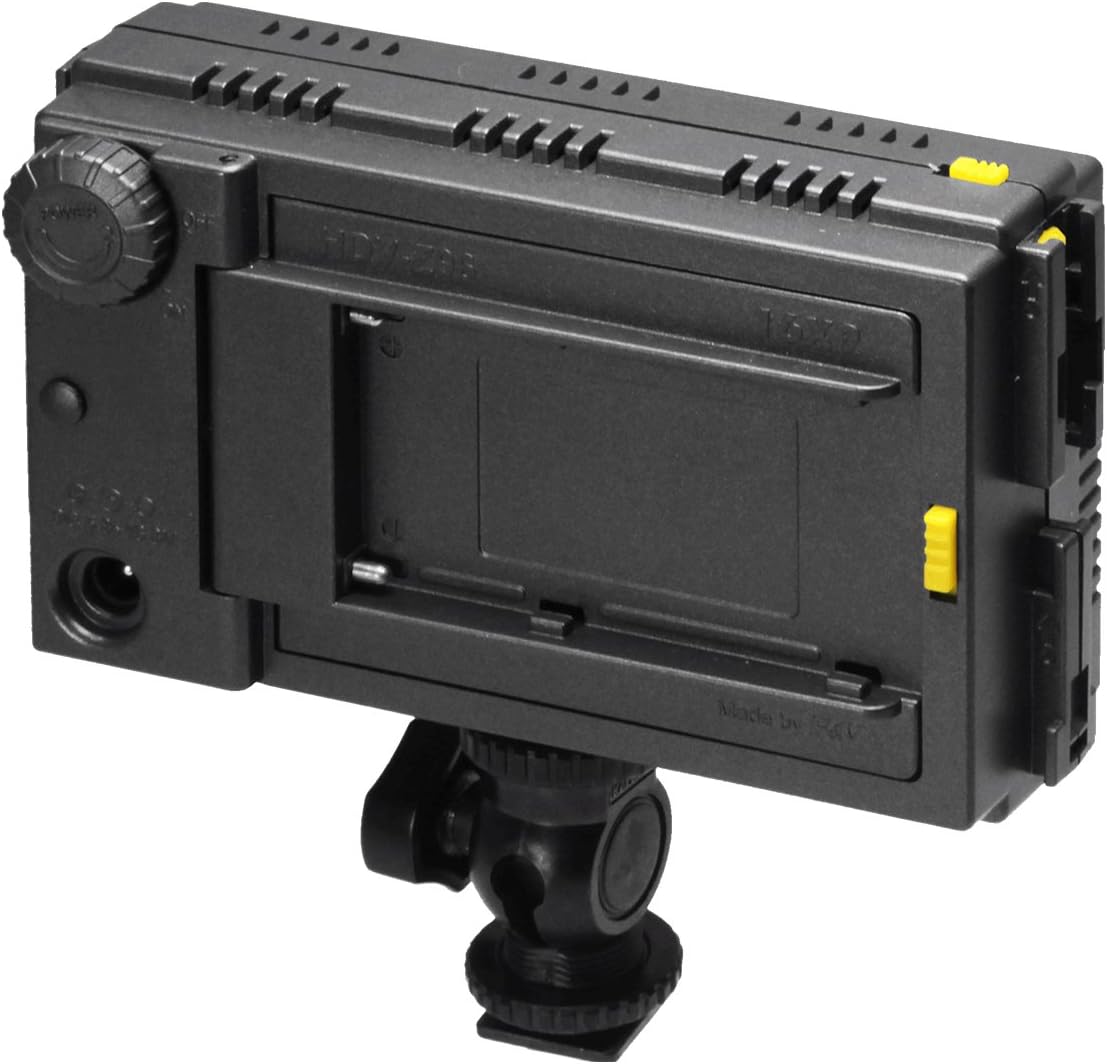
Figure 4.2: Rear view of the HDV-Z96, highlighting the battery compartment, dimmer dial, and DC power input.
5. Setup
5.1. Battery Installation
- Locate the battery compartment on the rear of the unit.
- Slide the battery compartment door latch and open the door.
- Insert 5x AA batteries, ensuring correct polarity (+/-). Alternatively, insert a compatible Sony NP-F series battery (e.g., LF570, F770, F970, F550, F750).
- Close the battery compartment door securely until it latches.
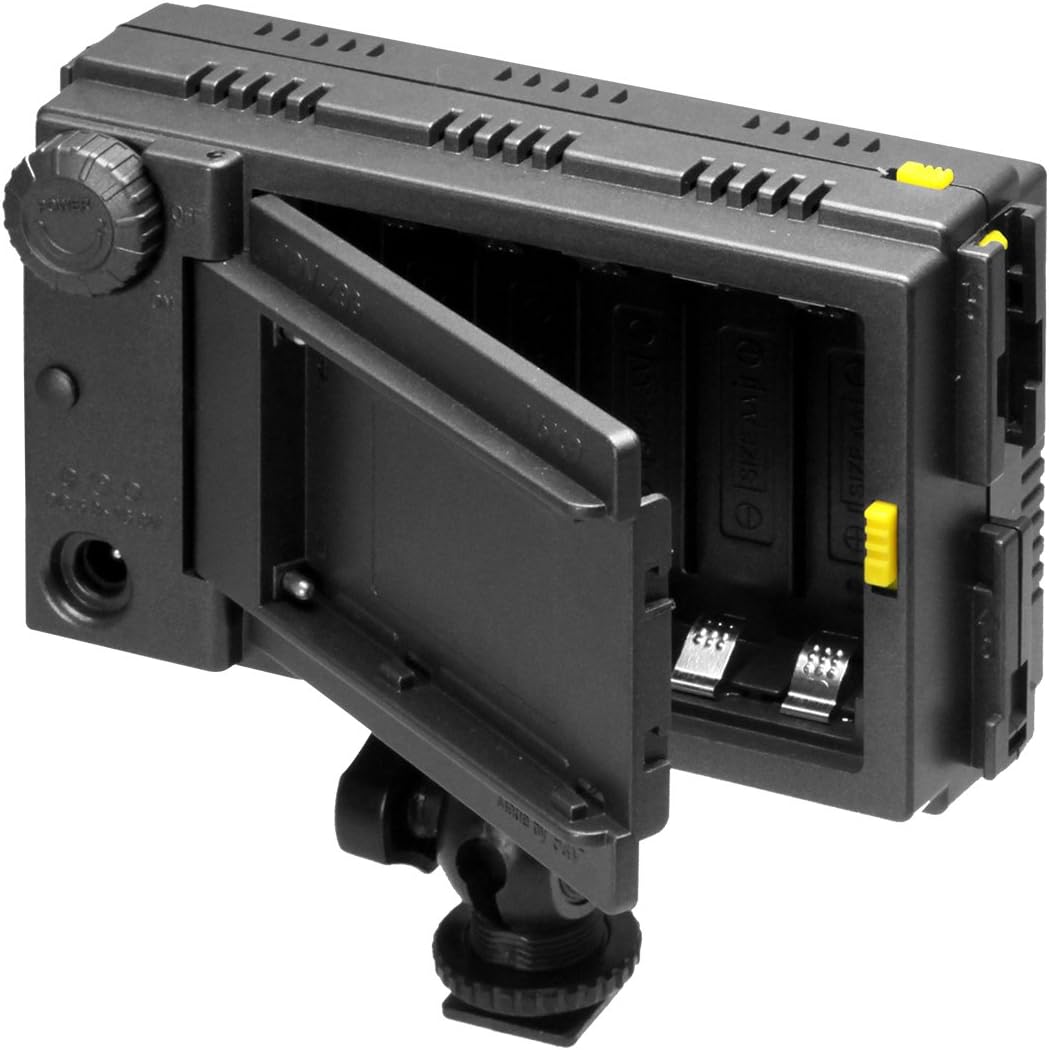
Figure 5.1: The battery compartment opened, revealing slots for AA batteries.
5.2. Mounting the Light
- Attach the hot shoe mount to the bottom of the HDV-Z96 unit.
- Slide the hot shoe mount into your camera's hot shoe or onto a compatible light stand.
- Tighten the locking ring on the hot shoe mount to secure the light in place.
5.3. Attaching Filters
The HDV-Z96 includes two filters: a diffusion filter (white) and a tungsten filter (orange).
- Align the filter with the slots on the front of the LED panel.
- Gently push the filter into place until it clicks securely.
- To remove, gently pull the filter away from the unit.

Figure 5.2: The HDV-Z96 with the orange tungsten filter installed, used to adjust color temperature.

Figure 5.3: The HDV-Z96 with the white diffusion filter installed, used to soften the light output.
6. Operating Instructions
6.1. Powering On/Off
To power on the unit, rotate the dimmer dial clockwise. To power off, rotate the dimmer dial counter-clockwise until it clicks off.
6.2. Adjusting Brightness
Once powered on, continue rotating the dimmer dial clockwise to increase brightness and counter-clockwise to decrease brightness.
6.3. Using Filters
- The Diffusion Filter (White) softens the light output, reducing harsh shadows and creating a more even illumination.
- The Tungsten Filter (Orange) changes the color temperature of the light from 5600K (daylight) to approximately 3200K (tungsten), matching indoor lighting conditions.
6.4. Connecting Multiple Units
Multiple HDV-Z96 units can be connected together using the side expansion slots to create a larger light panel. Each connected unit will require its own power source and brightness adjustment.

Figure 6.1: Two HDV-Z96 units interlocked via their side expansion slots.
7. Maintenance
- Cleaning: Use a soft, dry, lint-free cloth to clean the exterior of the light. For the LED panel, use a lens cleaning cloth. Do not use abrasive cleaners or solvents.
- Storage: When not in use, store the light in a cool, dry place, away from direct sunlight and moisture. Remove batteries if storing for extended periods to prevent leakage.
- Battery Care: Always dispose of used batteries responsibly according to local regulations.
8. Troubleshooting
| Problem | Possible Cause | Solution |
|---|---|---|
| Light does not turn on. | Batteries are dead or incorrectly inserted. | Replace batteries or ensure correct polarity. |
| Light is dim or flickers. | Low battery power. | Replace batteries or use an external power source. |
| Light overheats. | Poor ventilation or prolonged use in high temperatures. | Ensure adequate airflow around the unit. Reduce usage time if necessary. |
9. Specifications
| Feature | Detail |
|---|---|
| Model | HDV-Z96 |
| LED Count | 96 |
| Color Temperature | 5600K (Daylight) |
| Power Options | 5x AA Batteries or Sony NP-F series (LF570, F770, F970, F550, F750) |
| Item Weight | 15.5 ounces (approx. 439 grams) |
| Package Dimensions | 8.66 x 6.06 x 3.86 inches |
| Manufacturer | F&V |
| UPC | 508937558576 |
10. Warranty and Support
Specific warranty information for the F&V HDV-Z96 96 LED Light Kit is not provided in the product details. For support inquiries or further assistance, please refer to the contact information provided by your retailer or the manufacturer, F&V.


