
LAGUNA PT8121
Instruction Manual
Laguna Impeller Assembly Replacement Kit for PT8120 Submersible Water Pump
Introduction
This manual provides detailed instructions for the installation, operation, and maintenance of the Laguna Impeller Assembly Replacement Kit, specifically designed for the Laguna PT8120 Submersible Water Pump. Please read this manual thoroughly before attempting any installation or maintenance to ensure proper function and longevity of your pump system.
Product Overview
Package Contents
The Laguna Impeller Assembly Replacement Kit includes the following components:
- 1 x Impeller Assembly (blue impeller with black housing)
- 1 x Ceramic Shaft
- 1 x O-ring Gasket
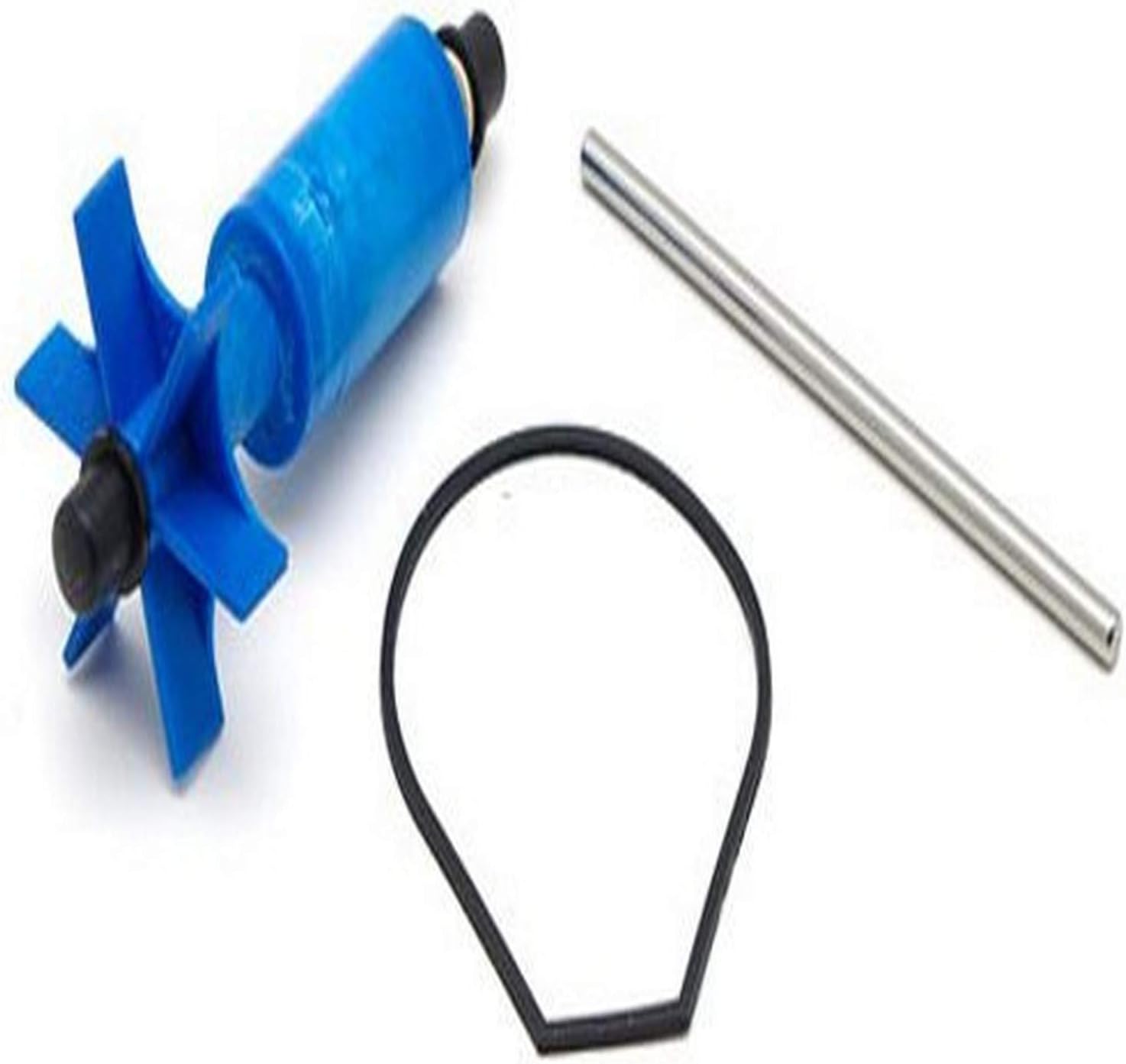
Image: Components of the Laguna Impeller Assembly Replacement Kit. Shown are the blue impeller assembly, a silver ceramic shaft, and a black O-ring gasket, all essential for the proper functioning of the PT8120 submersible water pump.
Key Features
- Direct replacement for Laguna submersible water pump model PT8120.
- Designed for use in ponds up to 5000-liters.
- Durable construction for reliable performance.
- Essential for maintaining optimal water flow and pump efficiency.
Setup and Installation
Before You Begin
- Safety First: Always disconnect the pump from the power supply before handling or performing any maintenance.
- Ensure the pump is clean and free of debris before disassembly.
- Have a clean workspace and necessary tools (e.g., screwdriver if pump housing requires it).
Installation Steps
- Disconnect Power: Unplug the Laguna PT8120 pump from its power source.
- Remove Pump: Carefully remove the pump from the pond or water feature.
- Disassemble Pump Housing: Depending on your specific PT8120 model, you may need to unclip or unscrew the pump's outer casing or filter cage to access the impeller chamber.
- Remove Old Impeller Assembly: Gently pull out the old impeller assembly, ceramic shaft, and O-ring gasket from the pump chamber. Note their orientation for reassembly.
- Clean Chamber: Thoroughly clean the impeller chamber and surrounding areas within the pump to remove any accumulated debris, algae, or mineral deposits. This ensures optimal performance and fit for the new parts.
- Install New O-ring: Place the new O-ring gasket securely into its groove within the pump housing. This gasket is crucial for maintaining a watertight seal.
- Insert Ceramic Shaft: Carefully insert the new ceramic shaft into its designated slot within the pump motor housing.
- Install New Impeller Assembly: Align the new impeller assembly with the ceramic shaft and gently push it into place until it seats firmly. Ensure the impeller spins freely.
- Reassemble Pump: Reattach the pump housing or filter cage, ensuring all clips or screws are securely fastened.
- Test Pump: Submerge the pump in water and reconnect it to the power supply. Observe for proper operation, water flow, and any unusual noises or leaks.
Operation
Once the new impeller assembly is installed, the Laguna PT8120 pump should operate as intended, providing consistent water circulation for your pond. Ensure the pump is fully submerged and that the intake is clear of obstructions for optimal performance. Regularly check the water flow to confirm the pump is functioning efficiently.
Maintenance
Routine Maintenance
- Regular Cleaning: Periodically remove the pump from the water and clean the impeller chamber and impeller blades. Debris such as algae, leaves, or mineral buildup can reduce efficiency and lifespan.
- Inspect Components: During cleaning, inspect the impeller blades, ceramic shaft, and O-ring for signs of wear, cracks, or damage. Replace components if significant wear is observed.
- Winterization: If the pump is used in an area subject to freezing temperatures, remove it from the pond for winter storage to prevent damage.
Troubleshooting
Common Issues and Solutions
| Problem | Possible Cause | Solution |
|---|---|---|
| Pump not running | No power; Impeller jammed; Motor failure | Check power connection; Disconnect power, clean impeller chamber; Contact manufacturer support if motor failure is suspected. |
| Reduced water flow | Clogged intake/impeller; Worn impeller/shaft; Air lock | Clean intake and impeller; Replace impeller assembly if worn; Ensure pump is fully submerged and free of air bubbles. |
| Unusual noise from pump | Debris in impeller chamber; Worn impeller/shaft; Pump not stable | Disconnect power, clean impeller chamber; Replace impeller assembly; Ensure pump is on a stable, flat surface. |
Specifications
Technical Specifications
| Attribute | Detail |
|---|---|
| Product Name | Impeller Assembly Replacement Kit |
| Brand | LAGUNA |
| Compatible Pump Model | Laguna PT8120 Submersible Water Pump |
| Kit Model Number | PT8121 |
| Dimensions (L x W x H) | 1-1/2 inches x 3-1/5 inches x 6 inches (approx. 3.81 x 8.13 x 15.49 cm) |
| Weight | 0.15 Pounds (approx. 66.22 g) |
| UPC | 015561281218 |
Warranty and Support
This product is covered by the manufacturer's standard warranty. For specific warranty details, claims, or technical support, please refer to the official Laguna website or contact their customer service department. Keep your purchase receipt as proof of purchase.
For further assistance, you may visit the LAGUNA brand page on Amazon or consult the original pump manual for the PT8120 model.
Ask a question about this manual
Ask about setup, troubleshooting, compatibility, parts, safety, or missing instructions. Manuals+ will review the question and use this page’s manual context to help answer it.