1. Introduction
This manual provides essential information for the safe and effective operation, maintenance, and troubleshooting of your ALLSOURCE ASC41700 Vacuum Media Abrasive Blaster. Please read this manual thoroughly before operating the unit to ensure proper usage and to prevent injury or damage.
The ALLSOURCE ASC41700 is a 28-gallon capacity siphon abrasive blaster featuring a powerful 90 CFM electric vacuum system. This system is designed to recover approximately 90% of dust and debris generated during abrasive blasting, making it suitable for applications where a clean work environment is critical. It is ideal for surface preparation tasks in automotive, marine, industrial, and glass etching projects.

Figure 1: ALLSOURCE ASC41700 Vacuum Media Abrasive Blaster. This image shows the complete red blasting unit with its hoses, blast gun, and wheels.
2. Safety Information
Always prioritize safety when operating abrasive blasting equipment. Failure to follow safety instructions can result in serious injury or property damage.
- Personal Protective Equipment (PPE): Always wear appropriate PPE, including a NIOSH-approved respirator, safety glasses or face shield, hearing protection, heavy-duty gloves, and protective clothing.
- Ventilation: Operate the blaster in a well-ventilated area to prevent the accumulation of dust and fumes.
- Electrical Safety: Ensure the unit is properly grounded. Do not operate with damaged cords or plugs. Disconnect power before performing any maintenance or adjustments.
- Abrasive Media: Use only recommended abrasive media. Never use silica sand, as it can cause silicosis, a severe lung disease.
- Pressure: Never exceed the maximum recommended operating pressure for the unit. Always depressurize the system before opening the tank or performing maintenance.
- Stability: Ensure the blaster is on a stable, level surface during operation to prevent tipping.
- Children and Bystanders: Keep children and unauthorized personnel away from the operating area.
3. Components Overview
The ALLSOURCE ASC41700 Vacuum Media Abrasive Blaster includes the following main components:
- 28-Gallon Heavy-Duty Steel Tank
- Electric Vacuum Recovery System (90 CFM)
- Filter System
- 8ft Blast Hose
- Aluminum Body Blast Gun
- Blast Head with Brush
- Wheels and Handle for Mobility
- Lighted On/Off Switch

Figure 2: Blast Gun with Brush Attachment. This image details the aluminum body blast gun and the integrated brush head, which aids in containing abrasive media during operation.
4. Setup and Assembly
Follow these steps to set up your abrasive blaster:
- Unpacking: Carefully remove all components from the packaging. Inspect for any shipping damage.
- Wheel Assembly: Attach the wheels to the base of the unit using the provided hardware. Ensure they are securely fastened for stability and mobility.
- Handle Attachment: Secure the handle to the main tank body.
- Hose Connections: Connect the 8ft blast hose to the appropriate ports on the blaster and the blast gun. Ensure all connections are tight to prevent air leaks.
- Vacuum System Connection: Connect the vacuum recovery hose to the blast head and the vacuum inlet on the unit.
- Abrasive Loading: Open the easy-open flip top lid of the 28-gallon tank. Carefully pour the desired abrasive media into the tank. Do not overfill. Close and secure the lid using the latches.

Figure 3: Top Lid Open. This image illustrates the top of the blaster with its lid open, revealing the internal filter system and the large opening for loading abrasive media.

Figure 4: Lid Latch Mechanism. A detailed view of the robust latch mechanism used to secure the top lid of the abrasive blaster, ensuring a sealed system during operation.
5. Operating Instructions
Once the unit is set up and abrasive media is loaded, follow these steps for operation:
- Power Connection: Plug the blaster's power cord into a suitable 100V grounded electrical outlet.
- Turn On: Activate the lighted on/off switch to power on the vacuum recovery system.
- Air Supply: Connect an air compressor (not included) to the air inlet on the blaster. Ensure the air supply is clean and dry.
- Pressure Adjustment: Slowly open the air valve to allow air into the tank. Adjust the pressure regulator (if equipped) to the desired blasting pressure. Refer to your abrasive media manufacturer's recommendations for optimal pressure.
- Blasting: Aim the blast gun at the surface to be cleaned. Depress the trigger on the blast gun to begin abrasive flow. The vacuum system will simultaneously recover spent media and debris.
- Monitoring: Continuously monitor the abrasive flow and vacuum performance. Adjust as needed.
- Shut Down: Release the blast gun trigger. Close the air supply valve. Turn off the lighted on/off switch for the vacuum system. Disconnect the power cord.
6. Maintenance
Regular maintenance ensures the longevity and optimal performance of your blaster.
- Filter Cleaning/Replacement: Periodically check and clean the filter system. The frequency depends on usage and the type of abrasive media. Replace filters when they become clogged or damaged to maintain vacuum efficiency. Access the filter by opening the top lid (refer to Figure 3).
- Hose Inspection: Inspect blast hoses and vacuum hoses for wear, cracks, or blockages before each use. Replace damaged hoses immediately.
- Nozzle Inspection: Check the blast gun nozzle for wear. Worn nozzles can reduce blasting efficiency and increase abrasive consumption. Replace as necessary.
- Abrasive Media Management: Ensure abrasive media is dry and free of contaminants. Store unused media in a dry environment.
- General Cleaning: Keep the exterior of the unit clean. Wipe down any dust or debris after use.
7. Troubleshooting
This section addresses common issues you might encounter.
| Problem | Possible Cause | Solution |
|---|---|---|
| No abrasive flow |
|
|
| Poor vacuum recovery |
|
|
| Unit not powering on |
|
|
8. Specifications
Key specifications for the ALLSOURCE ASC41700 Vacuum Media Abrasive Blaster:
- Model Number: ASC41700
- Brand: ALLSOURCE
- Tank Capacity: 28 Gallons
- Vacuum System: 90 CFM Electric
- Item Weight: 88 pounds
- Product Dimensions: 15 x 15 x 28 inches (Length x Width x Height)
- Included Hose Length: 8 feet
- Power Requirement: 100V
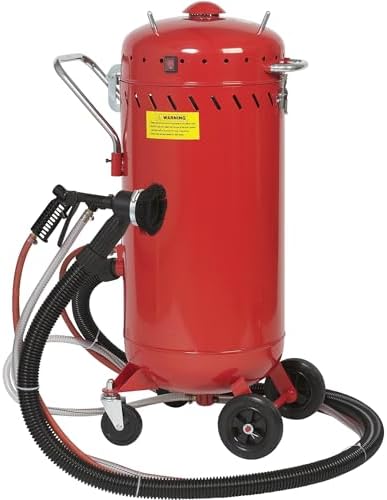
Figure 5: Wheels for Mobility. This image provides a close-up view of the durable wheels, highlighting the unit's design for easy movement and positioning.
9. Warranty and Support
For warranty information, technical support, or to order replacement parts, please contact ALLSOURCE customer service. Refer to your purchase documentation or the ALLSOURCE official website for current contact details.
It is recommended to register your product upon purchase to facilitate warranty claims and receive important product updates.

