Introduction
This manual provides detailed instructions for the installation, operation, and maintenance of your Ganz Pixel Pro Series ZN-C2M H.264 1080P IP Camera. The ZN-C2M is a high-definition surveillance camera featuring H.264 compression, 1080p resolution, true day/night functionality with a retractable IR cut filter, and Power over Ethernet (PoE) capability. Please read this manual thoroughly before using the product to ensure proper setup and performance.
Setup
1. Unpacking
Carefully remove all components from the packaging. Verify that all items listed in the packing list are present and undamaged. If any items are missing or damaged, contact your supplier immediately.
2. Physical Installation
The ZN-C2M camera features a CS Mount for lens attachment. Ensure the lens is securely fastened. Mount the camera in the desired location using appropriate hardware. The camera's dimensions are 3.2 x 2.5 x 2.4 inches, and it weighs 8 ounces. Consider the camera's IP67 rating for outdoor or harsh environments, ensuring proper sealing if exposed to elements.
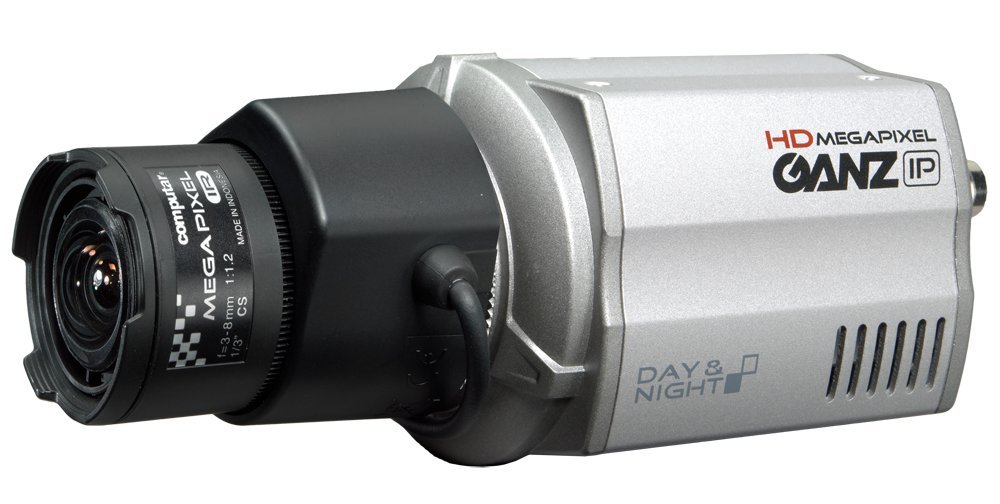
This image shows the front view of the Ganz Pixel Pro Series ZN-C2M IP Camera, highlighting its box form factor and lens mount.
3. Power and Network Connection
The ZN-C2M supports Power over Ethernet (PoE) (IEEE 802.3af compliant). Connect a standard Ethernet cable from a PoE-enabled switch or injector to the camera's RJ45 port. This single connection provides both power and network connectivity. Alternatively, the camera can be powered via an AC/DC power source (not included) if PoE is not available. Ensure the power source matches the camera's specifications.
4. Initial Configuration
After connecting the camera to your network, use the manufacturer's provided software or a web browser to discover the camera's IP address. Access the camera's web interface by entering its IP address into a web browser. Follow the on-screen prompts to set up initial network settings, user accounts, and video parameters. The default login credentials can be found in the quick start guide or on the manufacturer's support website.
Operating
1. Accessing Live View
Once configured, you can access the camera's live video stream through its web interface or compatible video management software (VMS). The camera provides 1080p resolution video using H.264 compression for efficient bandwidth and storage usage.
2. Day/Night Functionality
The ZN-C2M features true day/night performance with a retractable IR cut filter. In low-light conditions, the camera automatically switches to night mode, removing the IR cut filter to enhance sensitivity and utilize infrared illumination (external IR illuminators may be required for optimal night vision). The low light technology is specified as 'Night Color'.
3. Recording and Storage
The camera includes a Micro SDHC Card Slot for local video storage. Insert a compatible Micro SDHC card (not included) to enable edge recording. Configure recording schedules and motion detection settings via the camera's web interface. Video is captured in MP4 format.
4. Motion Detection
The ZN-C2M is equipped with a motion sensor. Configure motion detection zones and sensitivity settings through the camera's web interface to trigger recordings, alarms, or notifications upon detecting movement within the monitored area.
Maintenance
1. Cleaning
Regularly clean the camera lens and housing to ensure clear image quality. Use a soft, dry cloth for the housing. For the lens, use a specialized lens cleaning solution and a microfiber cloth to avoid scratches. Do not use harsh chemicals or abrasive materials.
2. Firmware Updates
Periodically check the Ganz official website for firmware updates. Firmware updates can provide new features, performance improvements, and security enhancements. Follow the instructions provided with the firmware update package carefully to avoid damaging the device.
3. Environmental Considerations
The camera has an International Protection Rating of IP67, indicating it is protected against dust ingress and temporary immersion in water. While robust, avoid exposing the camera to extreme temperatures outside its operating range or direct, high-pressure water jets.
Troubleshooting
No Video Output
- Check power connection: Ensure the camera is receiving power, either via PoE or an external power supply.
- Verify network connection: Confirm the Ethernet cable is securely connected and network indicators are active.
- Check IP address: Ensure the camera's IP address is correct and accessible on your network.
Poor Image Quality
- Clean the lens: Dust or smudges on the lens can degrade image quality.
- Adjust focus: If using a varifocal lens, ensure it is properly focused.
- Check lighting conditions: Ensure adequate lighting for the scene, especially in low-light environments.
Network Connectivity Issues
- Restart network devices: Power cycle your router, switch, and the camera.
- Check cable integrity: Ensure the Ethernet cable is not damaged.
- Verify network settings: Confirm the camera's IP address, subnet mask, and gateway settings are correct for your network.
Factory Reset
If issues persist, a factory reset may be necessary. Refer to the camera's specific documentation or the manufacturer's website for instructions on performing a factory reset. This will revert all settings to their default values.
Specifications
| Model Number | ZN-C2M |
| Mounting Type | CS Mount |
| Video Capture Resolution | 1080p |
| Wireless Communication Technology | PoE (IEEE 802.3af compliant) |
| Form Factor | Box |
| Item Dimensions (L x W x H) | 3.2 x 2.5 x 2.4 inches |
| Item Weight | 8 ounces (0.5 Pounds) |
| Low Light Technology | Night Color (True Day/Night with IR cut filter) |
| Photo Sensor Technology | CMOS |
| International Protection Rating | IP67 |
| Power Source | Ac/dc, PoE |
| Connectivity Protocol | Wi-Fi (Note: PoE is primary wired connection) |
| Special Feature | Motion Sensor |
| Video Capture Format | MP4 |
| UPC | 781904462438 |
Warranty
Warranty information for the Ganz Pixel Pro Series ZN-C2M IP Camera is typically provided with the product packaging or available on the official Ganz website. Please refer to these resources for details regarding warranty coverage, terms, and conditions.
Support
For technical assistance, additional documentation, or customer support, please visit the official Ganz website or contact their customer service department. Contact information can usually be found on the manufacturer's website or in the product's original packaging.