
1. Introduction
Thank you for choosing the Fossil CH2652 Chronograph Watch. This manual provides detailed instructions to help you understand the features, set up, operate, and maintain your timepiece. Please read this manual carefully to ensure proper use and longevity of your watch.
2. Product Overview
The Fossil CH2652 is a men's chronograph watch featuring a black dial, a durable black leather strap, and a robust stainless steel case. It is designed for both style and functionality, incorporating a precise quartz movement and chronograph capabilities.
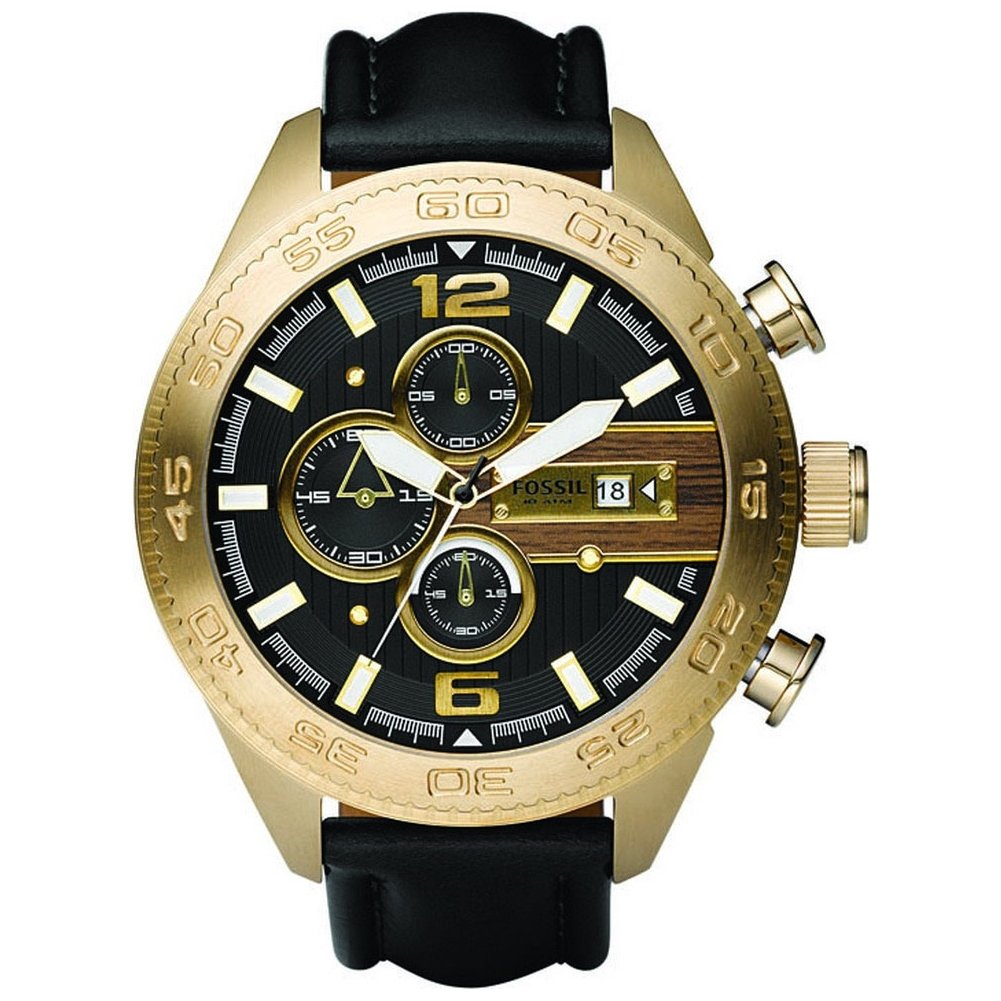
An image showing the front view of the Fossil CH2652 chronograph watch with a black dial and black leather strap.
Key Components:
- Crown: Used for setting time and date.
- Pushers (A & B): Operate the chronograph functions.
- Hour, Minute, Second Hands: Indicate current time.
- Chronograph Sub-dials: Measure elapsed time.
- Date Window: Displays the current date.
3. Setup
3.1. Setting the Time
- Pull the crown out to position 2 (farthest out). The second hand will stop.
- Turn the crown clockwise or counter-clockwise to set the hour and minute hands to the desired time. Ensure the AM/PM is correctly set if your watch has a 24-hour indicator or date change mechanism.
- Push the crown back into position 0 (normal position). The second hand will resume movement.
3.2. Setting the Date
- Pull the crown out to position 1 (middle position).
- Turn the crown clockwise to set the date. Avoid setting the date between 9 PM and 3 AM, as this may damage the date mechanism.
- Once the correct date is displayed, push the crown back into position 0.
3.3. Adjusting the Strap
The leather strap features a buckle closure. Adjust the strap by inserting the pin into the appropriate hole for a comfortable and secure fit on your wrist. The watch should be snug but not overly tight.
4. Operating Instructions
4.1. Basic Timekeeping
Once the time and date are set, the watch will continuously display the current time. The quartz movement ensures accurate timekeeping.
4.2. Using the Chronograph Function
The chronograph function allows you to measure elapsed time independently of the main time display.
- Start: Press pusher A (top pusher) to start the chronograph. The chronograph second hand and sub-dials will begin to move.
- Stop: Press pusher A again to stop the chronograph. The elapsed time will be indicated by the chronograph hands on the sub-dials.
- Reset: After stopping the chronograph, press pusher B (bottom pusher) to reset all chronograph hands to their zero positions.
- Split Time (if applicable): Some chronographs allow for split time measurement. Consult specific model details if this feature is present.
5. Maintenance
5.1. Cleaning Your Watch
- Wipe the watch case and crystal with a soft, dry cloth.
- For the leather strap, avoid prolonged exposure to water, direct sunlight, and harsh chemicals to prevent damage and discoloration. Clean with a slightly damp cloth and allow to air dry.
- Do not use chemical cleaners or abrasive materials, as these can damage the watch's finish.
5.2. Water Resistance
The Fossil CH2652 watch has a water resistance depth of 100 meters (10 ATM). This means it is suitable for showering, swimming, and snorkeling. However, it is not suitable for high-impact water sports or diving.
- Ensure the crown is fully pushed in before any contact with water.
- Do not operate the pushers or crown while the watch is wet or submerged.
- After exposure to saltwater, rinse the watch with fresh water and dry it thoroughly.
5.3. Battery Replacement
The watch is powered by a quartz battery. When the watch stops or the second hand begins to skip, it indicates a low battery. Battery replacement should be performed by a qualified watch technician to ensure proper sealing and water resistance.
6. Troubleshooting
6.1. Watch Not Running
- Check Crown: Ensure the crown is fully pushed into position 0.
- Battery: The battery may be depleted. Refer to section 5.3 for battery replacement.
- Impact: If the watch has sustained a significant impact, internal components may be damaged. Seek professional service.
6.2. Time Inaccurate
- Battery: A low battery can affect accuracy. Replace the battery if needed.
- Magnetism: Exposure to strong magnetic fields can affect quartz watch accuracy. If suspected, demagnetization by a professional may be required.
- Setting Error: Re-set the time carefully as per section 3.1.
6.3. Chronograph Hands Not Resetting to Zero
If the chronograph hands do not return to their zero position after pressing pusher B, they may need calibration. This usually involves pulling the crown out to position 2 and using the pushers to manually adjust the chronograph hands back to zero. Consult a professional if you are unsure.
7. Specifications
| Feature | Detail |
|---|---|
| Model Name | CH2652 |
| Brand | Fossil |
| Movement Type | Quartz |
| Display Type | Analog |
| Case Material | Stainless Steel |
| Case Diameter | 50 Millimetres |
| Case Thickness | 16 Millimetres |
| Band Material | Leather |
| Band Colour | Black |
| Band Width | 22 Millimetres |
| Dial Colour | Black |
| Crystal Material | Mineral |
| Water Resistance Depth | 100 Metres (10 ATM) |
| Closure Type | Buckle (Tang Buckle) |
| Item Weight | 500 Grams |
8. Warranty Information
This Fossil CH2652 watch comes with a Manufacturer's Warranty. The warranty typically covers manufacturing defects in materials and workmanship under normal use. It generally does not cover:
- Battery, crystal, strap, or case.
- Damage resulting from improper handling, lack of care, accidents, or normal wear and tear.
- Water damage if the watch was not used according to the water resistance guidelines.
For specific terms and conditions of your warranty, please refer to the warranty card included with your purchase or visit the official Fossil website.
9. Support
Should you require further assistance, service, or have questions not covered in this manual, please contact Fossil customer support. You can find contact information on the official Fossil website or through your authorized retailer.
Manufacturer: FOSSIL INDIA PVT LTD
Website: www.fossil.com (Please check for your regional website for specific support details).


