
Fossil FS4552IE
Fossil Machine Quartz Chronograph Watch (Model FS4552IE)
Instruction Manual
1. Introduction
Welcome to your new Fossil Machine Quartz Chronograph Watch. This manual provides essential information for setting up, operating, and maintaining your timepiece. Please read it thoroughly to ensure proper use and longevity of your watch.
2. Components Overview
Your Fossil Machine watch features a robust design with several key components:
- Dial: The watch face displaying time and chronograph functions.
- Hands: Hour, Minute, and Second hands for timekeeping.
- Sub-dials: Smaller dials for chronograph minutes, chronograph seconds, and a 24-hour indicator.
- Date Window: Displays the current date.
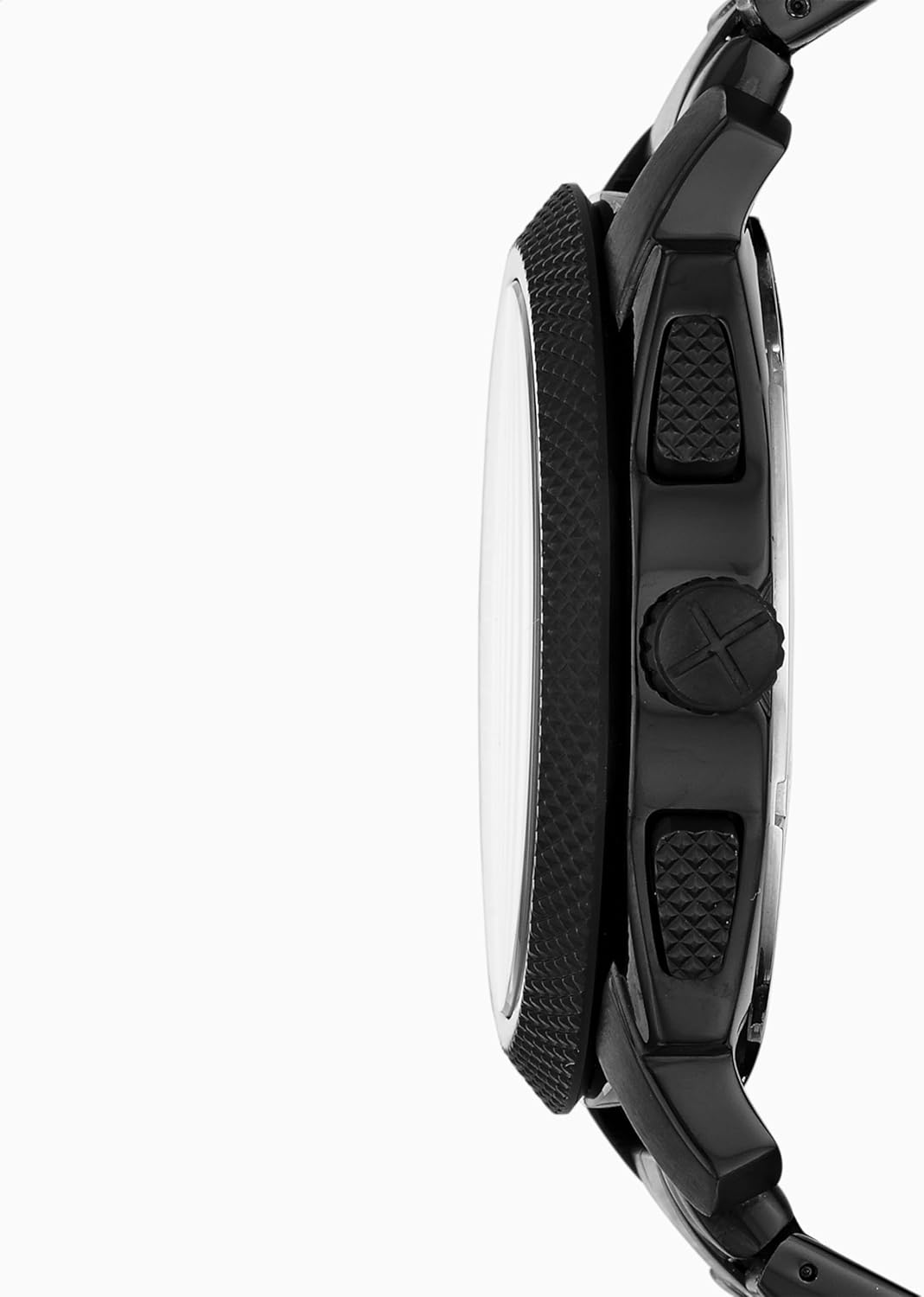
- Crown: Used for setting time and date.
- Pushers: Buttons used to operate the chronograph functions.
- Case: The main body of the watch, made from stainless steel.
- Bezel: The textured ring surrounding the watch crystal.
- Bracelet: Black stainless steel metal bracelet with a push-button fold-over clasp.

3. Setup
3.1 Setting the Time
- Pull the crown out to position 2 (the outermost position).
- Turn the crown clockwise or counter-clockwise to move the hour and minute hands to the correct time. Ensure you set the correct AM/PM by observing if the date changes when passing midnight.
- Push the crown back into position 0 (the innermost position) to start the watch.
3.2 Setting the Date
- Pull the crown out to position 1 (the middle position).
- Turn the crown to adjust the date. Turn it until the correct date is displayed in the date window.
- Push the crown back into position 0 (the innermost position).
3.3 Adjusting the Bracelet
The watch comes with a stainless steel metal bracelet. For optimal comfort and fit, the bracelet may need adjustment. This typically involves adding or removing links. It is recommended to have this procedure performed by a professional jeweler or watch technician to prevent damage to the bracelet or clasp.

4. Operating
4.1 Chronograph Function
Your watch is equipped with a chronograph function for measuring elapsed time.
- Start/Stop: Press the top pusher (located at 2 o'clock) to start the chronograph. Press it again to stop the measurement.
- Reset: With the chronograph stopped, press the bottom pusher (located at 4 o'clock) to reset all chronograph hands to their zero positions.
4.2 Water Resistance
This watch is water resistant up to 5 ATM (50 meters / 165 feet). This rating means the watch is suitable for short periods of recreational swimming and showering. It is not recommended for diving, snorkeling, or high-impact water sports. Always ensure the crown is fully pushed in before exposing the watch to water.
5. Maintenance
5.1 Cleaning
Regular cleaning will help maintain the appearance of your watch. Wipe the watch case and bracelet with a soft, dry cloth. For water-resistant models, a slightly damp cloth can be used, followed by thorough drying with a soft, dry cloth.
5.2 Battery Replacement
Your watch is powered by a Lithium Metal battery. When the battery runs low, the watch hands may stop or operate erratically. It is recommended that battery replacement be performed by a qualified watch technician to ensure proper sealing and maintain the watch's water resistance and warranty.
5.3 Storage
When not wearing your watch, store it in a cool, dry place away from direct sunlight, extreme temperatures, and strong magnetic fields. This helps preserve the watch's movement and materials.
6. Troubleshooting
- Watch Not Running: Ensure the crown is fully pushed into position 0. If the watch still does not run, the battery may need to be replaced.
- Date Not Changing Correctly: If the date changes at noon instead of midnight, pull the crown out to position 2 and advance the time by 12 hours. Then, reset the time and date as described in the Setup section.
- Condensation/Water Inside Watch: If you notice condensation or water droplets inside the watch, immediately take it to a qualified service center. Do not attempt to open the watch yourself, as this can void the warranty and cause further damage.
- Chronograph Hands Not Resetting to Zero: If the chronograph hands do not reset to the 12 o'clock position, consult a professional watch technician for adjustment.
7. Specifications
| Model Number | FS4552IE |
| Movement Type | Quartz |
| Case Material | Stainless Steel |
| Case Diameter | 45 Millimeters |
| Case Thickness | 12 Millimeters |
| Band Material Type | Stainless Steel |
| Band Width | 24 Millimeters |
| Water Resistance Depth | 50 Meters (165 Feet) |
| Crystal Type | Mineral |
| Closure Type | Push-Button Clasp |
| Battery | 1 Lithium Metal battery (included) |

8. Warranty and Support
Your Fossil Machine Quartz Chronograph Watch is covered by a manufacturer's warranty. For detailed information regarding warranty terms, conditions, and duration, please refer to the warranty card included with your purchase or visit the official Fossil website. For customer support, service inquiries, or to locate an authorized service center, please visit Fossil Customer Care.
Related documentsFS4552IE


Ask a question about this manual
Ask about setup, troubleshooting, compatibility, parts, safety, or missing instructions. Manuals+ will review the question and use this page’s manual context to help answer it.