Introduction
This manual provides detailed instructions for the safe and effective use of your Sony Alpha NEX-3 interchangeable lens digital camera. The NEX-3 combines the performance of a DSLR with a compact, lightweight design, featuring a 14.2-megapixel APS-C sensor and an 18-55mm zoom lens. Please read this manual thoroughly before operating the camera and retain it for future reference.
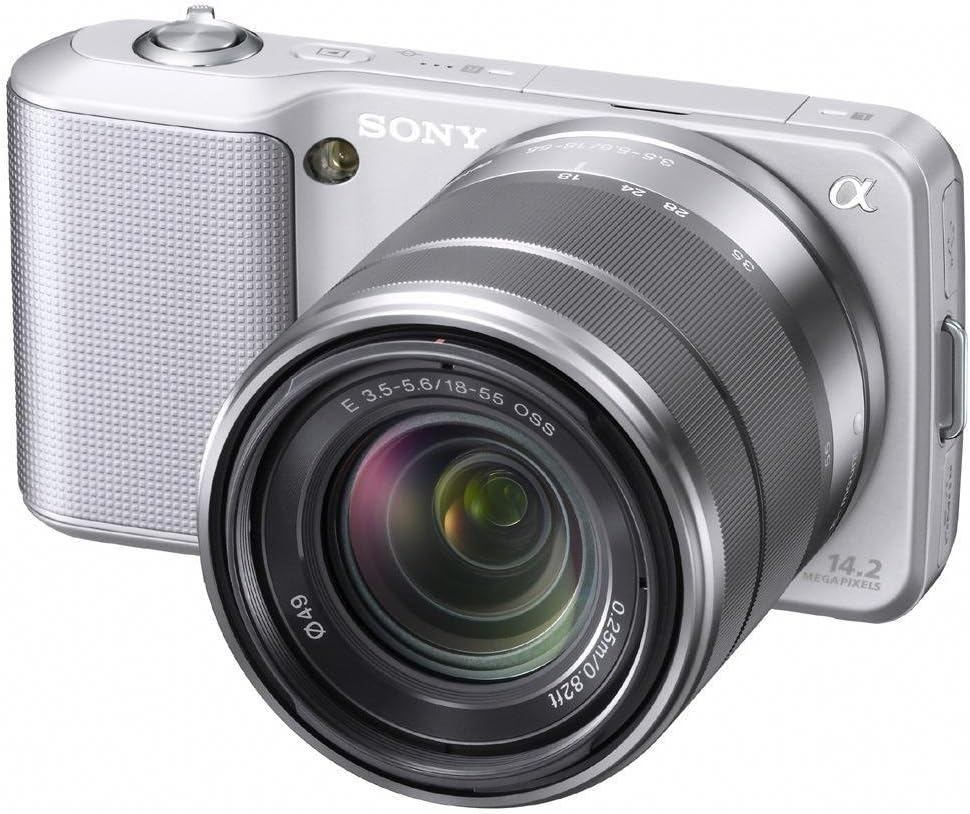
Figure 1: Sony Alpha NEX-3 Digital Camera with the included 18-55mm zoom lens. The camera body is silver with a textured grip, and the lens is also silver and black.
Setup
Before using your camera, perform the following setup steps:
- Charge the Battery: Insert the supplied NP-FW50 Lithium-Ion battery into the charger and connect the charger to a power outlet. The charging indicator will illuminate and turn off when charging is complete.
- Insert Battery: Open the battery cover on the bottom of the camera and insert the charged battery, ensuring correct orientation. Close the cover securely.
- Insert Memory Card: Open the memory card slot cover. Insert a compatible SD/SDHC/SDXC or Memory Stick Pro Duo/Pro-HG Duo card with the contacts facing the correct direction until it clicks into place. Close the cover.
- Attach the Lens: Align the white index mark on the lens with the white index mark on the camera body. Mount the lens by rotating it clockwise until it locks into position.
- Initial Settings: Turn on the camera using the power switch. Follow the on-screen prompts to set the language, date, time, and time zone.
Operating the Camera
The Sony Alpha NEX-3 offers various modes and features for capturing images and videos.
Basic Photography
- iAuto Mode: For automatic scene recognition and optimal settings, rotate the control wheel to select the 'iAuto' mode. The camera will automatically adjust exposure, white balance, and other parameters.
- Taking a Picture: Frame your subject using the 3-inch tilting LCD. Press the shutter button halfway down to focus, then press it fully to capture the image.
Advanced Shooting Modes
For more creative control, the NEX-3 provides Program Auto (P), Shutter Priority (S), Aperture Priority (A), and Manual (M) modes. Access these via the menu system using the control wheel and soft keys.
- Sweep Panorama: This mode allows you to capture wide panoramic images by sweeping the camera horizontally or vertically. The camera automatically stitches multiple images together.
- Hand-held Twilight Mode: Captures six images at high speed and combines them to reduce noise in low-light conditions without a tripod.
- Anti Motion Blur Mode: Similar to Hand-held Twilight, this mode combines six shots to reduce blur caused by camera shake or subject movement in low light.
Video Recording
The NEX-3 can record high-definition video in MP4 format (720p/30p or 480p/30p).
- Start/Stop Recording: Press the dedicated MOVIE button to begin or end video recording.
- Focus and Exposure: The camera automatically adjusts focus and exposure during video recording with E-mount lenses. Exposure compensation can be adjusted using the control wheel.
Maintenance
Proper maintenance ensures the longevity and optimal performance of your camera.
- Cleaning the Camera Body: Use a soft, dry cloth to wipe the camera body. For stubborn dirt, slightly dampen the cloth with water. Avoid using organic solvents.
- Cleaning the Lens: Use a lens blower to remove dust. For smudges, use a lens cleaning solution and a soft lens cloth, wiping gently in a circular motion from the center outwards.
- Sensor Cleaning: If dust spots appear on images, the image sensor may need cleaning. This is a delicate procedure; it is recommended to have this performed by a qualified service technician.
- Battery Care: Store batteries in a cool, dry place. Do not expose them to extreme temperatures. If not using the camera for an extended period, remove the battery.
- Storage: Store the camera in a dry, well-ventilated area, away from direct sunlight and extreme temperatures. Use a desiccant if storing in humid environments.
Troubleshooting
This section addresses common issues you might encounter.
| Problem | Possible Cause / Solution |
|---|---|
| Camera does not power on. | Battery may be depleted. Ensure the battery is charged and inserted correctly. |
| Images are blurry. |
|
| Images appear noisy, especially in low light. | High ISO settings can introduce noise. Use Hand-held Twilight mode or ensure adequate lighting. |
| Memory card error. | Ensure the memory card is inserted correctly and is not damaged. Try formatting the card (this will erase all data). |
| Flash does not fire. | Check flash settings. Ensure the external flash unit (if used) is properly attached and powered. |
If problems persist, consult the Sony support website or contact customer service.
Specifications
| Feature | Detail |
|---|---|
| Model Name | ALPHA NEX-3 |
| Photo Sensor Resolution | 14.2 MP |
| Photo Sensor Size | APS-C (23.4 x 15.6 mm) |
| Sensor Type | CMOS |
| Lens Type | Zoom (18-55mm) |
| Compatible Mountings | Sony E (NEX), Sony FE |
| Image Stabilization | Digital |
| Video Resolution | 720p |
| Display Type | 3-inch Tilting LCD |
| Continuous Shooting | Up to 7 FPS |
| ISO Sensitivity (Expanded) | 200 - 12800 |
| Shutter Speed | 30 seconds to 1/4000 seconds |
| Battery Type | Lithium-Ion NP-FW50 |
| Connectivity | HDMI, USB, EyeFi (Wireless Technology) |
| Dimensions (Approx.) | Item Height: 2.44 inches |
| Weight (Approx.) | 0.65 Pounds |
Warranty and Support
Your Sony Alpha NEX-3 camera comes with a 1-Year Limited Warranty from the date of purchase. This warranty covers manufacturing defects under normal use. Please retain your proof of purchase for warranty claims.
For technical support, service, or detailed warranty information, please visit the official Sony support website or contact Sony customer service.


