
Introduction
This manual provides essential information for the proper use, installation, and maintenance of your Tripp Lite N001-015-BK Cat5e 350MHz Snagless Molded Patch Cable. This 15-foot black cable is designed for high-performance network connections, featuring snagless RJ45 molded male connectors with integral strain relief. It is manufactured from PVC 4-pair stranded UTP and supports 350MHz/1Gbps communication, making it suitable for various Category 5 and 5e cabling requirements.
Product Features
- Premium cabling for Category 5 and Category 5e applications, rated for 350 MHz/1 Gbps communications.
- 15-foot length, black color, with RJ45 male connectors.
- Snagless design protects the locking tabs on the RJ45 connectors from damage during installation.
- Meets current industry standards including IEEE 802.3ab, IEEE 802.5 ANSI/EIA/TIA 568, ISO/IEC 11801, and ETL (category 5e draft 11).
Package Contents
- 15-foot Black Snagless Cat5e Patch Cable (N001-015-BK)
Setup and Installation
The Tripp Lite N001-015-BK cable is designed for simple plug-and-play installation. Follow these steps to connect your devices:
- Identify the RJ45 ports on the devices you wish to connect (e.g., computer, router, network switch, modem).
- Carefully insert one end of the Tripp Lite Cat5e cable's RJ45 connector into the RJ45 port of the first device. Ensure the connector clicks securely into place. The snagless design helps prevent the locking tab from breaking during insertion or removal.
- Insert the other end of the cable's RJ45 connector into the RJ45 port of the second device. Again, ensure a secure connection.
- Verify that both connections are firm and that the cable is not kinked or excessively bent.

Image: Close-up of the snagless RJ45 connectors, highlighting the durable molded design.
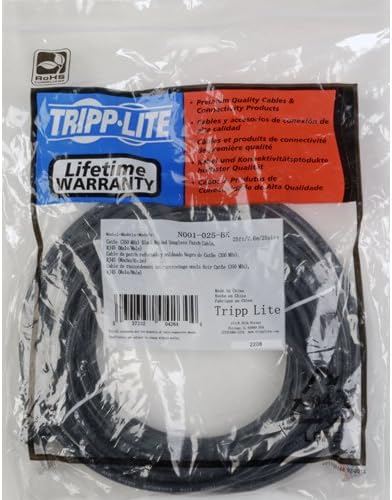
Image: The Tripp Lite Cat5e cable as it appears in its original packaging.
Operating Instructions
Once the Tripp Lite Cat5e cable is securely connected between two compatible network devices, it will facilitate data transfer automatically. No additional configuration is typically required for the cable itself. The cable supports data transfer rates up to 1 Gbps (Gigabit per second) and frequencies up to 350 MHz, ensuring reliable and high-speed network communication for applications such as internet browsing, file sharing, and streaming.
Maintenance
To ensure the longevity and optimal performance of your Tripp Lite Cat5e cable, consider the following maintenance tips:
- Avoid Sharp Bends: Do not bend the cable at sharp angles, as this can damage the internal wires and reduce performance. Maintain a gentle curve when routing the cable.
- Protect Connectors: While the snagless design offers protection, avoid pulling the cable by the cord itself when disconnecting. Always grasp the molded connector.
- Keep Clean: Keep the RJ45 connectors free from dust and debris. If necessary, gently clean with a dry, lint-free cloth.
- Proper Storage: When not in use, coil the cable loosely and store it in a dry, cool place away from direct sunlight or extreme temperatures.
- Indoor/Outdoor Usage: This cable is suitable for both indoor and outdoor usage, but avoid prolonged exposure to harsh environmental conditions if possible.
Troubleshooting
If you experience issues with your network connection, consider these common troubleshooting steps:
- No Network Connection:
- Ensure both ends of the cable are securely plugged into the respective RJ45 ports.
- Check the network status lights on your devices (e.g., router, computer's Ethernet port). If they are off, try reseating the cable or using a different port.
- Test the cable with another known working device or try a different Ethernet cable to isolate the issue.
- Slow Network Speed:
- While this Cat5e cable supports 1 Gbps, ensure all connected devices (router, switch, network adapter) also support Gigabit Ethernet.
- Check for any physical damage to the cable, such as kinks or frayed insulation.
- Ensure the cable length is appropriate for your setup and not excessively long, which can sometimes lead to signal degradation over very long distances (though 15ft is well within limits).
- Intermittent Connection:
- Verify that the cable is not being stepped on, pinched, or subjected to constant movement that could loosen connections.
- Inspect the RJ45 connectors for any bent or broken pins.
Specifications
| Feature | Detail |
|---|---|
| Model Number | N001-015-BK |
| Cable Type | Cat 5e Ethernet Patch Cable |
| Length | 15 feet |
| Color | Black |
| Connector Type | RJ45 Male-to-Male |
| Data Transfer Rate | 1000 Megabits Per Second (1 Gbps) |
| Frequency | 350 MHz |
| Compatible Devices | Computer, Router, Switch, Modem, Network Devices |
| Special Feature | Snagless, Molded, Universal |
| Indoor/Outdoor Usage | Indoor, Outdoor |
| Item Weight | 4.6 ounces |
| Product Dimensions | 0.5 x 7 x 9 inches |
Warranty and Support
Tripp Lite warrants this product to be free from defects in materials and workmanship for life. This Lifetime Limited Warranty ensures peace of mind regarding the quality and durability of your Cat5e cable.
For technical support, warranty claims, or additional product information, please visit the official Tripp Lite store or contact their customer service directly.
Official Tripp Lite Store: https://www.amazon.com/stores/TrippLite/page/A32C28E1-7D68-4127-A940-901841EA7721


