
1. Product Overview
The Unicraft TR 3 Transport Rollers are robust tools designed for the efficient and safe movement of heavy objects. This unit features a high load capacity and durable construction, making it suitable for industrial and workshop environments. Its design prioritizes stability and ease of use when relocating machinery or other substantial items.
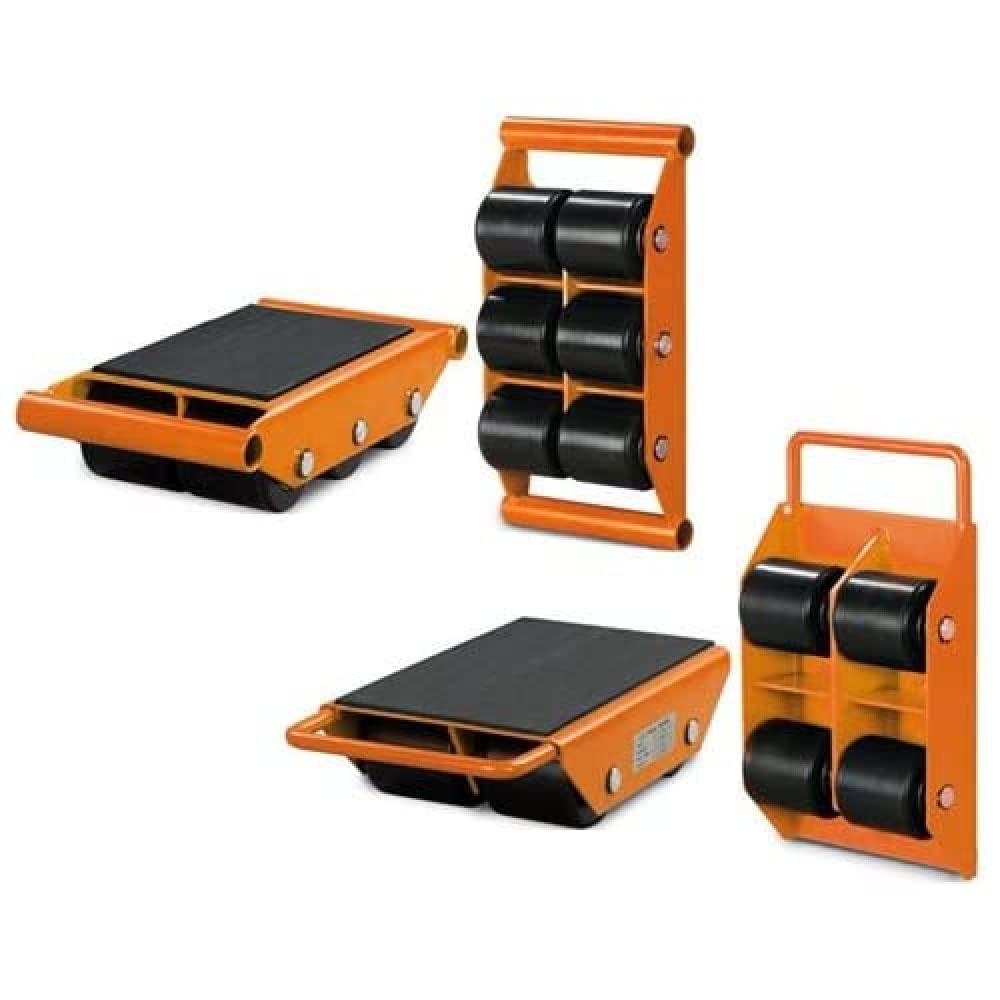
Image: The Unicraft TR 3 Transport Roller, highlighting its sturdy construction and the four large nylon rollers designed for smooth movement of heavy loads. The top surface features an anti-slip pad for secure load placement.
- Designed for easy and safe transport of heavy objects.
- Equipped with large, durable nylon rollers for smooth movement.
- Features an anti-slip surface to secure the load during transport.
2. Safety Instructions
Always prioritize safety when operating heavy equipment. Failure to follow these instructions may result in injury or damage to property.
- Read the Manual: Familiarize yourself with all instructions before use.
- Load Capacity: Do not exceed the maximum load capacity of 3 tons. Overloading can cause equipment failure and serious injury.
- Stable Surface: Ensure the floor or ground surface is level, stable, and capable of supporting the combined weight of the load and the rollers.
- Load Distribution: Distribute the load evenly across the rollers to prevent tipping or instability.
- Personal Protective Equipment (PPE): Wear appropriate safety gear, including safety shoes and gloves.
- Clear Area: Keep the area around the load and rollers clear of personnel and obstructions during operation.
- Inspect Before Use: Check rollers for damage, wear, or obstructions before each use. Do not use damaged equipment.
- Controlled Movement: Move loads slowly and deliberately. Avoid sudden movements or changes in direction.
- Secure Load: Ensure the load is stable and secured on the anti-slip surface before attempting to move it.
3. Setup
Proper setup is crucial for safe and effective operation.
- Prepare the Area: Clear the path of any obstacles and ensure the floor is clean and free of debris that could impede roller movement.
- Inspect Rollers: Before placing the load, visually inspect each roller for any signs of damage, wear, or foreign objects that might affect its function.
- Positioning: Carefully lift the heavy object using appropriate lifting equipment (e.g., a jack or hoist) to create clearance. Slide the TR 3 rollers underneath the load, ensuring they are positioned symmetrically and securely under the load's center of gravity or designated support points.
- Lowering the Load: Slowly and carefully lower the load onto the anti-slip surface of the rollers. Ensure the load is stable and does not rock or shift once fully supported by the rollers.
4. Operating Instructions
Follow these steps for safe and controlled movement of your heavy object.
- Verify Stability: Before initiating movement, confirm that the load is stable on the rollers and that all rollers are making proper contact with the floor.
- Apply Force: Apply steady, controlled force to the load to initiate movement. This can be done manually for lighter loads or with a suitable pushing/pulling device for heavier items.
- Directional Control: Guide the load carefully in the desired direction. The rollers are designed for straight-line movement. For changes in direction, it may be necessary to temporarily lift the load, reorient the rollers, and then lower the load again.
- Monitor Movement: Continuously observe the load and rollers during transport. Watch for any signs of instability, roller jamming, or obstructions.
- Stopping: To stop the load, gradually reduce the applied force. Once the load is in its final position, carefully lift it off the rollers using appropriate lifting equipment and remove the rollers.
5. Maintenance
Regular maintenance ensures the longevity and safe operation of your Unicraft TR 3 Transport Rollers.
- Cleaning: After each use, clean the rollers and the anti-slip surface to remove dirt, dust, and debris. A damp cloth can be used for cleaning, followed by thorough drying.
- Inspection: Periodically inspect the nylon rollers for signs of wear, cracks, or flat spots. Check the frame for any deformation or damage.
- Storage: Store the rollers in a clean, dry environment when not in use to prevent corrosion and damage.
- Lubrication: The nylon rollers are generally self-lubricating. However, if any squeaking or stiffness is observed, a light application of a suitable lubricant to the axle points may be beneficial. Avoid over-lubrication, which can attract dirt.
- Replacement Parts: If any part of the roller system becomes damaged or excessively worn, contact Unicraft or an authorized dealer for genuine replacement parts.
6. Troubleshooting
This section addresses common issues you might encounter.
- Issue: Rollers are difficult to move or get stuck.
Solution: Check for obstructions on the floor or within the roller mechanism. Ensure the load is not exceeding the capacity and is evenly distributed. Inspect rollers for damage or excessive wear. Clean any debris from the rollers. - Issue: Load is unstable or rocking.
Solution: Re-evaluate the load distribution. Ensure the rollers are positioned symmetrically and securely under the load's support points. Verify the floor surface is level and stable. - Issue: Anti-slip surface is not effective.
Solution: Clean the anti-slip surface and the bottom of the load to remove any grease, oil, or dirt that might reduce friction. Ensure the load is fully resting on the surface.
If problems persist after attempting these solutions, discontinue use and contact customer support.
7. Specifications
| Specification | Value |
|---|---|
| Model Number | TR 3 |
| Manufacturer | Unicraft |
| Load Capacity | 3 Tons |
| Dimensions (L x W x H) | 400 x 228 x 100 mm |
| Number of Rollers | 4 |
| Roller Size | 85 x 90 mm |
| Approximate Weight | 9.5 kg (20.9 lbs) |
| Color | Black |
8. Warranty and Support
For warranty information, technical support, or to inquire about replacement parts, please refer to the documentation provided at the time of purchase or contact your authorized Unicraft dealer or the manufacturer directly. Keep your purchase receipt as proof of purchase.