
1. Introduction
Thank you for choosing the STEINEL Master Check 3 Voltage Tester. This device is engineered for professional use, offering a robust, versatile, and practical solution for electrical testing. It is specifically designed for working on electrical installations and for safely verifying the presence of live circuits. The Master Check 3 accurately tests both AC (Alternating Current) and DC (Direct Current) voltage, with clear indication provided by integrated LEDs.
2. Safety Instructions
To ensure safe operation and prevent personal injury or damage to the device, please read and adhere to the following safety guidelines:
- Always assume that electrical circuits are live until proven otherwise.
- Do not use the device if it appears damaged or is not functioning correctly.
- Ensure your hands are dry and you are standing on an insulated surface when testing.
- Never attempt to measure voltages exceeding the specified maximum ratings of the device.
- This device is intended for voltage testing only. Do not use it for other purposes.
- Keep the device away from children.
3. Product Overview
The STEINEL Master Check 3 is a compact and durable voltage tester. Its primary function is to detect and indicate AC and DC voltages across a wide range. The device is battery-powered for portability and ease of use in various environments.
Key Features:
- Voltage Testing: Capable of testing both AC and DC voltages.
- LED Indication: Voltage levels are clearly indicated by a series of LEDs.
- Voltage Ranges: Supports common voltage levels including 6V, 12V, 24V, 50V, 120V, 220V, 380V (and 240V/415V for specific applications).
- Robust Design: Built for durability in professional settings.
- Power Source: Operates on batteries.
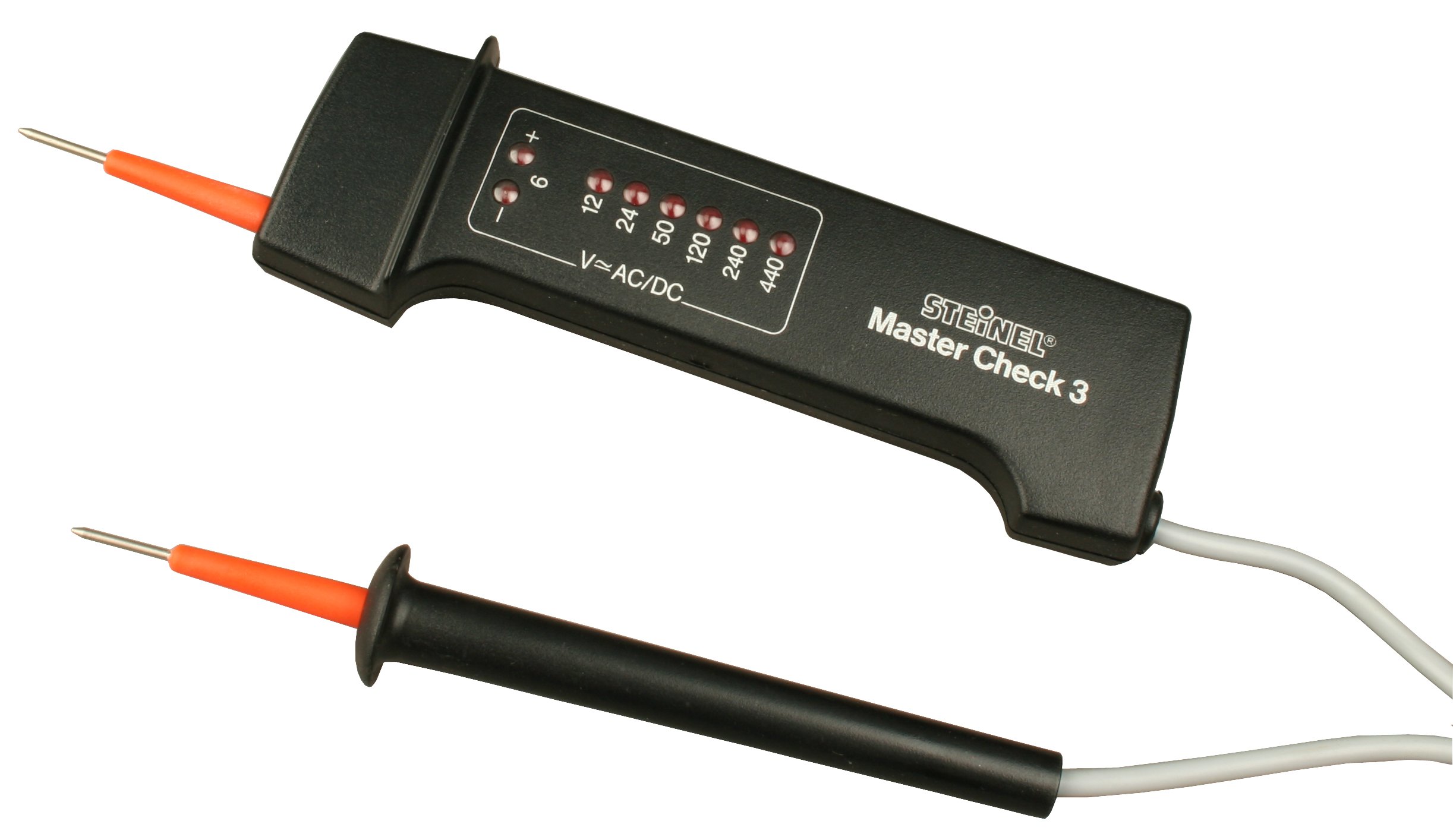
This image displays the STEINEL Master Check 3 Voltage Tester, highlighting its durable construction and the two test probes used for electrical measurements.
4. Setup
4.1 Battery Installation
The STEINEL Master Check 3 is powered by batteries. Before initial use, or when the indicators become dim, batteries must be installed or replaced.
- Locate the battery compartment cover on the back of the device.
- Use a suitable tool (e.g., a small screwdriver) to open the battery compartment.
- Insert the required batteries, ensuring correct polarity (+ and - terminals). Refer to the markings inside the compartment.
- Securely close the battery compartment cover.
4.2 Initial Check
Before using the tester on an unknown circuit, it is recommended to test it on a known live circuit (e.g., a wall outlet) to confirm proper functionality.
5. Operating Instructions
The Master Check 3 is designed for straightforward voltage detection.
5.1 Performing a Voltage Test
- Ensure the test probes are clean and free from damage.
- Carefully apply the two test probes to the points of the circuit you wish to test. For AC voltage, this would typically be phase and neutral. For DC voltage, this would be positive and negative terminals.
- Observe the LED indicators on the device.
5.2 Interpreting LED Indicators
The Master Check 3 features a series of LEDs that illuminate to indicate the detected voltage level. The LEDs are typically labeled with voltage values (e.g., 6V, 12V, 24V, 50V, 120V, 220V, 380V). The highest illuminated LED indicates the approximate voltage present. For example, if the 220V LED illuminates but the 380V LED does not, the voltage is between 220V and 380V.
The device automatically detects whether the voltage is AC or DC and indicates accordingly, often through specific LED patterns or dedicated indicators if present on the model.
6. Maintenance
6.1 Cleaning
To clean the device, wipe it with a soft, damp cloth. Do not use abrasive cleaners or solvents. Ensure the device is completely dry before storage or next use.
6.2 Battery Replacement
Replace batteries as described in Section 4.1 when the LED indicators become dim or the device fails to respond. Always dispose of used batteries responsibly according to local regulations.
6.3 Storage
Store the Master Check 3 in a dry, cool place, away from direct sunlight and extreme temperatures. If storing for extended periods, it is advisable to remove the batteries to prevent leakage.
7. Troubleshooting
If you encounter issues with your STEINEL Master Check 3, refer to the following common problems and solutions:
- No LED indication when testing a known live circuit:
- Check battery installation and replace batteries if necessary.
- Ensure probes are making good contact with the circuit points.
- Verify the circuit is indeed live with another known working device.
- Dim or flickering LEDs:
- Batteries are low. Replace them.
- Inconsistent readings:
- Ensure probes are clean and free from corrosion.
- Confirm stable contact with the test points.
If the problem persists after attempting these solutions, contact STEINEL customer support for further assistance.
8. Specifications
| Feature | Specification |
|---|---|
| Brand | STEINEL |
| Model | Master Check 3 |
| Power Source | Battery-powered |
| Voltage Test Range | 6V, 12V, 24V, 50V, 120V, 220V, 380V (240V/415V) |
| Voltage Type | AC and DC |
| ASIN | B003IPCZ84 |
| Manufacturer | Steinel |
| Style | Standard |
| Unit Count | 1.0 unit |
9. Warranty and Support
Specific warranty information for the STEINEL Master Check 3 Voltage Tester is not provided within this manual. For details regarding warranty coverage, terms, and conditions, please refer to the documentation included with your purchase or visit the official STEINEL website. For technical support or service inquiries, please contact STEINEL customer service through their official channels.