
Garmin GPSMAP 78
Garmin GPSMAP 78 Marine GPS Navigator User Manual
Model: GPSMAP 78 (010-00864-00)
Brand: Garmin
Introduction
This manual provides comprehensive instructions for the Garmin GPSMAP 78 Marine GPS Navigator. It covers device setup, operation, maintenance, and troubleshooting to ensure optimal performance and user experience. The GPSMAP 78 is a rugged, marine-friendly handheld device designed for navigation in various environments, featuring a high-sensitivity GPS receiver and a color display.
Safety Information
WARNING: This product contains chemicals known to the State of California to cause cancer and birth defects or other reproductive harm. For more information, visit www.P65Warnings.ca.gov.
Always exercise caution when operating any electronic device near water. Ensure battery compartment is securely sealed to maintain water resistance. Use only recommended battery types.
Getting Started
What's in the Box
- Garmin GPSMAP 78 device
- Wrist Strap
- USB Cable
- Quick Start Manual
Battery Installation
The GPSMAP 78 requires two AA batteries (not included). NiMH or Lithium batteries are recommended for optimal performance and battery life.
- Locate the battery compartment on the back of the device.
- Open the battery compartment cover.
- Insert two AA batteries, observing the polarity markings (+ and -).
- Close the battery compartment cover securely to ensure water resistance.
Important: The microSD card slot is located inside the waterproof battery compartment. Ensure the compartment is properly sealed after accessing the card slot to prevent water ingress.
Initial Power-On
Press and hold the Power button (usually marked with a power symbol) to turn on the device. Follow the on-screen prompts for initial setup, including language selection and time zone settings.
Operating Instructions
Device Overview and Buttons
The Garmin GPSMAP 78 features a 2.6-inch color display and a series of buttons for navigation and control.

Image 1: Front view of the Garmin GPSMAP 78 handheld GPS unit. The image displays the device's 2.6-inch color screen, which shows a map of the Great Lakes region. Above the screen are buttons labeled 'MOB', 'FIND', 'PAGE', and '+' and '-'. Below the screen is a directional pad, and buttons labeled 'QUIT', 'MENU', 'ENTER', and 'MARK'. The Garmin logo is visible at the bottom.
- Power Button: Turns the device on/off, adjusts backlight.
- Zoom In/Out (+/-): Adjusts map zoom level.
- Page Button: Cycles through main pages (Map, Compass, Trip Computer, etc.).
- Menu Button: Opens the menu for the current page; press twice for main menu.
- Enter Button: Selects options, confirms actions.
- Quit Button: Cancels an action, returns to the previous page.
- Find Button: Accesses search functions for waypoints, geocaches, etc.
- Mark Button: Marks your current location as a waypoint.
- MOB (Man Overboard) Button: Initiates a Man Overboard navigation.
- Directional Pad: Navigates menus and pans the map.
Navigation Basics
The GPSMAP 78 comes with a built-in worldwide basemap. Its high-sensitivity, WAAS-enabled GPS receiver and HotFix satellite prediction technology ensure quick and precise position acquisition, even in challenging environments like heavy tree cover or deep canyons.
- Viewing Your Position: On the Map page, your current location is indicated by a position icon.
- Panning the Map: Use the directional pad to move the map view.
- Zooming: Use the + and - buttons to zoom in or out.
Adding Maps
The device supports additional detailed maps via a microSD card.
- BlueChart g2: Preloaded cards for marine navigation.
- City Navigator NT: Map data for turn-by-turn routing on roads.
- BirdsEye Satellite Imagery: Download satellite images (subscription required).
- Custom Maps: Free software allows converting paper and electronic maps into downloadable maps for the device.
To install a microSD card, open the battery compartment, insert the card into the slot, and then securely close the compartment.
Waypoints, Routes, and Tracks
- Waypoints: Mark specific locations. Press the MARK button to save your current location as a waypoint.
- Routes: Create a sequence of waypoints to navigate a planned path.
- Tracks: Record your path as you travel. The device automatically records a track log.
Geocaching
The GPSMAP 78 supports geocaching GPX files. You can download geocaches and their details directly to your unit, eliminating the need for manual coordinate entry or paper printouts. The device stores and displays key information such as location, terrain, difficulty, hints, and descriptions.
Connectivity
Connect your GPSMAP 78 to a computer using the provided USB cable to manage data and interact with Garmin Connect.
- Garmin Connect: Upload activities, analyze data, view tracks on a map, and share experiences.
- Data Transfer: Transfer waypoints, routes, and tracks between your device and computer.
Maintenance
Cleaning the Device
Clean the device with a cloth dampened with a mild detergent solution. Avoid using abrasive cleaners or solvents that could damage the device's surfaces.
Water Resistance
The GPSMAP 78 is waterproof to IPX7 standards and floats in water. This means it can withstand incidental exposure to water of up to 1 meter for 30 minutes. However, it is not designed for continuous submersion. Always ensure all covers, especially the battery compartment, are securely closed to maintain water resistance.
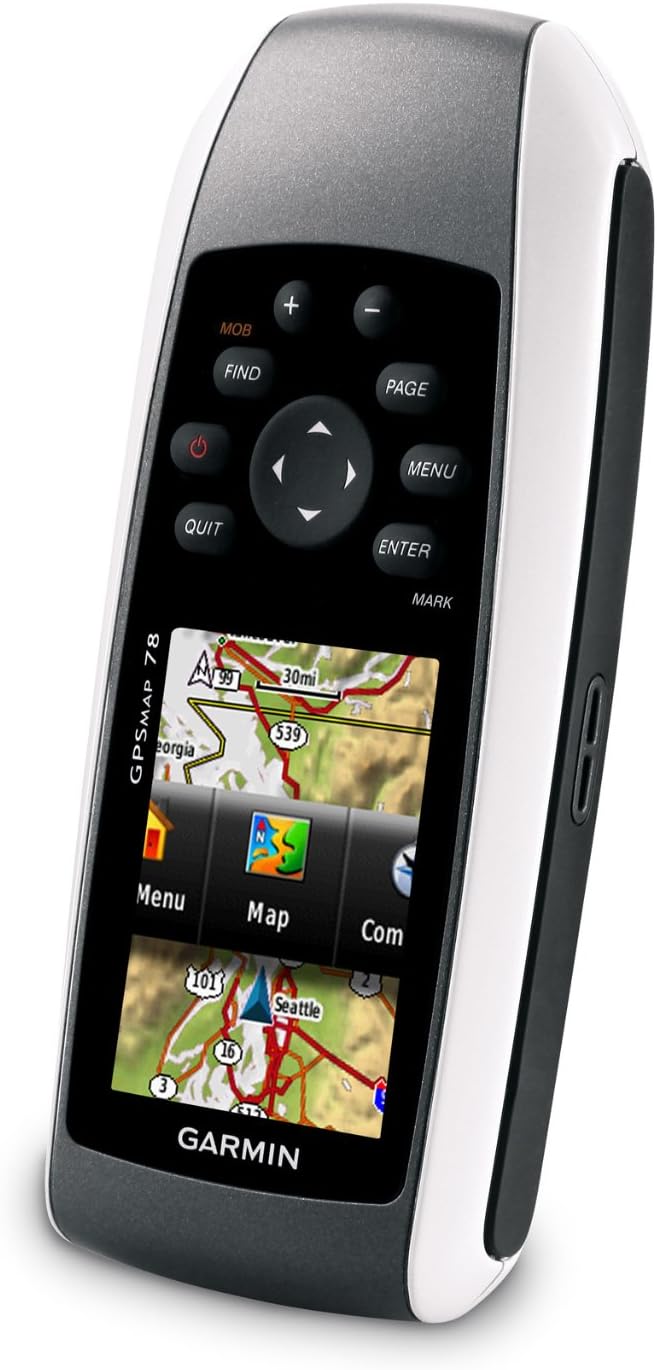
Image 2: Angled view of the Garmin GPSMAP 78, highlighting its molded rubber side grips for enhanced handling. The screen displays a menu interface with options like "Menu", "Map", and "Com".
Storage
When storing the device for extended periods, remove the batteries to prevent leakage and potential damage. Store in a cool, dry place away from direct sunlight.
Troubleshooting
Device Not Powering On
- Ensure batteries are correctly installed with proper polarity.
- Replace old batteries with fresh AA batteries (NiMH or Lithium recommended).
- Check if the battery compartment cover is fully closed.
Poor GPS Signal Reception
- Ensure the device has a clear view of the sky.
- Avoid operating in areas with dense foliage, tall buildings, or indoors.
- Allow sufficient time for the device to acquire satellites (HotFix technology assists in faster acquisition).
Maps Not Displaying Correctly
- Verify that the microSD card containing the maps is properly inserted.
- Ensure the map products are compatible with the GPSMAP 78.
- Check map settings within the device to ensure desired maps are enabled.
Specifications
| Product Dimensions | 1.2 x 2.6 x 6 inches |
| Item Weight | 7.7 ounces |
| Display Size | 2.6 inches diagonal (1.43" x 2.15") |
| Display Resolution | 160 x 240 pixels |
| Memory | 1.7 GB |
| Battery Type | 2 AA batteries (NiMH or Lithium recommended) |
| Battery Life | Up to 20 hours |
| Water Rating | IPX7 (floats) |
| Connectivity | USB |
| Special Features | High-sensitivity receiver, WAAS-enabled, HotFix, Geocaching, Custom POIs, Garmin Connect Compatible |
Warranty and Support
For information regarding warranty coverage, product support, or service, please refer to the official Garmin website or contact Garmin customer support directly. Keep your purchase receipt as proof of purchase.
Online resources, including software updates and additional manuals, may be available on the Garmin support portal.
Related Documents - GPSMAP 78
 |
Panduan Pengguna GPSMAP® 9000XSV/9000/9500 - Garmin Panduan pengguna komprehensif untuk seri chartplotter maritim Garmin GPSMAP 9000XSV, 9000, dan 9500. Pelajari cara mengatur, menggunakan fitur navigasi, sonar, radar, autopilot, dan aplikasi ActiveCaptain. |
 |
Garmin GPSMAP 使用者手冊:7x2, 9x2, 12x2, 7x3 系列導航指南 深入了解 Garmin GPSMAP 7x2, 9x2, 12x2 Touch, A12, 7x2 Plus, 9x2 Plus, 12x2 Plus, 7x3, 9x3, 12x3 系列裝置。本使用者手冊提供詳細的操作說明、功能介紹與設定指南,助您掌握 Garmin 導航技術。 |
 |
Garmin GPSMAP 7400/7600 Series Owner's Manual Comprehensive owner's manual for the Garmin GPSMAP 7400/7600 Series marine chartplotters, detailing features, setup, navigation, and advanced functions for optimal use on the water. |
 |
Garmin GPSMAP 12x3, 9x3, 7x3, 12x2 Plus, 9x2 Plus, 7x2 Plus Owner's Manual Explore the comprehensive owner's manual for Garmin GPSMAP chartplotters (12x3, 9x3, 7x3, 12x2 Plus, 9x2 Plus, 7x2 Plus). Learn about setup, navigation, sonar, radar, autopilot, and advanced features for your marine electronics. |
 |
Instructions d'installation de la série Garmin GPSMAP 4000/5000 Ce manuel fournit des instructions détaillées pour l'installation des traceurs GPS et des antennes GPS de la série Garmin GPSMAP 4000/5000, incluant le montage, le câblage et les connexions réseau. |
 |
Garmin GPSMAP 8x10/8x12/8x16 Installation Guide Comprehensive installation guide for Garmin GPSMAP 8x10, 8x12, and 8x16 marine chartplotters. Covers safety, mounting, wiring, and connectivity for marine environments. |
Ask a question about this manual
Ask about setup, troubleshooting, compatibility, parts, safety, or missing instructions. Manuals+ will review the question and use this page’s manual context to help answer it.