
Introduction
This manual provides comprehensive instructions for the Bellman & Symfon Visit Portable Receiver (BE1450). Please read this manual carefully before using the device to ensure proper operation and to understand its features and functions. This receiver is designed to alert users to various signals from compatible Bellman Visit transmitters.
Product Overview
The Bellman & Symfon Visit Portable Receiver is a device designed to receive signals from various Bellman Visit transmitters. It alerts users through distinct sounds and LED light signals for different alarms. Its portability allows for use in various locations, such as a garden or balcony, within the operating range of your transmitters.
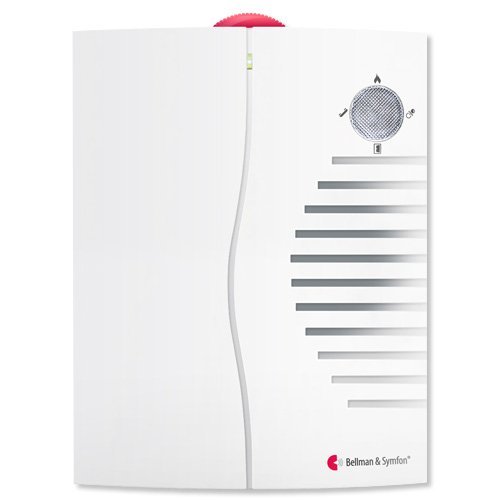
Image: Front view of the Bellman & Symfon Visit Portable Receiver. The device is white with a red indicator at the top and a speaker grille on the right side, accompanied by LED indicators.
Key Features:
- Receives signals from Bellman Visit transmitters.
- Alerts with distinct sounds and LED light signals.
- Optimized sound frequency and adjustable sound level (0dB to 90dB).
- Suitable for individuals with mild to moderate hearing loss.
- Portable design for flexible placement.
- Supports up to four transmitters of the same type (e.g., four door transmitters).
- Approximate operating range: 100 feet (33 yards) in open fields.
- Powered by four C batteries (included).
Setup
1. Battery Installation
The Visit Portable Receiver requires four C batteries for operation. These are typically included with the unit.
- Locate the battery compartment on the back of the receiver.
- Open the battery compartment cover.
- Insert four C batteries, ensuring correct polarity (+/-) as indicated inside the compartment.
- Close the battery compartment cover securely.
2. Pairing with Transmitters
The receiver must be paired with compatible Bellman Visit transmitters (e.g., door transmitters, smoke alarms, baby monitors) to function. Refer to the specific transmitter's manual for detailed pairing instructions. Generally, the process involves activating the transmitter's pairing mode and then activating the receiver's pairing mode within range.
3. Placement
Place the portable receiver in a location where you can easily hear the alerts and see the LED signals. Consider its portability to move it between rooms or even outdoors within the operating range of your transmitters.
Operating Instructions
1. Power On/Off
The receiver powers on automatically once batteries are correctly installed. There is no separate power button. To turn off, remove the batteries.
2. Adjusting Sound Level
The receiver features an adjustable sound level, ranging from 0dB to 90dB. Locate the volume control on the device and adjust it to a comfortable and audible level.
3. Receiving Alerts
When a paired Bellman Visit transmitter sends a signal, the portable receiver will alert you through:
- Distinct Sounds: Each type of alert (e.g., doorbell, telephone, smoke alarm) will have a unique sound pattern.
- LED Light Signals: Specific LED indicators on the receiver will illuminate to visually identify the source of the alert.
The receiver can differentiate between up to four transmitters of the same type, indicating which specific device triggered the alert.
4. Operating Range
The approximate operating range in an open field is about 100 feet (33 yards). Walls, furniture, and other large objects can significantly reduce this range. Position your receiver and transmitters to minimize obstructions for optimal performance.
Maintenance
1. Cleaning
Wipe the receiver with a soft, dry cloth. Do not use abrasive cleaners or solvents, as these can damage the device.
2. Battery Replacement
Replace the C batteries when the low battery indicator (if present) illuminates or when the device's performance degrades. Always replace all four batteries at the same time with new ones.
3. Storage
If storing the receiver for an extended period, remove the batteries to prevent leakage and potential damage to the device.
Troubleshooting
| Problem | Possible Cause | Solution |
|---|---|---|
| Receiver not alerting. | Dead or incorrectly installed batteries. | Check battery polarity and replace with fresh C batteries. |
| Receiver not alerting. | Not paired with a transmitter. | Ensure the receiver is correctly paired with the desired Bellman Visit transmitter. Refer to the transmitter's manual. |
| Receiver not alerting. | Out of range. | Move the receiver closer to the transmitter or reduce obstructions between them. |
| Alerts are too quiet or too loud. | Volume setting is incorrect. | Adjust the volume control on the receiver to your preferred level. |
Specifications
- Model: BE1450
- Brand: Bellman & Symfon
- Power Source: 4 x C batteries
- Sound Level: Adjustable, 0dB to 90dB
- Operating Range: Approximately 100 feet (33 yards) in open field
- Dimensions: 9 x 6 x 1.9 inches (approximate package dimensions)
- Weight: 1.65 Pounds (approximate package weight)
- ASIN: B003I7FKCU
- Manufacturer: Bellman and Symfon
- First Available: May 5, 2011
Warranty and Support
Warranty Information
The Bellman & Symfon Visit Portable Receiver (BE1450) comes with a two-year warranty from the date of purchase. Please retain your proof of purchase for warranty claims.
Customer Support
For technical assistance, troubleshooting beyond this manual, or warranty inquiries, please contact Bellman & Symfon customer support. Visit the official Bellman & Symfon website for contact details.
You can find more information about Bellman & Symfon products on their Amazon Store.


