
Introduction
The Crown XLS2000 is a high-performance, lightweight Class-D power amplifier designed for portable sound reinforcement systems. This amplifier delivers 375 watts per channel at 8 ohms, 650 watts per channel at 4 ohms, and 2100 watts per channel at 4 ohms bridged. It features an integrated PureBand Crossover System for enhanced performance and control, along with PeakX Limiters to protect connected speakers. The XLS2000 offers versatile input options including XLR, 1/4-inch, and RCA connectors, ensuring compatibility with various audio sources. This manual provides essential information for the safe and effective setup, operation, and maintenance of your Crown XLS2000 amplifier.
Setup
Unpacking and Inspection
Carefully remove the amplifier from its packaging. Inspect the unit for any signs of damage that may have occurred during shipping. If damage is found, contact your dealer immediately.
Physical Placement and Ventilation
The XLS2000 amplifier is designed for surface mounting and has dimensions of 10.7 x 19 x 3.5 inches (L x W x H) and weighs approximately 10.75 pounds. Ensure the amplifier is placed in a location that allows for adequate airflow to prevent overheating. Do not block the ventilation openings on the front or rear panels. Maintain at least 2 inches (5 cm) of clear space around all sides for proper cooling.
Power Connection
Connect the provided AC power cord to the amplifier's power inlet and then to a grounded 120 Volt AC power outlet. Ensure the power source matches the amplifier's voltage requirements. Always connect the power cord last after all audio connections have been made.
Input Connections
The XLS2000 offers flexible input options. Connect your audio source (mixer, preamplifier, etc.) to the amplifier's input jacks using XLR, 1/4-inch (TRS), or RCA cables. The amplifier features two input channels (CH1 and CH2). Ensure proper cable routing to avoid interference.
Output Connections
Connect your loudspeakers to the amplifier's output terminals. The XLS2000 provides both Speakon-compatible (NL4) and binding post outputs. Ensure correct polarity (+ to + and - to -) when connecting speakers. For stereo operation, connect one speaker to CH1 output and another to CH2 output. For bridged-mono operation, refer to the operating section for specific instructions and connect a single speaker to the designated bridged output terminals.
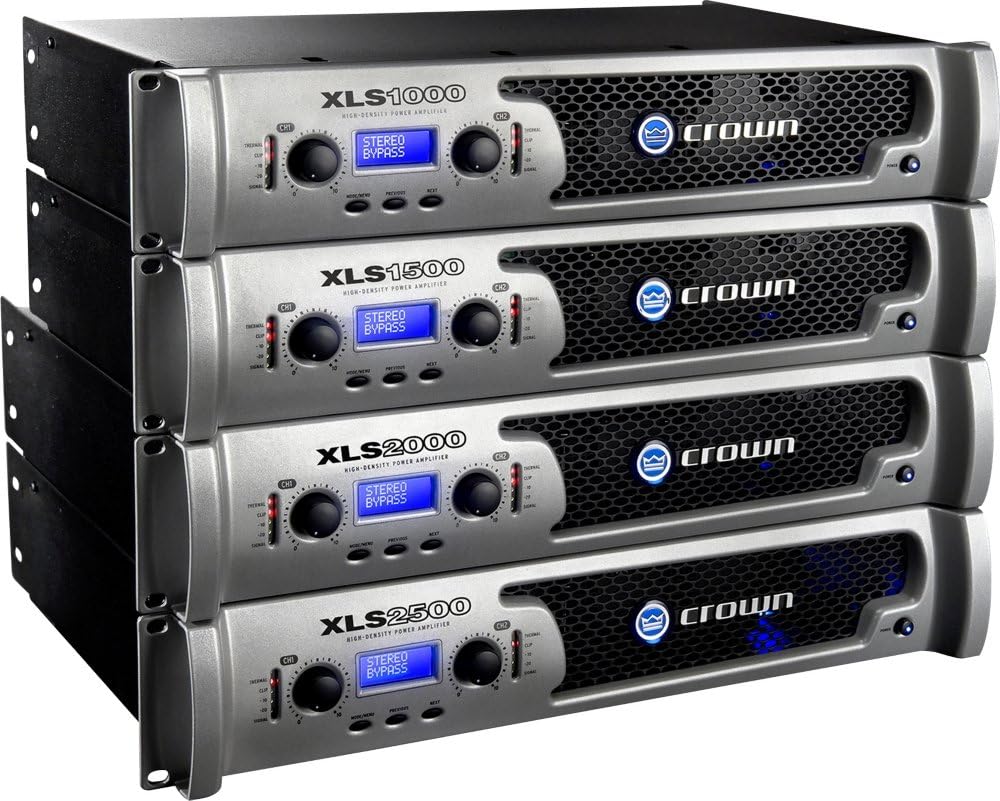
Figure 1: Rear panel of the Crown XLS2000 amplifier. This view illustrates the power input, CH1 and CH2 outputs (Speakon and binding post), and CH1 and CH2 inputs (XLR, 1/4-inch, RCA). The central fan ensures cooling, and switches for Dual/Bridge mode are visible.

Figure 2: Front view of Crown XLS series amplifiers. The XLS2000 model is visible, showcasing its front panel display, level controls, and status indicators.
Operating Instructions
Powering On/Off
- Ensure all connections (input, output, power) are secure.
- Turn down the level controls on the amplifier to their minimum setting.
- Power on your audio source (mixer, etc.) first.
- Press the power button on the front panel of the XLS2000 amplifier. The power indicator should illuminate.
- Slowly increase the level controls on the amplifier to the desired listening level.
- To power off, reverse the sequence: turn down amplifier levels, power off the amplifier, then power off your audio source.
Mode Selection (Dual/Bridge)
The XLS2000 supports both Dual (stereo) and Bridged-Mono operation. A switch on the rear panel allows selection between these modes. In Dual mode, each channel operates independently. In Bridged-Mono mode, both amplifier channels are combined to deliver higher power into a single load. Refer to the rear panel diagram (Figure 1) for the location of the mode switch. Ensure the amplifier is powered off before changing this setting.
PureBand Crossover System
The integrated PureBand Crossover System allows for precise frequency management. This feature enables you to optimize the amplifier's output for specific speaker types, such as subwoofers or full-range speakers. Consult the amplifier's front panel display and controls to access and adjust crossover settings. Detailed instructions for configuring the crossover are available in the full product manual on the manufacturer's website.
PeakX Limiters
The PeakX Limiters are designed to protect your speakers by preventing excessive signal peaks from reaching them. These limiters automatically engage when the output signal approaches clipping, ensuring clean audio and extending speaker lifespan. The PeakX Limiters operate automatically and generally do not require user adjustment.
Maintenance
Cleaning
To clean the amplifier, disconnect it from the power source. Use a soft, dry cloth to wipe down the exterior surfaces. For stubborn dirt, a slightly damp cloth may be used, followed by a dry cloth. Avoid using abrasive cleaners, solvents, or harsh chemicals, as these can damage the finish or internal components.
Ventilation Care
Regularly check the ventilation grilles on the front and rear panels for dust accumulation. Use a soft brush or a vacuum cleaner with a brush attachment to gently remove any dust, ensuring unobstructed airflow. Proper ventilation is crucial for the amplifier's long-term performance and reliability.
Storage
If storing the amplifier for an extended period, ensure it is disconnected from power, cleaned, and placed in a dry, temperature-controlled environment. It is recommended to store it in its original packaging or a protective case to prevent physical damage.
Troubleshooting
This section addresses common issues you might encounter with your XLS2000 amplifier. For more complex problems, contact Crown customer support or a qualified service technician.
- No Power / No Lights:
- Check if the power cord is securely connected to both the amplifier and a working AC outlet.
- Verify that the AC outlet is supplying power (test with another device).
- Ensure the power switch on the amplifier is in the "On" position.
- Check for tripped circuit breakers in your electrical panel.
- No Sound Output:
- Confirm that the audio source (mixer, etc.) is powered on and sending a signal.
- Check all input and output cable connections for security and correct routing.
- Ensure speaker cables are correctly connected to the amplifier and speakers, observing polarity.
- Verify that the amplifier's level controls are not set to minimum.
- Check the mode switch (Dual/Bridge) to ensure it matches your speaker configuration.
- Distorted Sound:
- Reduce the input level from your audio source.
- Lower the amplifier's level controls.
- Ensure speaker impedance matches the amplifier's capabilities (e.g., do not connect speakers with impedance lower than recommended for bridged mode).
- Check for damaged cables or faulty speakers.
- Amplifier Overheating:
- Ensure adequate ventilation around the amplifier. Clear any obstructions from the fan and vents.
- Reduce the output level or the duration of high-volume operation.
- Verify that the speaker impedance is within the amplifier's specified range.
Specifications
| Feature | Specification |
|---|---|
| Model Number | XLS2000 |
| Brand | Crown |
| Output Power (8 ohms per channel) | 375 Watts |
| Output Power (4 ohms per channel) | 650 Watts |
| Output Power (4 ohms bridged) | 2100 Watts |
| Number of Channels | 2 |
| Voltage | 120 Volts |
| Dimensions (L x W x H) | 10.7 x 19 x 3.5 inches |
| Item Weight | 10.75 pounds |
| Mounting Type | Surface Mount |
| GTIN / UPC | 871015003825 |
Warranty and Support
Specific warranty terms and conditions for the Crown XLS2000 amplifier are typically provided with the product at the time of purchase or can be found on the official Crown Audio website. For technical support, service, or detailed warranty information, please visit the manufacturer's official website or contact their customer service department directly.
Note: Always refer to the latest documentation available from the manufacturer for the most accurate and up-to-date information.


