
1. Introduction
This manual provides detailed instructions for the proper use and care of your Sigma 70-200mm f/2.8 APO EX DG HSM OS FLD Telephoto Zoom Lens. Designed for Nikon Digital DSLR Cameras, this high-performance lens offers exceptional image quality and versatility for various photographic applications, including sports, wildlife, portraits, and photojournalism.
Please read this manual thoroughly before using the lens to ensure optimal performance and longevity.

Figure 1: Sigma 70-200mm f/2.8 Telephoto Zoom Lens for Nikon DSLR Cameras.
2. Key Features
- 70-200mm Focal Length: Versatile telephoto zoom range.
- Constant f/2.8 Maximum Aperture: Excellent low-light performance and shallow depth of field.
- Optical Stabilizer (OS): Provides up to 4 stops of image stabilization, with dual modes for normal and panning shots.
- Hypersonic Motor (HSM): Ensures fast, quiet, and accurate autofocusing with full-time manual focus override.
- FLD Glass Elements: Offers optical performance comparable to fluorite glass, reducing chromatic aberrations.
- Special Low Dispersion (SLD) Glass: Enhances image sharpness and contrast.
- Super Multi-Layer Coating: Minimizes flare and ghosting for clear, high-quality images.
- Internal Focusing and Zooming: Maintains constant lens length during operation.
- Minimum Focusing Distance: 140cm (55.1 inches) with a maximum magnification of 1:8.
3. Setup
3.1 Attaching the Lens
- Ensure both the camera and lens are powered off.
- Remove the rear lens cap and the camera body cap.
- Align the mounting index mark on the lens with the corresponding mark on the camera body.
- Rotate the lens clockwise (for Nikon F-mount) until it clicks into place. Do not force the lens.
3.2 Detaching the Lens
- Ensure the camera is powered off.
- While pressing the lens release button on the camera body, rotate the lens counter-clockwise until it stops.
- Remove the lens from the camera.
- Attach the rear lens cap to the lens and the body cap to the camera to protect them from dust and damage.
3.3 Attaching the Lens Hood
The lens hood helps to block extraneous light and reduce flare. Align the lens hood with the front of the lens and twist until it locks into place. For storage, the hood can be reversed and attached to the lens.

Figure 2: Sigma 70-200mm f/2.8 lens with its hood attached.
3.4 Using the Tripod Collar
The lens includes a removable tripod collar for better balance when mounted on a tripod, especially given the lens's weight. Loosen the knob on the collar to rotate the lens for vertical or horizontal shooting, or to remove the collar entirely.
4. Operation
4.1 Autofocus (AF) and Manual Focus (MF)
The lens features a switch to select between Autofocus (AF) and Manual Focus (MF) modes. In AF mode, the Hypersonic Motor (HSM) provides fast and quiet focusing. Full-time manual focus override is available, allowing you to fine-tune focus manually even when in AF mode by simply turning the focus ring.
4.2 Optical Stabilizer (OS)
The Optical Stabilizer (OS) function helps to reduce camera shake, especially useful in low light or when shooting at longer focal lengths. The OS switch allows you to turn the stabilization ON or OFF. This lens offers two OS modes:
- Mode 1 (Normal): For general shooting, compensating for vertical and horizontal camera shake.
- Mode 2 (Panning): For tracking moving subjects horizontally, compensating only for vertical camera shake.
Note:
- Turn the OS OFF when using a tripod to prevent potential image blur.
- The OS may produce a slight sound during operation; this is normal.
4.3 Zooming
Rotate the zoom ring to adjust the focal length between 70mm and 200mm. The internal zooming mechanism ensures the lens length remains constant.
4.4 Using with APS-C Cameras
When used with APS-C (crop sensor) cameras, the effective focal length will be approximately 105-300mm (depending on the camera's crop factor). This provides an even greater telephoto reach.
4.5 Using with Teleconverters
This lens is compatible with Sigma APO teleconverters (sold separately) to further extend its focal length. Refer to the teleconverter's manual for specific attachment and usage instructions.
5. Maintenance
5.1 Cleaning the Lens
- Use a blower brush to remove dust from the lens surface.
- For smudges or fingerprints, use a clean, soft microfiber cloth specifically designed for optics, along with a small amount of lens cleaning solution.
- Never use harsh chemicals or abrasive materials on the lens elements or body.
5.2 Storage
- Always attach the front and rear lens caps when not in use.
- Store the lens in a cool, dry place, away from direct sunlight and extreme temperatures.
- If storing for an extended period, consider using a desiccant to prevent mold and mildew.

Figure 3: Sigma 70-200mm f/2.8 lens stored in its soft case.
6. Troubleshooting
| Problem | Possible Cause | Solution |
|---|---|---|
| Lens not focusing | AF/MF switch set to MF; dirty lens contacts; insufficient light. | Set switch to AF; clean lens and camera contacts; use adequate lighting. |
| Images are blurry | OS is off; camera shake; incorrect focus; slow shutter speed. | Turn OS ON; use faster shutter speed; ensure proper focus; use a tripod. |
| OS not working | OS switch is OFF; lens not fully mounted. | Turn OS ON; re-mount lens securely. |
| Lens not recognized by camera | Dirty lens contacts; improper mounting. | Clean lens and camera contacts; re-mount lens securely. |
7. Specifications
| Feature | Detail |
|---|---|
| Product Dimensions | 7.76 x 3.39 x 3.39 inches |
| Item Weight | 3.2 pounds (1.43 kg) |
| Item Model Number | 589306 |
| Brand | Sigma |
| Focal Length | 70-200mm |
| Maximum Aperture | f/2.8 |
| Minimum Aperture | f/22 |
| Lens Type | Telephoto Zoom |
| Compatible Mountings | Nikon F (FX) |
| Minimum Focusing Distance | 140cm / 55.1 inches |
| Maximum Magnification | 1:8 |
| Filter Size | 77mm |
| Image Stabilization | Optical Stabilizer (OS) |
| Autofocus Motor | Hypersonic Motor (HSM) |
| Date First Available | February 1, 2010 |
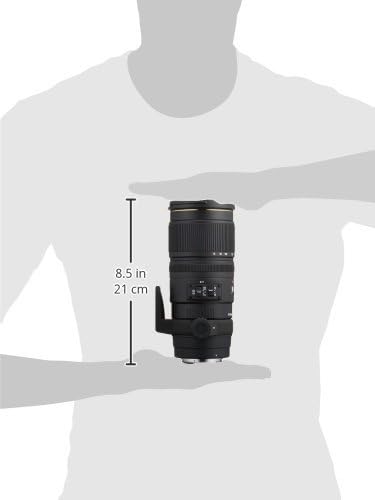
Figure 4: Approximate dimensions of the Sigma 70-200mm f/2.8 lens.
8. Warranty & Support
8.1 Warranty Information
This Sigma lens is covered by a 4-year Sigma USA warranty. Please retain your proof of purchase for warranty claims. For detailed terms and conditions, refer to the warranty card included with your product or visit the official Sigma website.
8.2 Customer Support
For technical assistance, service, or any inquiries regarding your Sigma lens, please contact Sigma Corporation of America customer support. Contact information can be found on the official Sigma website or in the product packaging.
9. Official Product Videos
9.1 Sigma 70-200mm f/2.8 APO EX DG HSM OS FLD Large Aperture Telephoto Zoom Lens Overview
This video provides an overview of the Sigma 70-200mm f/2.8 APO EX DG HSM OS FLD Large Aperture Telephoto Zoom Lens, highlighting its key features and benefits for various photography styles. Duration: 2 minutes 39 seconds.
9.2 Sigma 70-200mm Lens Features and Usage
This video delves into the features and practical usage of the Sigma 70-200mm lens, demonstrating its capabilities for professional and enthusiast photographers. Duration: 3 minutes 5 seconds.