
1. Introduction
This manual provides detailed instructions for the installation, operation, and maintenance of your Planet Audio AC1200.2 2-Channel Car Amplifier. The AC1200.2 is a Class A/B amplifier designed to deliver high output audio performance for your vehicle's sound system. Please read this manual thoroughly before attempting installation or operation to ensure proper use and to prevent damage.

Image 1.1: Front view of the Planet Audio AC1200.2 2-Channel Car Amplifier.
2. Safety Information
Improper installation or use of this amplifier can result in serious injury or damage to the unit or vehicle. Always adhere to the following safety guidelines:
- Professional Installation Recommended: For optimal performance and safety, professional installation by an authorized Planet Audio dealer is strongly recommended.
- Power Connections: Ensure all power connections are secure and properly fused. Incorrect wiring can cause fire or electrical shock.
- Speaker Impedance: Verify that the speaker impedance matches the amplifier's specifications (2 Ohm stable). Connecting speakers with lower impedance can damage the amplifier.
- Ventilation: Mount the amplifier in a location that allows for adequate air circulation to prevent overheating. Do not block cooling fins.
- Avoid Moisture: Do not expose the amplifier to moisture or water.
- Disconnect Battery: Always disconnect the vehicle's battery negative terminal before starting any electrical work.
3. Product Features
The Planet Audio AC1200.2 amplifier incorporates several features designed for enhanced audio performance and reliability:
- Power Output: Delivers 600 Watts Max x 2 @ 2 Ohms, 300 Watts Max x 2 @ 4 Ohms, and 1200 Watts Max Bridged x 1 @ 4 Ohms.
- Class A/B Topology: Utilizes Class A/B amplifier design, balancing efficiency and sound quality.
- Full Range Operation: Capable of powering both full-range speakers and subwoofers.
- Variable Gain Control: Allows adjustment of the input signal level to match the output of your head unit.
- Low & High Level Inputs: Supports both RCA (low-level) and speaker wire (high-level) input signals.
- Variable High-Pass Crossover: Filters out low frequencies to protect speakers and improve sound clarity.
- Bridgeable: Enables combining two amplifier channels for increased power output to a single speaker or subwoofer.
- MOSFET Power Supply: Features a robust MOSFET power supply for efficient and stable power delivery.
- 2 Ohm Stable: Designed to operate safely with speaker loads down to 2 Ohms per channel.
- Short Protection: Built-in circuitry protects the amplifier from short circuits.
- Switchable Input Sensitivity: Provides flexibility for matching various head unit output levels.
- Remote Subwoofer Level Control: Allows convenient adjustment of subwoofer output from the driver's seat.

MOSFET Power Supply

Variable LP Filter

Variable Bass Boost

2 Ohm Stable

Short Protection

Switchable Input Sensitivity

Remote Sub Control

Bridgeable
4. Installation
4.1 Pre-Installation Checklist
- Ensure the vehicle's battery is disconnected.
- Gather all necessary tools and wiring materials (power wire, ground wire, remote turn-on wire, speaker wire, RCA cables, fuse holder, fuse).
- Plan the amplifier mounting location, ensuring adequate ventilation and protection from moisture.
4.2 Mounting the Amplifier
Choose a secure, dry location with sufficient airflow. Avoid mounting on carpet or in enclosed spaces without ventilation. Use the provided mounting hardware to secure the amplifier firmly to a solid surface in the vehicle.
4.3 Wiring Connections
Refer to the wiring diagram below for proper connection of power, ground, remote turn-on, and speaker wires.

Image 4.1: Overview of amplifier connections.
4.3.1 Power Connection (+12V)
- Connect a heavy gauge power cable (e.g., 4-gauge) directly from the positive terminal of the vehicle's battery to the +12V terminal on the amplifier.
- Install an in-line fuse holder with an appropriate fuse (e.g., 75 Amps) within 18 inches (45 cm) of the battery.
4.3.2 Ground Connection (GND)
- Connect a heavy gauge ground cable (e.g., 4-gauge) from the GND terminal on the amplifier to a clean, unpainted metal surface of the vehicle's chassis.
- Ensure the ground point is free of paint, rust, or dirt for a good electrical connection.
4.3.3 Remote Turn-On Connection (REM)
- Connect a smaller gauge wire (e.g., 18-gauge) from the remote turn-on output of your head unit to the REM terminal on the amplifier.
- This wire signals the amplifier to turn on and off with the head unit.
4.3.4 Speaker Connections
- Connect your speakers to the SPEAKER CONNECTIONS terminals.
- For stereo operation, connect one speaker to the L+ and L- terminals and another to the R+ and R- terminals.
- For bridged mode (mono operation for a subwoofer), connect the subwoofer to the L+ and R- terminals. Ensure the subwoofer impedance is 4 Ohms for bridged mode.
4.3.5 Input Connections (RCA or High-Level)
- RCA Inputs (Low-Level): Connect RCA cables from the head unit's RCA outputs to the INPUTS R and L jacks on the amplifier.
- High-Level Inputs: If your head unit does not have RCA outputs, use the HIGH LEVEL INPUTS. Connect the speaker wires from the head unit to the corresponding terminals.
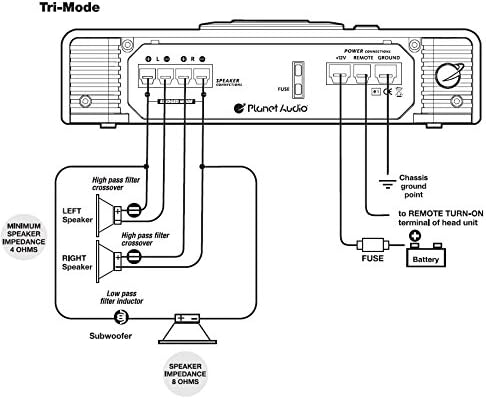
Image 4.2: Tri-Mode wiring diagram for speaker and subwoofer connections.
5. Operating Controls
The AC1200.2 amplifier features several controls for fine-tuning your audio system. These controls are located on the amplifier's input panel.

Image 5.1: Amplifier control panel showing input and crossover adjustments.
5.1 Input Controls
- SENSITIVITY (Gain Control): This knob adjusts the input sensitivity of the amplifier to match the output voltage of your head unit. Start with the gain at minimum and slowly increase it until the desired volume is achieved without distortion. This is not a volume control.
- BASS BOOST: Adjusts the bass level at a specific frequency. Use sparingly to avoid distortion.
5.2 Crossover Controls
- MODE Switch (FULL/HPF/LPF): Selects the operating mode for the crossover filter.
- FULL: Full range audio signal passes through.
- HPF (High Pass Filter): Allows frequencies above the set point to pass through. Useful for full-range speakers to prevent low-frequency distortion.
- LPF (Low Pass Filter): Allows frequencies below the set point to pass through. Essential for subwoofers.
- HIGH PASS FREQ: Adjusts the cutoff frequency for the High Pass Filter.
- LOW PASS FREQ: Adjusts the cutoff frequency for the Low Pass Filter.
5.3 Remote Subwoofer Level Control
The included remote subwoofer level control allows you to adjust the subwoofer output from your listening position. Connect it to the 'REMOTE SUBWOOFER LEVEL CONTROL' port on the amplifier using the provided cable.

Image 5.2: Remote Subwoofer Level Control unit.
6. Specifications
The following table outlines the technical specifications for the Planet Audio AC1200.2 amplifier:
| Specification | Value |
|---|---|
| Item Dimensions (L x W x H) | 12 x 10 x 2.4 inches |
| Voltage | 16 Volts |
| Mounting Type | Surface Mount |
| Number of Channels | 2 |
| Output Power | 1200 Watts (Maximum) |
| Supply Current | 75 Amps |
| Material | Aluminum alloy |
| Item Weight | 7.5 pounds |
| Color | Black |
7. Troubleshooting
If you experience issues with your amplifier, consult the following troubleshooting guide:
- No Power:
- Check the in-line fuse near the battery. Replace if blown.
- Verify all power, ground, and remote turn-on connections are secure and properly wired.
- Ensure the remote turn-on wire is receiving +12V from the head unit when it is on.
- No Sound:
- Confirm the amplifier is powered on (power indicator light is illuminated).
- Check all RCA or high-level input connections from the head unit to the amplifier.
- Verify speaker wire connections at both the amplifier and the speakers.
- Adjust the gain control. Ensure it is not set to minimum.
- Check head unit settings (volume, fader, balance).
- Distorted Sound:
- Reduce the gain control setting. Excessive gain can cause distortion.
- Check speaker impedance. Ensure it is within the amplifier's acceptable range.
- Verify speaker wires are not shorted or touching the vehicle chassis.
- Adjust Bass Boost settings. High bass boost can cause distortion.
- Amplifier Overheating / Protection Mode:
- Ensure the amplifier has adequate ventilation. Clear any obstructions around the cooling fins.
- Check speaker impedance. Running speakers below the minimum recommended impedance (e.g., below 2 Ohms stereo or 4 Ohms bridged) can cause overheating.
- Verify power and ground wire gauge is sufficient for the amplifier's power output.
- Reduce the gain setting.
8. Maintenance
To ensure the longevity and optimal performance of your Planet Audio AC1200.2 amplifier, follow these simple maintenance guidelines:
- Cleaning: Periodically wipe the amplifier's exterior with a soft, dry cloth. Avoid using harsh chemicals or abrasive cleaners.
- Ventilation: Regularly check that the amplifier's cooling fins are free from dust, dirt, or obstructions. Ensure proper airflow around the unit.
- Connection Checks: Occasionally inspect all wiring connections (power, ground, remote, speaker, RCA) to ensure they remain tight and free from corrosion.
- Environmental Protection: Keep the amplifier away from direct sunlight, extreme temperatures, and moisture.
9. Warranty and Support
Planet Audio provides a 6-year Platinum Online Dealer Warranty for this product when purchased through Amazon.com. This warranty covers defects in materials and workmanship under normal use.
For technical support, warranty claims, or further assistance, please contact Planet Audio customer service or visit their official website. It is recommended to have your purchase details and product model number (AC1200.2) available when seeking support.


