
1. Introduction
This manual provides comprehensive instructions for the installation, operation, and maintenance of the Adaptec AHA-1540B ISA SCSI Controller. Designed for use in personal computers, this controller enables the connection and management of SCSI (Small Computer System Interface) devices, such as hard drives, CD-ROM drives, and scanners, enhancing system capabilities and data transfer efficiency.
2. Product Overview
The Adaptec AHA-1540B is a high-performance ISA (Industry Standard Architecture) bus mastering SCSI host adapter. It provides a reliable interface between your computer's ISA bus and various SCSI peripheral devices. The card features a standard 50-pin external SCSI connector and internal connectors for connecting multiple SCSI devices.
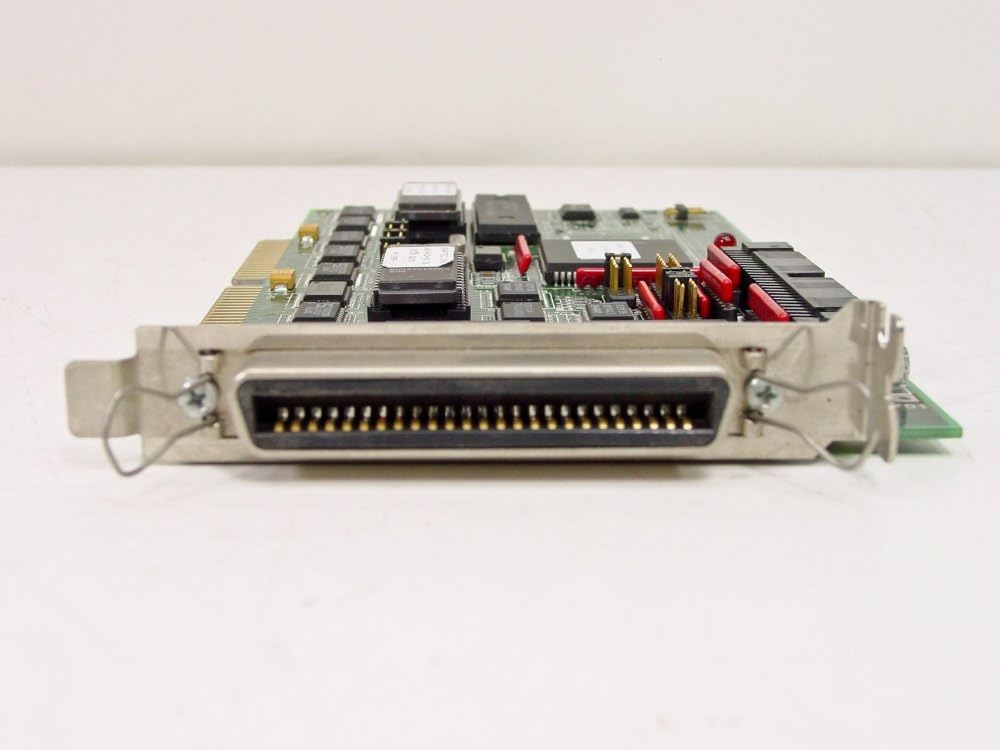
Figure 2.1: Side view of the Adaptec AHA-1540B controller, highlighting the external 50-pin SCSI connector and the ISA bus interface.

Figure 2.2: Top-down view of the Adaptec AHA-1540B circuit board, displaying the various integrated circuits, jumpers, and internal connectors for SCSI devices.
3. Setup and Installation
3.1 System Requirements
- Available ISA expansion slot in your computer.
- Compatible operating system (e.g., MS-DOS, Windows 3.x/95, OS/2, Novell NetWare).
- SCSI peripheral devices (hard drives, CD-ROMs, scanners, etc.) with appropriate cabling.
- SCSI termination (internal or external, depending on device configuration).
3.2 Installation Steps
- Power Off and Disconnect: Ensure your computer is completely powered off and unplugged from the electrical outlet.
- Open Computer Case: Carefully open your computer's case to access the motherboard and expansion slots.
- Locate ISA Slot: Identify an available 16-bit ISA expansion slot.
- Install Controller Card: Gently but firmly insert the Adaptec AHA-1540B card into the ISA slot until it is fully seated. Secure the card with the retaining screw or clip from your computer case.
- Connect SCSI Devices: Connect your SCSI devices to the controller using appropriate SCSI cables. Ensure proper termination for the SCSI chain. The last device on the chain (or the controller itself if it's the only device) must be terminated.
- Close Case and Power On: Close your computer case, reconnect all cables, and power on your computer.
- Driver Installation: Upon booting, you may need to install the appropriate device drivers for the Adaptec AHA-1540B. Refer to your operating system's documentation or Adaptec's legacy driver archives for specific instructions.
4. Operating Instructions
Once physically installed and drivers are loaded, the Adaptec AHA-1540B operates as the primary interface for your SCSI devices. Its bus-mastering capabilities offload data transfer tasks from the CPU, improving overall system performance.
- BIOS Configuration: The AHA-1540B has its own onboard BIOS. During system boot-up, you may see a prompt (e.g., "Press Ctrl+A for SCSISelect Utility") to enter the SCSISelect utility. This utility allows you to configure SCSI IDs, termination, boot device order, and other advanced settings.
- Device Detection: After installation and driver loading, your operating system should detect and recognize the connected SCSI devices. Verify device recognition through your operating system's device manager or equivalent utility.
- SCSI IDs: Each SCSI device on the bus must have a unique SCSI ID (0-7). The AHA-1540B typically uses ID 7 by default. Ensure no two devices share the same ID.
- Termination: Proper termination is crucial for stable SCSI operation. The devices at both ends of the SCSI chain (physical ends, not necessarily ID ends) must be terminated. The AHA-1540B may have onboard termination jumpers; consult the card's specific documentation for details.
5. Maintenance
The Adaptec AHA-1540B is a robust electronic component designed for long-term reliability. Minimal maintenance is required.
- Dust Removal: Periodically open your computer case and gently remove any accumulated dust from the card and surrounding components using compressed air or a soft brush. Ensure the computer is powered off and unplugged before performing this.
- Environmental Conditions: Operate the computer in a clean, dry environment with adequate ventilation to prevent overheating and component degradation.
- Firmware/Driver Updates: While less common for legacy hardware, check Adaptec's support archives for any available firmware updates or updated drivers that might improve compatibility or performance.
6. Troubleshooting
If you encounter issues with your Adaptec AHA-1540B, consider the following troubleshooting steps:
- Card Not Detected:
- Ensure the card is fully seated in the ISA slot.
- Try a different ISA slot if available.
- Check for IRQ/DMA conflicts with other installed hardware.
- SCSI Devices Not Recognized:
- Verify all SCSI cables are securely connected.
- Check SCSI termination. Ensure only the devices at the physical ends of the chain are terminated.
- Confirm each SCSI device has a unique SCSI ID.
- Check power connections to all SCSI devices.
- Enter the SCSISelect utility during boot to verify the controller sees the devices.
- System Instability/Crashes:
- Ensure correct drivers are installed for your operating system.
- Check for resource conflicts (IRQ, DMA, I/O addresses) with other expansion cards.
- Verify proper SCSI termination and ID settings.
7. Specifications
| Feature | Detail |
|---|---|
| Manufacturer | ADAPTEC |
| Model Number | AHA-1540B |
| Hardware Interface | SCSI (Small Computer System Interface) |
| Bus Type | ISA (Industry Standard Architecture) |
| UPC | 754031328892 |
| Date First Available | September 29, 2010 |
8. Warranty and Support
For information regarding warranty coverage, technical support, or to access legacy drivers and documentation for the Adaptec AHA-1540B, please refer to the official Adaptec (now Microchip Technology) support website or contact their customer service. Support resources for older products may be found in their archives.
Note: As a legacy product, direct manufacturer support may be limited. Community forums and historical computing resources can also be valuable for troubleshooting and information.
