
1. Introduction
Thank you for choosing the GE JES2051SNSS Countertop Microwave Oven. This manual provides essential information for the safe and efficient operation, maintenance, and troubleshooting of your new appliance. Please read it thoroughly before use and keep it for future reference.
This 1200-watt, 2.0 cubic foot microwave oven is designed for effective and efficient cooking. It features instant-on settings for various foods, weight and time defrost options, and convenient one-touch controls for ease of use.
2. Important Safety Information
To reduce the risk of fire, electric shock, injury to persons, or exposure to excessive microwave energy when using your appliance, follow basic safety precautions, including:
- Read all instructions before using the appliance.
- Do not operate the oven if it is damaged or malfunctioning.
- Do not attempt to service or repair the appliance yourself. Contact qualified service personnel.
- Do not heat liquids or other foods in sealed containers as they are liable to explode.
- Do not use corrosive chemicals or vapors in this appliance.
- Always ensure the turntable and turntable support are correctly in place before operation.
- Never operate the oven empty.
3. Setup
Unpacking and Placement
Carefully remove all packaging materials from the microwave oven. Ensure all internal components, such as the glass turntable and turntable support, are present and undamaged. This countertop microwave oven has product dimensions of 19.4"D x 24.09"W x 13.75"H and weighs 48 pounds. Place the microwave on a flat, stable surface that can support its weight. Ensure adequate ventilation around the unit.
Turntable Assembly
Place the turntable support ring in the center of the microwave cavity. Position the glass turntable securely on top of the support ring, ensuring it sits properly on the drive hub.
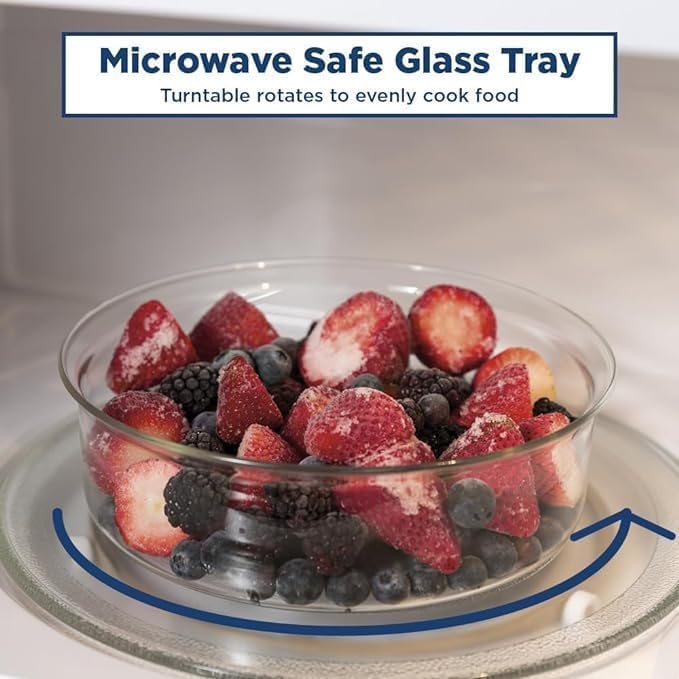
Image: Close-up of the microwave's glass turntable with frozen berries and blueberries on it, showing the rotation mechanism. The turntable rotates to evenly cook food.
Power Connection
Plug the microwave oven into a grounded 120 Volt, 60 Hz electrical outlet. Do not use an extension cord.
4. Operating Instructions
Control Panel Overview

Image: Detailed view of the GE microwave oven's control panel, showing various cooking options and numerical keypad. The panel includes Sensor Cooking options like Popcorn, Beverage, Reheat, Potato, Vegetable, Chicken/Fish, along with Time Cook, Defrost, Power Level, and Express Cook buttons.
- Sensor Cooking Controls: Automatically adjusts time and power for optimal results for items like Popcorn, Beverage, Reheat, Potato, Vegetable, and Chicken/Fish.
- Time Cook: Allows manual entry of cooking time.
- Defrost Auto/Time: Offers both weight-based and time-based defrosting.
- Power Level: Adjusts microwave power (10 levels available).
- Express Cook: One-touch buttons (1-6) for quick cooking times (e.g., press '1' for 1 minute).
- Add 30 Sec: Adds 30 seconds to the cooking time with each press.
- Clock: Sets the time of day.
- Kitchen Timer: Functions as a standalone timer.
- Start/Pause: Begins or temporarily stops cooking.
- Clear/Off: Cancels current settings or stops cooking.
Basic Microwave Operation
- Place food in a microwave-safe container on the glass turntable.
- Close the oven door securely.
- For quick cooking, press an Express Cook button (1-6) for 1 to 6 minutes of cooking at 100% power. Or, press Add 30 Sec to start cooking for 30 seconds.
- For custom cooking time, press Time Cook, enter the desired time using the number pad, then press Start.
- To adjust power level, press Power Level, enter a number from 1 to 10 (10 being 100%), then press Start.
Defrosting

Image: Microwave control panel highlighting the Weight and Time Defrost feature. This function allows users to enter the food's weight, and the oven automatically sets the optimal defrosting time and power level.
The microwave offers both weight and time defrost options:
- Weight Defrost: Press Defrost Auto/Time once, enter the weight of the food (in pounds), then press Start. The oven automatically calculates the defrosting time.
- Time Defrost: Press Defrost Auto/Time twice, enter the desired defrosting time, then press Start.
Sensor Cooking
For optimal results with popular foods, use the Sensor Cooking controls. Simply place the food in the microwave, close the door, and press the corresponding button (e.g., Popcorn, Beverage, Reheat). The microwave will detect the moisture and humidity levels to automatically adjust cooking time and power.
Image: Microwave interior with a casserole dish of vegetables, illustrating sensor cooking. The image shows food being heated evenly on the glass turntable.
Child Lock Feature
The GE JES2051SNSS microwave includes a two-step child lock safety feature. To activate the child lock, press and hold the '7' button for 5 seconds until a beep sounds, then press '9' and '0' consecutively. The display will show 'UnLo' (Unlocked) or a lock icon when active. To deactivate, repeat the same sequence or press 'Clear/Off' to unlock the door.
5. Maintenance and Cleaning
Regular cleaning and maintenance will ensure the longevity and optimal performance of your microwave oven.
- Interior: Clean the interior cavity with a damp cloth and mild soap. For stubborn stains, a microwave-safe cleaner can be used.
- Exterior: Wipe the exterior surfaces with a soft, damp cloth. Avoid abrasive cleaners.
- Glass Turntable: The glass turntable can be removed and washed by hand or in a dishwasher. Ensure it is completely dry before placing it back in the oven.
- Door Seals: Keep the door seals clean to ensure proper closure and efficient operation.
6. Troubleshooting
If your microwave oven is not operating correctly, refer to the following common issues before contacting service.
| Problem | Possible Cause | Solution |
|---|---|---|
| Oven does not start | Door not closed properly; Power cord unplugged; Fuse blown or circuit breaker tripped. | Ensure door is latched; Check power cord connection; Check household fuse/circuit breaker. |
| Food not heating | Incorrect cooking time/power level; Microwave-safe dish not used. | Adjust settings; Use microwave-safe cookware. |
| Turntable not rotating | Turntable not correctly placed; Obstruction. | Reposition turntable; Remove any obstructions. |
For issues not listed here, or if problems persist, please contact customer support.
7. Specifications
| Feature | Specification |
|---|---|
| Brand | GE |
| Model Number | JES2051SNSS |
| Capacity | 2.0 Cubic Feet |
| Wattage | 1200 watts |
| Voltage | 120 Volts |
| Product Dimensions (D x W x H) | 19.4" x 24.09" x 13.75" |
| Item Weight | 48 Pounds |
| Color | Stainless Steel |
| Installation Type | Countertop |
| Special Features | Defrost, Shortcut Keys, Timer, Turntable |
| Included Components | Turntable |
8. Warranty and Support
For warranty information or customer support, please refer to the warranty card included with your product or visit the official GE Appliances website. Keep your proof of purchase for any warranty claims.