
1. Introduction
This manual provides essential information for the safe and correct installation, operation, and maintenance of the GE WB44X200 Lower Bake Element. This genuine OEM part is designed for GE electric ovens, providing the necessary heat for baking functions. Please read this manual thoroughly before proceeding with any installation or service.
2. Safety Information
Your safety and the safety of others are very important. Always observe the following safety precautions when installing or servicing this appliance part.
- Disconnect Power: Always disconnect the appliance from all utilities (power supply) before attempting any installation, repair, or maintenance. Failure to do so can result in electric shock, serious injury, or death.
- Qualified Personnel: Installation and service should only be performed by a qualified technician.
- Wear Protective Gear: Use appropriate personal protective equipment, such as gloves and eye protection, during installation.
- Inspect for Damage: Before installation, carefully inspect the new element for any signs of damage. Do not install a damaged part.
- Proper Tools: Use only the correct tools for the job to prevent damage to the part or the appliance.
3. Product Overview
The GE WB44X200 is a genuine OEM lower bake element, rated at 3100 Watts and 240 Volts. It is the primary heat source for the baking function in compatible GE electric ovens. The element features screw-style connections for secure attachment.

Image 3.1: The GE WB44X200 Lower Bake Element. This image displays the full element, showing its characteristic 'U' shape and terminal connections at the base.

Image 3.2: Close-up view of the terminal connections on the GE WB44X200 Lower Bake Element. This shows the screw-style connections for electrical wiring.

Image 3.3: Diagram illustrating the dimensions of the GE WB44X200 Lower Bake Element. The element measures approximately 19.25 inches in length and 13.18 inches in width.
4. Specifications
| Specification | Value |
|---|---|
| Model Number | WB44X200 |
| Brand | GE |
| Voltage | 240 Volts |
| Wattage | 3100 Watts |
| Approximate Length | 19.25 inches (48.9 cm) |
| Approximate Width | 13.18 inches (33.5 cm) |
| Approximate Height | 1.5 inches (3.8 cm) |
| Connection Type | Screw Style |
| Certification | UL Certified |
5. Installation Instructions
Follow these steps carefully to replace the lower bake element in your GE electric oven.
5.1. Preparation
- Disconnect Power: Locate the circuit breaker for your oven and turn off the power. Verify that the power is off by attempting to turn on the oven.
- Access Oven Interior: Open the oven door and remove any oven racks to provide clear access to the lower bake element.
5.2. Removal of Old Element
- Locate Mounting Screws: Identify the screws that secure the existing bake element to the back wall of the oven.
- Remove Screws: Using a screwdriver, carefully remove these mounting screws.
- Gently Pull Element: Carefully pull the element forward a few inches into the oven cavity. This will expose the electrical terminals at the back.
- Disconnect Wires: Note the position of the wires connected to the element terminals. Disconnect the wires from the old element. It may be helpful to take a picture for reference.
- Remove Old Element: Once wires are disconnected, fully remove the old bake element from the oven.
5.3. Installation of New Element
- Connect Wires: Connect the electrical wires to the terminals of the new GE WB44X200 bake element. Ensure connections are secure.
- Insert Element: Carefully push the new element into the oven cavity, guiding the terminals through the opening in the back wall.
- Secure Mounting Screws: Align the mounting plate of the new element with the screw holes in the oven's back wall. Insert and tighten the mounting screws to secure the element in place.
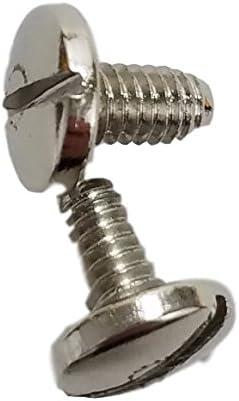
Image 5.1: Example of mounting screws used to secure the bake element. Ensure these are properly tightened during installation.
5.4. Post-Installation Check
- Replace Racks: Reinstall any oven racks that were removed.
- Restore Power: Turn the circuit breaker back on to restore power to the oven.
- Test Functionality: Set the oven to a bake cycle at a moderate temperature (e.g., 350°F or 175°C) and observe the new element. It should begin to glow red, indicating proper operation.
6. Operation
The GE WB44X200 Lower Bake Element functions automatically as part of your oven's heating system. When the oven is set to a bake cycle, the element receives electrical current and heats up, radiating heat upwards to cook food. The oven's thermostat controls the cycling of the element to maintain the set temperature.
7. Maintenance
The bake element itself requires minimal maintenance. However, regular cleaning of the oven cavity can help ensure optimal performance and longevity of all components, including the element.
- Oven Cleaning: Follow your oven's manufacturer instructions for cleaning the oven interior. Avoid direct contact of harsh cleaning chemicals with the element.
- Inspect Periodically: During oven cleaning, visually inspect the element for any signs of physical damage, such as cracks or breaks. If damage is observed, the element should be replaced.
8. Troubleshooting
If your oven is not heating correctly after replacing the bake element, consider the following:
- Element Not Heating:
- Ensure power is fully restored to the oven (check circuit breaker).
- Verify that the electrical connections to the element terminals are secure and correctly attached.
- Confirm the oven is set to a bake function and a temperature above room temperature.
- Uneven Heating:
- While less common for a new element, ensure the element is fully seated and not bent or obstructed.
- Check other oven components, such as the temperature sensor or control board, if the issue persists.
If troubleshooting steps do not resolve the issue, it is recommended to contact a qualified appliance technician for further diagnosis and repair.
9. Warranty and Support
The GE WB44X200 Lower Bake Element comes with GE's standard 1-year warranty, covering defects in material and workmanship under normal use. For warranty claims, technical support, or to locate authorized service providers, please refer to the official GE Appliances website or contact their customer service directly.
For additional information and support, visit the official GE Appliances website: www.geappliances.com