
TOOLCRAFT 821400
TOOLCRAFT Run 821400 Universal Tool Case User Manual
Model: 821400 | Brand: TOOLCRAFT
Introduction
The TOOLCRAFT Run 821400 Universal Tool Case is designed for mobile use, offering robust construction and systematic organization for a wide range of tools. Its durable ABS material and aluminum frame ensure safe transport and protection for your equipment.
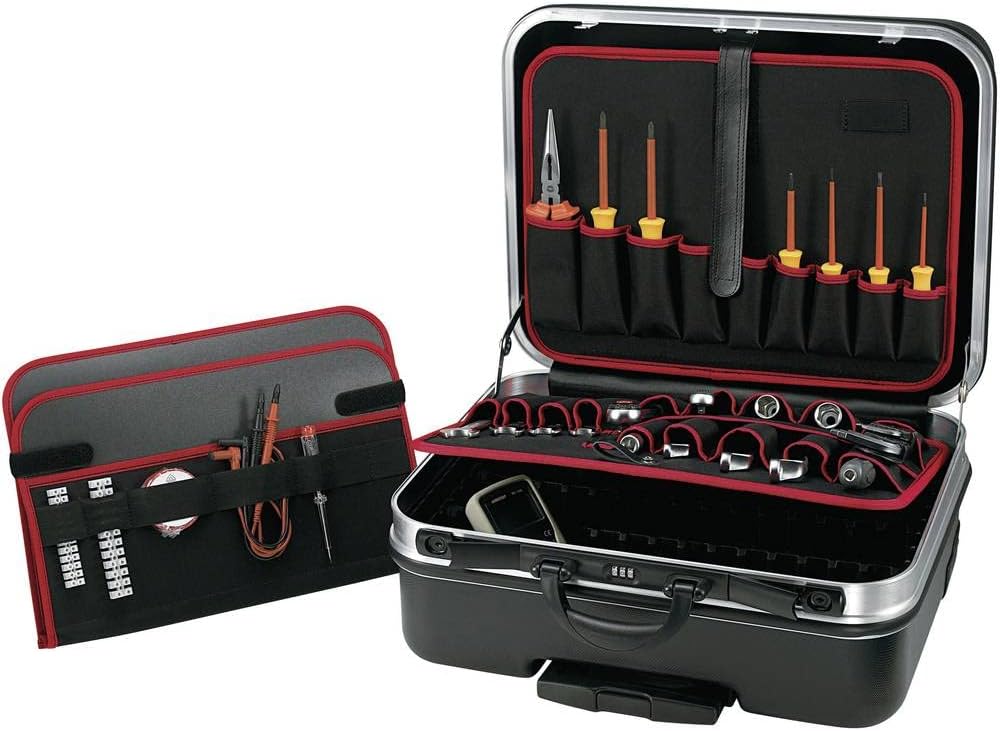
Key Features
- Mobile case with extendable telescopic handle for easy transport.
- Constructed from highly impact-resistant ABS material for durability.
- Robust aluminum frame with edge protection for enhanced safety.
- Features removable tool boards with various compartments on both front and back sides.
- Bottom section offers freely divisible compartments with dimensionally stable partitions for systematic storage.
Setup
Unpacking
Carefully remove the tool case from its packaging. Inspect the case for any signs of damage that may have occurred during transit. Retain packaging materials for future storage or transport if needed.
Initial Configuration
The tool case comes with removable tool panels and adjustable dividers for the bottom compartment. To configure:
- Open the case by releasing the latches.
- The top section contains removable tool panels. These panels can be detached by releasing their fastening mechanisms (e.g., hook-and-loop fasteners or clips) to access the main compartment or to organize tools more conveniently.
- The bottom compartment features slots for inserting the provided dimensionally stable dividers. Arrange these dividers to create custom-sized sections suitable for your tools and equipment.

Operating Instructions
Organizing Tools
Utilize the various compartments and features to organize your tools efficiently:
- Removable Tool Panels: Use the elastic loops and pockets on the removable panels to secure screwdrivers, pliers, wrenches, and other hand tools. These panels can be easily removed for access or reconfigured.
- Bottom Compartment: The adjustable dividers in the bottom shell are ideal for larger tools, power tools, or spare parts. Arrange them to prevent items from shifting during transport.
- Lid Compartments: Some models may feature additional pockets or straps in the lid for documents or smaller items.

Transporting the Case
The TOOLCRAFT Run 821400 is designed for mobile use:
- Telescopic Handle: Extend the telescopic handle by pressing the release button and pulling it upwards. Ensure it is fully extended and locked in place before pulling the case.
- Wheels: The integrated wheels allow for smooth rolling transport over various surfaces.
- Carrying Handle: For short distances or lifting, use the robust top carrying handle.
Maintenance
Cleaning
To maintain the appearance and functionality of your tool case:
- Wipe the exterior surfaces with a soft, damp cloth. For stubborn dirt, a mild soap solution can be used.
- Avoid using abrasive cleaners or solvents, as these can damage the ABS material and aluminum frame.
- Ensure the case is dry before closing and storing.
Storage
Store the tool case in a dry, cool place away from direct sunlight and extreme temperatures to prolong its lifespan.
Troubleshooting
Common Issues
- Case not closing properly: Ensure no tools are obstructing the closing mechanism or the edges of the case. Check that the removable panels are correctly seated.
- Telescopic handle stuck: Ensure the release button is fully depressed. Check for any debris or obstructions in the handle mechanism. Do not force the handle.
- Dividers not fitting securely: Ensure the dividers are inserted correctly into the designated slots in the bottom compartment. They should fit snugly to provide stable partitioning.
If you encounter issues not listed here or require further assistance, please refer to the Warranty and Support section.
Specifications
| Attribute | Value |
|---|---|
| Manufacturer | TOOLCRAFT |
| Item Number | 821400 |
| Product Dimensions (L x W x H) | 51.5 x 43.5 x 26.5 cm |
| Weight | 8 Grams |
| Color | Black |
| Material | Acrylonitrile Butadiene Styrene (ABS) |
| Power Source Type | Hand operated |
| Number of Item Packages | 1 |
| Special Features | Mobile case with extendable telescopic handle |
| Included Components | 1 piece |
| Batteries Included? | No |
| Batteries Required? | No |
| Water Resistance Level | Waterproof |
Warranty and Support
This TOOLCRAFT product is manufactured to high-quality standards. For information regarding warranty coverage, terms, and conditions, please refer to the documentation provided at the time of purchase or contact your retailer.
For technical support, spare parts, or service inquiries, please contact TOOLCRAFT customer service or your authorized dealer. Please have your model number (821400) and purchase details ready when contacting support.
Online Resources: For additional information, product updates, or frequently asked questions, please visit the official TOOLCRAFT website.
Related documents821400


Ask a question about this manual
Ask about setup, troubleshooting, compatibility, parts, safety, or missing instructions. Manuals+ will review the question and use this page’s manual context to help answer it.