
1. Introduction
This manual provides comprehensive instructions for the assembly, operation, and maintenance of your Office Star DC Series Deluxe Breathable Mesh Back Ergonomic Drafting Chair. Designed for comfort and functionality, this chair features a breathable mesh back, adjustable lumbar support, a thick padded seat, and a height-adjustable footring. Please read this manual thoroughly before use to ensure proper setup and to maximize your product's lifespan.

Figure 1: Front view of the Office Star DC Series Deluxe Drafting Chair.
2. Setup & Assembly
The Office Star DC Series Drafting Chair requires assembly. All necessary hardware and assembly instructions are included with your purchase. Please follow the step-by-step instructions provided in the packaging for safe and correct assembly.
2.1 Unpacking
- Carefully remove all components from the packaging.
- Verify that all parts listed in the assembly instructions are present.
- Keep packaging materials until assembly is complete in case of missing parts or returns.
2.2 Assembly Steps
- Attach the casters to the chair base.
- Insert the pneumatic cylinder into the center of the base.
- Slide the footring onto the pneumatic cylinder and secure it at the desired height using the adjustment knob.
- Place the seat plate onto the pneumatic cylinder.
- Attach the backrest to the seat plate using the provided hardware.
- Ensure all connections are secure before use.

Figure 2: Chair dimensions for reference during assembly and setup.
3. Operation
Your drafting chair offers several adjustment features to customize your seating experience for optimal comfort and ergonomic support.
3.1 Seat Height Adjustment
To adjust the seat height, locate the lever on the right side beneath the seat. While seated, pull the lever up to lower the seat. To raise the seat, lift your weight off the seat and pull the lever up. Release the lever at your desired height.
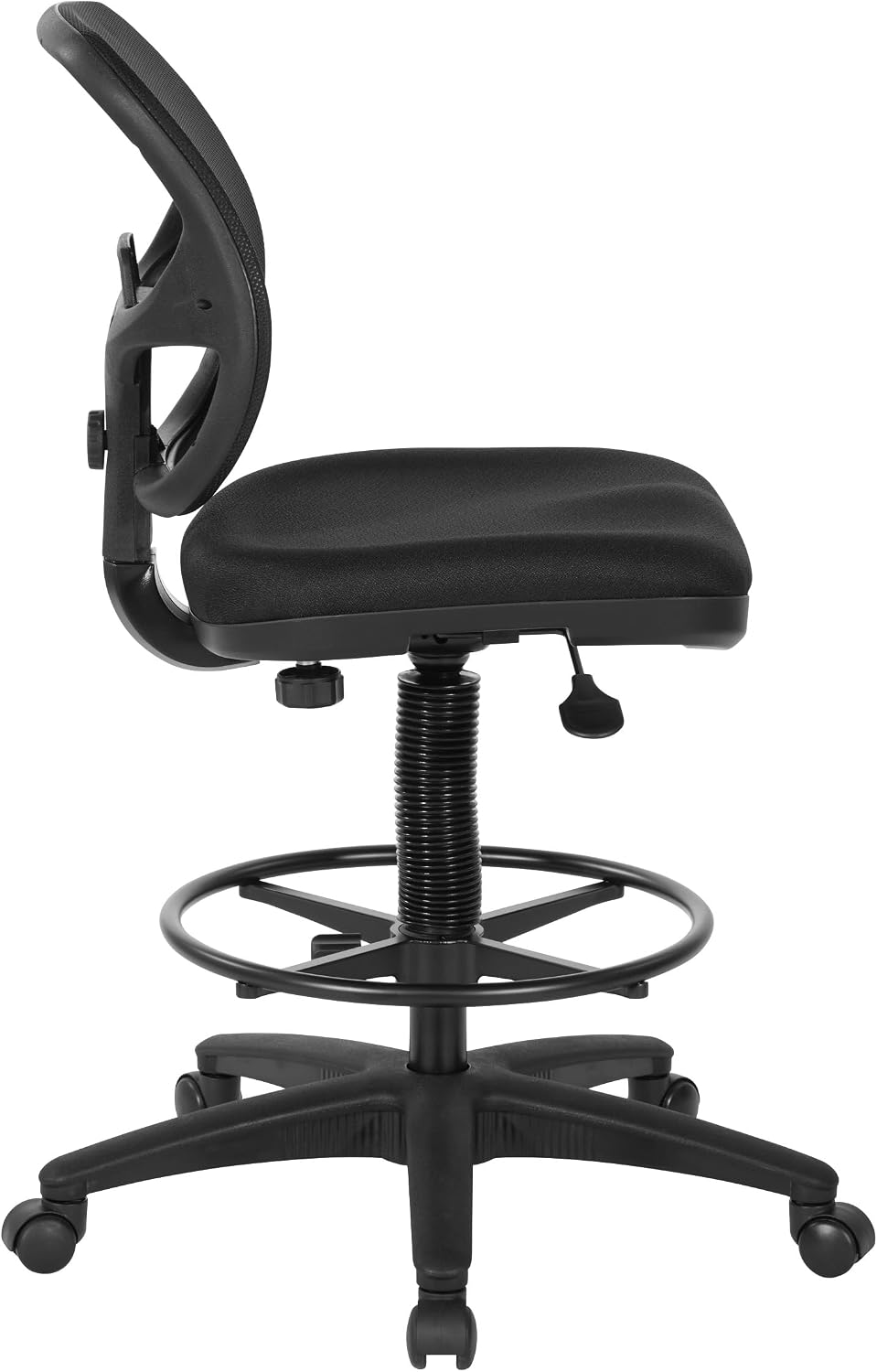
Figure 3: Side view illustrating the seat height adjustment lever.
3.2 Back Height Adjustment
The backrest height can be adjusted to provide optimal lumbar support. Locate the knob on the back of the chair, behind the backrest. Loosen the knob, adjust the backrest to your preferred height, and then tighten the knob to secure it.

Figure 4: Back view showing the backrest adjustment knob.
3.3 Footring Adjustment
The 18.25-inch diameter footring is adjustable to accommodate various user heights. To adjust, loosen the knob located on the footring's support column, slide the footring to the desired position, and securely tighten the knob.

Figure 5: Detail of the adjustable footring.
4. Maintenance
Proper care and maintenance will extend the life and appearance of your Office Star Drafting Chair.
4.1 Cleaning Instructions
- Fabric Seat: Spot clean only. Use a mild detergent and a damp cloth to gently blot stains. Do not saturate the fabric.
- Mesh Back: Wipe with a damp cloth. Avoid abrasive cleaners.
- Nylon Base & Metal Components: Wipe with a soft, damp cloth.
4.2 General Care
- Regularly check all screws and bolts to ensure they are tight. Re-tighten as needed.
- Avoid exposing the chair to direct sunlight for prolonged periods to prevent fading of the fabric and mesh.
- Do not use harsh chemicals or solvents on any part of the chair.
5. Troubleshooting
If you encounter any issues with your Office Star Drafting Chair, please refer to the following common solutions:
| Problem | Possible Cause | Solution |
|---|---|---|
| Chair does not adjust height smoothly. | Pneumatic cylinder issue or lever mechanism obstruction. | Ensure the lever is fully engaged. Check for any obstructions around the cylinder. If the issue persists, contact customer support. |
| Footring slips down. | Adjustment knob is not tightened sufficiently. | Loosen the knob, reposition the footring, and tighten the knob firmly. Apply extra pressure if needed. |
| Chair squeaks or wobbles. | Loose hardware. | Inspect all screws and bolts, and tighten any that are loose. |
| Casters do not roll smoothly. | Debris in casters or unsuitable floor surface. | Clean any hair or debris from the caster wheels. Consider using a chair mat on carpeted surfaces. |
6. Specifications
- Brand: Office Star Products
- Model Name: DC Series
- Model Number: DC2990
- Color: Black Fabric
- Material: Fabric, Foam, Metal, Nylon, Plastic
- Overall Size: 28" W x 22.75" D x 41-52" H
- Seat Size: 18.5" W x 18" D x 2.75" T
- Back Size: 17.75" W x 16" H
- Maximum Weight Recommendation: 275 Pounds
- Features: Adjustable Height, Lumbar Support, Foot Ring, Rolling Casters, Breathable Mesh Back, Padded Seat.
- Certifications: GREENGUARD Certified.
7. Warranty Information
Office Star chairs are warranted from the date of purchase against failure due to material and workmanship as follows:
- 15 years: All non-moving metal parts.
- 5 years: Component parts including control mechanisms, pneumatic cylinders, wood, plastic parts, base, and casters.
- 3 years: Upholstery fabric and foam against wear and deterioration.
Note: Leather is not warranted against routine scratching and scuffing, as leather is subject to minor blemishes in use.
8. Customer Support
For further assistance, questions, or to report any issues not covered in this manual, please contact Office Star Products customer support. Refer to your product packaging or the official Office Star Products website for current contact information.
Online Resources: www.officestar.net