
Pool Patrol PA-30
Pool Patrol PA-30 Pool Alarm Instruction Manual
Model: PA-30 | Brand: Pool Patrol
Introduction
The Pool Patrol PA-30 Pool Alarm is designed to enhance safety around your pool by detecting disturbances in the water. This device meets ASTM Safety Specification F2208, providing an audible alert when an object weighing 15 lbs or more enters the pool. This manual provides essential information for the proper installation, operation, and maintenance of your PA-30 Pool Alarm.
Important Safety Information
WARNING: This pool alarm is a supplemental safety device and is not a substitute for constant adult supervision. Always supervise children and pets around the pool area. Ensure all pool barriers and safety measures are in place.
- Read all instructions carefully before installation and use.
- Keep the alarm unit and receiver away from children.
- Regularly test the alarm to ensure proper function.
- Do not attempt to modify or repair the unit yourself, as this may void the warranty and compromise safety.
- Ensure the battery is correctly installed and replaced as needed.
Package Contents
Verify that all items are present:
- Pool Patrol PA-30 Pool Alarm Unit (Floating Unit)
- Remote Receiver Unit
- 9V Battery (for alarm unit)
- AC Adapter (for receiver unit)
- Mounting Hardware (e.g., rope, adhesive pads)
- Instruction Manual (this document)

Image: Components of the Pool Patrol PA-30 Pool Alarm system.
Setup Instructions
1. Installing the Battery in the Alarm Unit
- Locate the battery compartment on the underside of the floating alarm unit.
- Open the compartment cover.
- Insert a new 9V alkaline battery, ensuring correct polarity.
- Securely close the battery compartment cover to maintain water resistance.

Image: Close-up of the PA-30 floating alarm unit.
2. Placing the Alarm Unit in the Pool
- Gently place the floating alarm unit into the pool.
- Position the alarm in the center of the pool or in an area that provides optimal coverage for disturbances.
- Ensure the alarm is not near the filter, pump, or jets, as water movement from these sources can cause false alarms.
- For pools up to 20' x 40', a single unit is typically sufficient. For larger pools, consider additional units.
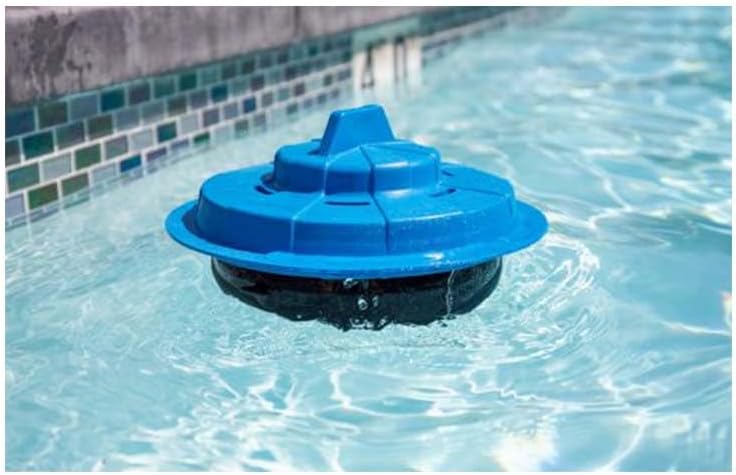
Image: PA-30 alarm unit floating in a pool.

Image: PA-30 alarm unit in different pool environments.
3. Adjusting Sensitivity Settings
- The PA-30 features adjustable sensitivity to prevent false alarms from wind or small debris.
- Refer to the markings on the alarm unit for sensitivity adjustment controls.
- Start with a moderate sensitivity setting and test the alarm by dropping an object of approximately 15 lbs into the pool.
- Adjust the sensitivity higher if the alarm does not trigger reliably, or lower if false alarms occur frequently.
- Ensure the filter inlet is pointed downward to minimize surface disturbance.
4. Setting Up the Remote Receiver
- Plug the AC adapter into the remote receiver unit and then into a standard 110VAC outlet inside your home.
- Ensure the ON/OFF switch on the receiver is in the "ON" position.
- Place the receiver in a central location where the alarm can be clearly heard throughout the house.
- Avoid placing the receiver in buildings with metal siding or foil insulation, as this can interfere with the signal. Relocate near a window if signal issues occur.
- To pair the alarm unit with the receiver (if not pre-paired or if issues arise), place the receiver in ID mode and follow the specific instructions for training the transmitter (alarm unit) to the receiver.
Operating Instructions
Arming and Disarming
- The PA-30 alarm unit is designed to be continuously active when placed in the water and powered on.
- To temporarily silence the alarm (e.g., for swimming), carefully remove the unit from the water and turn it upside down. This will typically disarm the unit.
- To re-arm, place the unit back into the water right-side up.
- The remote receiver has an ON/OFF switch. Turn it OFF when the pool is in use and supervised, and ON when the pool is unattended.
Alarm Triggers and Alerts
- The alarm is triggered when an object weighing 15 lbs or more disturbs the water surface.
- Upon activation, the alarm unit will emit a loud sound (85+ dB at 10 feet), and the remote receiver will also sound an alert.
- Immediately investigate any alarm activation.
Maintenance
Cleaning
- Periodically clean the alarm unit, especially the sensing post, to prevent oxidation buildup. Lightly clean with steel wool if necessary.
- Wipe down the exterior of both units with a damp cloth. Do not use harsh chemicals or abrasive cleaners.
Battery Replacement
- The alarm unit is designed for season-long battery life under normal operation.
- If the alarm makes an occasional chirp sound, the battery voltage may be low. Replace the 9V alkaline battery immediately.
- Refer to the "Installing the Battery" section for replacement instructions.
Storage
- During off-season or extended periods of non-use, remove the 9V battery from the alarm unit.
- Store both the alarm unit and receiver in a dry, cool place, away from direct sunlight.
Troubleshooting
| Problem | Possible Cause | Solution |
|---|---|---|
| Pool alarm will not work. | Low or missing battery. | Replace battery with a new 9V alkaline. |
| Pool alarm makes a chirp sound occasionally. | The battery voltage may be low. | Replace battery with a new 9V alkaline. |
| Pool alarm was working and now it is not. | Oxidation can build up on the sensing post. | Lightly clean with steel wool. |
| Pool alarm gives false alarms. | Alarm near filter, pump, or jets; filter inlet pointed incorrectly. | Check that the alarm is not near the filter, pump or jets. Be sure the filter inlet is pointed downward. Adjust sensitivity. |
| Water can be heard inside pool alarm. | Internal seal compromise. | Remove battery and return the pool alarm and receiver to Posthaste Electronics for service. |
| The LED on the receiver does not light. | Wall transformer unplugged or receiver switch OFF. | Be sure wall transformer is plugged into a 110VAC outlet and the power jack is plugged into the receiver. Check that the ON/OFF switch is ON. |
| Receiver is turned on but does not work when the pool alarm is triggered. | Receiver too far or signal interference. | Receiver may be too far from the alarm. Relocate. Receiver may be in a building with metal siding or with foil insulation. Relocate near a window. |
| Alarm sounds for no apparent reason. | Neighbor's alarm or interference. | A neighbor may have the same alarm. Place the receiver in ID mode and train the transmitter to the receiver. |
Specifications
- Model: PA-30
- Brand: Pool Patrol
- Manufacturer: Posthaste Electronics LLC
- ASTM Certification: F2208
- Power Source (Alarm Unit): 9V Battery (Alkaline recommended)
- Power Source (Receiver): 110VAC (via AC Adapter)
- Noise Level: 85+ dB at 10 feet
- Sensor Technology: Contact Sensor
- Trigger Weight: 15 lbs or more
- Coverage Area: Up to 20' x 40' pool (single unit)
- Product Dimensions: 10"L x 10"W x 6.5"H (Alarm Unit)
- Item Weight: 1 pound
- UPC: 696447421357, 789681012365
Warranty Information
Pool Patrol products are manufactured to high-quality standards. This product is covered by a limited warranty against defects in materials and workmanship. For specific warranty terms, duration, and claim procedures, please refer to the warranty card included with your product or contact Posthaste Electronics LLC directly. Keep your proof of purchase for warranty claims.
Note: One customer review mentioned a warranty replacement for a leaking antenna seal, indicating manufacturer support for product issues.
Customer Support
For technical assistance, troubleshooting not covered in this manual, or warranty inquiries, please contact the manufacturer:
- Manufacturer: Posthaste Electronics LLC
- Contact Information: Please refer to the product packaging or the official Pool Patrol website for the most current contact details.