
Introduction
This manual provides essential information for the setup, operation, and maintenance of your Samsung UN55C8000 55-Inch 1080p 240 Hz 3D LED HDTV. Please read these instructions carefully before using your television to ensure proper functionality and to maximize your viewing experience.
Setup
Package Contents
Verify that all components are present in the package:
- Samsung UN55C8000 LED HDTV
- Power Cable
- Stand
- Remote Control
- HDMI cable
- USB cable
- ConnectShare Movie software/documentation
Physical Installation
The Samsung UN55C8000 features an ultra-slim design and includes a swivel stand for flexible placement. For wall mounting, consider the Samsung WMN1000B Fixed Low-Profile Wall Mount (sold separately).
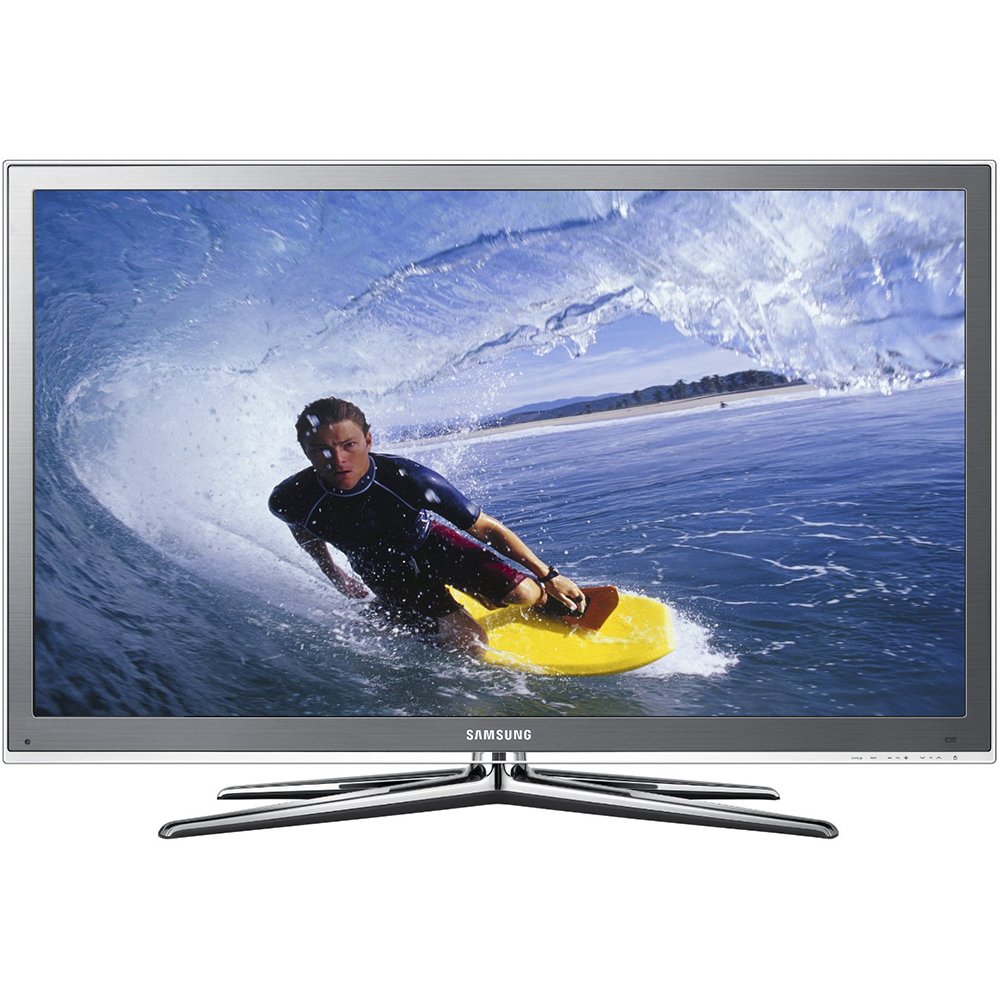
Image: Samsung UN55C8000 55-Inch LED HDTV with stand. The television measures approximately 50.5 inches in width, 32.8 inches in height (with stand), and 12.1 inches in depth (with stand).
Connections
Connect your external devices to the television using the appropriate ports:
- HDMI (High-Definition Multimedia Interface) version 1.4: 4 ports (located on the back). Use these for high-definition audio and video devices like Blu-ray players, game consoles, and cable/satellite boxes.
- USB: 2 ports (located on the side). For connecting USB storage devices for media playback or the LinkStick wireless LAN adapter.
- PC input: 1 port (located on the back). For connecting a computer.
- Ethernet: 1 port (located on the back). For wired network connection to access SMART TV features and internet.
- Optical sound output: 1 port (located on the back). For connecting to an external audio system.
- Component video input: 1 port (located on the back). For connecting older video devices.
For wireless internet connectivity, the 2010 LinkStick wireless LAN adapter (WIS09ABGN) is available separately to eliminate the need for a wired Ethernet connection.
Operation
Basic Features
- Full 1080p HD: Enjoy high-definition picture quality with 1920x1080 resolution.
- 240 Hz Clear Motion Rate: Provides smooth display of fast-moving scenes, reducing motion blur.
- Ultra Clear Panel: Enhances image details, natural skin tones, shadow detail, and vibrant colors.
- Wide Color Enhancer Plus: Delivers a broad spectrum of color and luminance for rich, saturated images.
- Built-in Digital Tuner: Allows reception of digital broadcast channels without an external set-top box.
- Pin-Point Dimming: Advanced technology for dynamic contrast, producing whiter whites and deeper blacks with reduced halo effect.
3D Viewing
The UN55C8000 is 3D-ready, offering an immersive viewing experience. To enjoy 3D content, ensure you have the following:
- 3D-Ready Display: Your UN55C8000 television.
- 3D Source: A device capable of playing 3D content, such as a 3D Blu-ray Disc player or a cable box with a 3D channel subscription.
- 3D Content: Movies, shows, or games specifically formatted for 3D (e.g., Blu-ray 3D format).
- 3D Active Glasses: Active Shutter glasses compatible with Samsung 3D TVs. One pair is required for each viewer.
- High-Speed HDMI Cable: To connect your 3D source to the TV, ensuring bandwidth speeds up to 10.2 Gbps for optimal 3D signal transmission.
The TV also supports converting 2D movies, sports, and shows to 3D. The 3D viewing experience may vary depending on the source content.
SAMSUNG SMART TV Features
Access a variety of online content and services directly on your television:
- Internet TV: Access content from services like Yahoo!, Flickr, and more.
- Content Library: Pre-loaded content such as cooking recipes and fitness exercises.
- DLNA CERTIFIED Connectivity (AllShare): Stream audio and video files from your PC to your HDTV over a wired or wireless network connection.
- Skype on Samsung TV: Conduct IP-based video calls directly from your television (requires compatible camera, sold separately).
- Customizable Widgets: Access applications like BLOCKBUSTER, Facebook, YouTube, Flickr, and Amazon Instant Video.
Note: Internet access (Ethernet or wireless LAN) is required for SMART TV features.
Additional Functions
- ConnectShare Movie: Play videos, music, and view pictures directly from a USB thumb drive or digital camera.
- Game Mode: Optimizes picture and sound quality for gaming by enhancing dark areas, sharpening the picture, and speeding up image processing.
- Anynet+ (HDMI-CEC): Allows control of compatible peripheral AV devices (e.g., DVD player) with your Samsung TV remote control.
Maintenance
To ensure the longevity and optimal performance of your Samsung UN55C8000 HDTV, follow these general maintenance guidelines:
- Cleaning the Screen: Gently wipe the screen with a soft, dry, lint-free cloth. For stubborn marks, lightly dampen the cloth with water or a specialized screen cleaner designed for electronics, then wipe dry immediately. Avoid using harsh chemicals, abrasives, or alcohol-based cleaners.
- Cleaning the Cabinet: Use a soft, dry cloth to clean the exterior of the television.
- Ventilation: Ensure proper ventilation around the television. Do not block ventilation openings.
- Power Cord: Regularly check the power cord for any damage. If damaged, discontinue use and contact service.
Troubleshooting
If you encounter issues with your television, refer to the following common troubleshooting steps. For more complex problems, consult the full user manual or contact Samsung customer support.
- No Power: Ensure the power cord is securely plugged into both the TV and a working electrical outlet.
- No Picture/Sound: Verify that the correct input source is selected. Check all cable connections (HDMI, component, etc.) are secure.
- Poor Picture Quality: Adjust picture settings (brightness, contrast, sharpness, color). Ensure the source content is high quality. For broadcast channels, check antenna connection and signal strength.
- Remote Control Not Working: Check and replace batteries. Ensure there are no obstructions between the remote and the TV's sensor.
- Network Connection Issues: For wired connections, check the Ethernet cable. For wireless, ensure the LinkStick is properly installed and configured, and that your Wi-Fi network is operational.
- 3D Display Issues: Ensure 3D glasses are charged/have fresh batteries and are properly synced. Verify the source content is 3D and the TV is in 3D mode.
If problems persist after attempting these steps, please contact Samsung customer support for further assistance.
Specifications
| Feature | Specification |
|---|---|
| Model Number | UN55C8000 |
| Screen Size | 55 Inches |
| Display Technology | LED |
| Resolution | 1080p (1920 x 1080) |
| Refresh Rate | 240 Hz Clear Motion Rate |
| Aspect Ratio | 16:9 |
| TV Dimensions (without stand) | 50.5 x 30.4 x 0.9 inches (WxHxD) |
| TV Dimensions (with stand) | 50.5 x 32.8 x 12.1 inches (WxHxD) |
| Item Weight (with stand) | 53.4 pounds |
| HDMI Ports | 4 (version 1.4) |
| USB Ports | 2 |
| Ethernet Port | 1 |
| PC Input | 1 |
| Optical Sound Output | 1 |
| Component Video Input | 1 |
| Audio Power | 15 Watts x 2 |
| Power Consumption | 30 watts (typical, ENERGY STAR compliant) |
| Color | Brushed Titanium Finish (Black) |
| Special Features | 3D-ready, SMART TV, ConnectShare Movie, Game Mode, Anynet+ (HDMI-CEC), Pin-Point Dimming |
Note: Specifications are subject to change without notice.
Warranty and Support
Warranty Information
Your Samsung UN55C8000 HDTV comes with a 1-year parts and 1-year labor warranty for residential use. For commercial use, the warranty is 90 days parts and labor. This warranty includes in-home service and is backed by Samsung's toll-free support.
Customer Support
For technical assistance, troubleshooting, or warranty claims, please contact Samsung customer support. Refer to your product registration or Samsung's official website for the most current contact information.
Legal Disclaimer
Product is sold as-is. Everything has been tested and is in working condition prior to shipping. Seller is not responsible for damages while shipping.