1. Introduction
This manual provides detailed instructions for the setup, operation, and maintenance of your Sangean PR-D7 AM/FM Digital Portable Radio. Designed for ease of use, this ultra-compact radio offers excellent sensitivity and selectivity for clear reception of both AM and FM bands. Please read this manual thoroughly to ensure optimal performance and longevity of your device.
2. What's in the Box
Upon unpacking, please ensure all items listed below are present:
- Sangean PR-D7 AM/FM Digital Portable Radio
- AC Power Adapter
- Owner's Manual (this document)
3. Product Overview
The Sangean PR-D7 is an ultra-compact portable radio featuring a clear digital display and conveniently located controls. Its design prioritizes both functionality and sound quality for an enhanced listening experience.
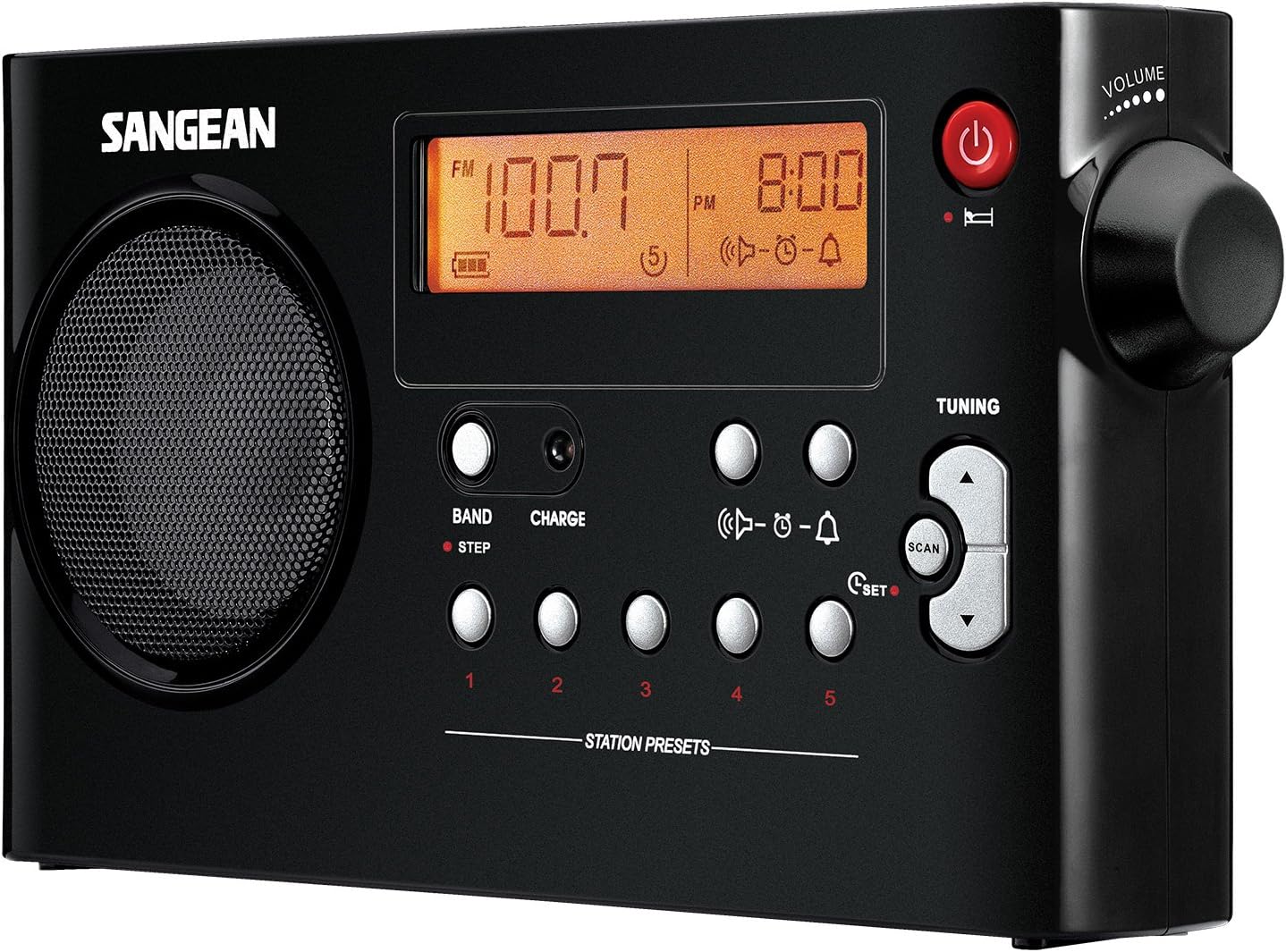
Figure 1: Front view of the Sangean PR-D7 radio, showing the speaker, digital display, and control buttons.

Figure 2: Sangean PR-D7 radio with approximate dimensions: 8.46 inches long, 4.57 inches tall, and 1.57 inches deep.
4. Setup
4.1 Powering the Radio
Your Sangean PR-D7 radio can be powered by the included AC adapter or by six 'AA' size batteries (not included). It also features a built-in charger for rechargeable 'AA' batteries.
Using the AC Adapter:
- Connect the AC adapter to the DC IN jack on the side of the radio.
- Plug the AC adapter into a standard wall outlet (100-240V, 50/60Hz).
Installing/Charging Batteries:
- Open the battery compartment cover located on the back of the radio.
- Insert six 'AA' size batteries, observing the correct polarity (+/-) as indicated inside the compartment.
- If using rechargeable 'AA' batteries, ensure the 'RECHARGEABLE' switch inside the battery compartment is set to the 'RECHARGEABLE' position. For alkaline batteries, set it to 'ALKALINE'.
- Close the battery compartment cover securely.
- When using rechargeable batteries, connect the AC adapter to charge them. A blinking red LED light indicates charging. The light will turn off or stay steady when fully charged.
Video 1: This video demonstrates the features and battery installation for a similar Sangean portable radio model (PR-D15), providing a general overview of operation and power options.
5. Operating Instructions
5.1 Turning On/Off
Press the Power button (usually marked with a circle and a vertical line) located on the top right of the radio to turn it on or off.
5.2 Band Selection
Press the BAND button to switch between AM and FM radio bands. The selected band will be displayed on the screen.
5.3 Tuning to Stations
The PR-D7 features a PLL Synthesized Tuning System for precise station selection.
- Manual Tuning: Use the Tuning Up/Down buttons (arrows) to manually adjust the frequency.
- Auto Seek: Press the SCAN button to automatically scan for and stop at the next strong station.
5.4 Setting Station Presets
The radio allows you to store 10 memory preset stations (5 AM, 5 FM).
- Tune to your desired station using the tuning buttons.
- Press and hold the SET button until the preset number flashes on the display.
- Use the Preset 1-5 buttons to select the desired memory location.
- Press the SET button again to confirm.
5.5 Volume Control
Adjust the listening volume by rotating the Volume knob located on the top right side of the radio.
5.6 Clock and Timer Functions
The radio features a real-time clock, sleep timer, and alarm functions.
- Setting the Clock: Refer to the detailed instructions in the full owner's manual for setting the time.
- Sleep Timer: The radio can be set to automatically turn off after 120, 90, 60, 45, 30, or 15 minutes. This is ideal for falling asleep to music or talk radio.
- Alarm Function: Wake up to either the radio or a Humane Wake System (HWS) buzzer. The HWS buzzer gradually increases in volume to gently wake you.
- Snooze Function: Temporarily silence the alarm for a short period.
5.7 Headphone Use
A headphone jack is provided for private listening. Plugging in headphones will automatically mute the radio's speaker.
6. Maintenance
To ensure the longevity and optimal performance of your Sangean PR-D7 radio, follow these maintenance guidelines:
- Cleaning: Wipe the radio with a soft, dry cloth. Do not use abrasive cleaners or solvents, as they may damage the finish.
- Battery Care: If the radio will not be used for an extended period, remove the batteries to prevent leakage and damage.
- Antenna: Handle the telescopic antenna gently to avoid bending or breaking. Extend it fully for best FM reception.
- Storage: Store the radio in a cool, dry place away from direct sunlight and extreme temperatures.
7. Troubleshooting
If you encounter issues with your Sangean PR-D7, please refer to the following common troubleshooting steps:
- No Power:
- Ensure the AC adapter is securely plugged into both the radio and a working wall outlet.
- If using batteries, check that they are inserted correctly with the proper polarity and are not depleted. Replace if necessary.
- Verify the 'RECHARGEABLE' / 'ALKALINE' switch is set correctly for the type of batteries being used.
- Poor Reception:
- For FM, fully extend and adjust the telescopic antenna.
- For AM, rotate the radio for the best signal, as the AM antenna is built-in and directional.
- Move the radio away from other electronic devices that may cause interference.
- No Sound:
- Check the volume level and ensure it is not set to minimum.
- If headphones are plugged in, unplug them to enable the speaker.
- Display Not Working:
- Ensure the radio is powered on.
- If the issue persists, try resetting the radio by temporarily removing all power sources (AC adapter and batteries) for a few minutes, then reconnecting.
If these steps do not resolve the issue, please contact Sangean customer support for further assistance.
8. Specifications
| Product Dimensions | 1.57 x 8.46 x 4.57 inches (L x W x H) |
| Item Weight | 1 pound |
| Item Model Number | PR-D7 BK |
| Batteries | 6 AA batteries required (not included) |
| Manufacturer | Sangean America, Inc. |
| Color | Black |
| Special Feature | Built-In AM Antenna, Portable |
| Connectivity Technology | Radio Frequency |
| Tuner Technology | AM/FM |
| Power Source | Battery Powered, Corded Electric AC Adapter Included |
| Radio Bands Supported | AM/FM |
9. Warranty and Support
For warranty information and technical support, please refer to the official Sangean website or contact Sangean customer service directly. The included Owner's Manual may also contain specific warranty details for your region.


