
Fotasy MARQ
Fotasy Rollei QBM Lens to Micro 4/3 Adapter Instruction Manual
Model: MARQ
1. Introduction
This instruction manual provides detailed information on the proper use and maintenance of your Fotasy Rollei QBM Lens to Micro 4/3 Adapter. This adapter allows you to mount classic Rollei QBM mount lenses onto modern Micro Four Thirds (M43) mirrorless digital cameras, expanding your lens options and creative possibilities.
Key Features:
- Solid Rollei QBM to MFT Adapter/ Rollei to Micro Four Three Mount Converter.
- Allows Rollei QBM Lens to fit on M43 Micro 4/3 Mirrorless Digital Cameras.
- Infinity Focus Guaranteed.
- Constructed with durable copper lens mount.
- No electrical contacts; requires manual exposure and focus adjustment.
2. Package Contents
Please verify that all items are present in your package:
- 1 x Fotasy Rollei QBM Lens to Micro 4/3 Adapter
3. Setup and Installation
3.1 Attaching the Lens to the Adapter
To attach your Rollei QBM lens to the Fotasy adapter:
- Align the red dot on the adapter with the corresponding mark on your Rollei QBM lens.
- Insert the lens into the adapter and rotate it clockwise until it clicks securely into place.
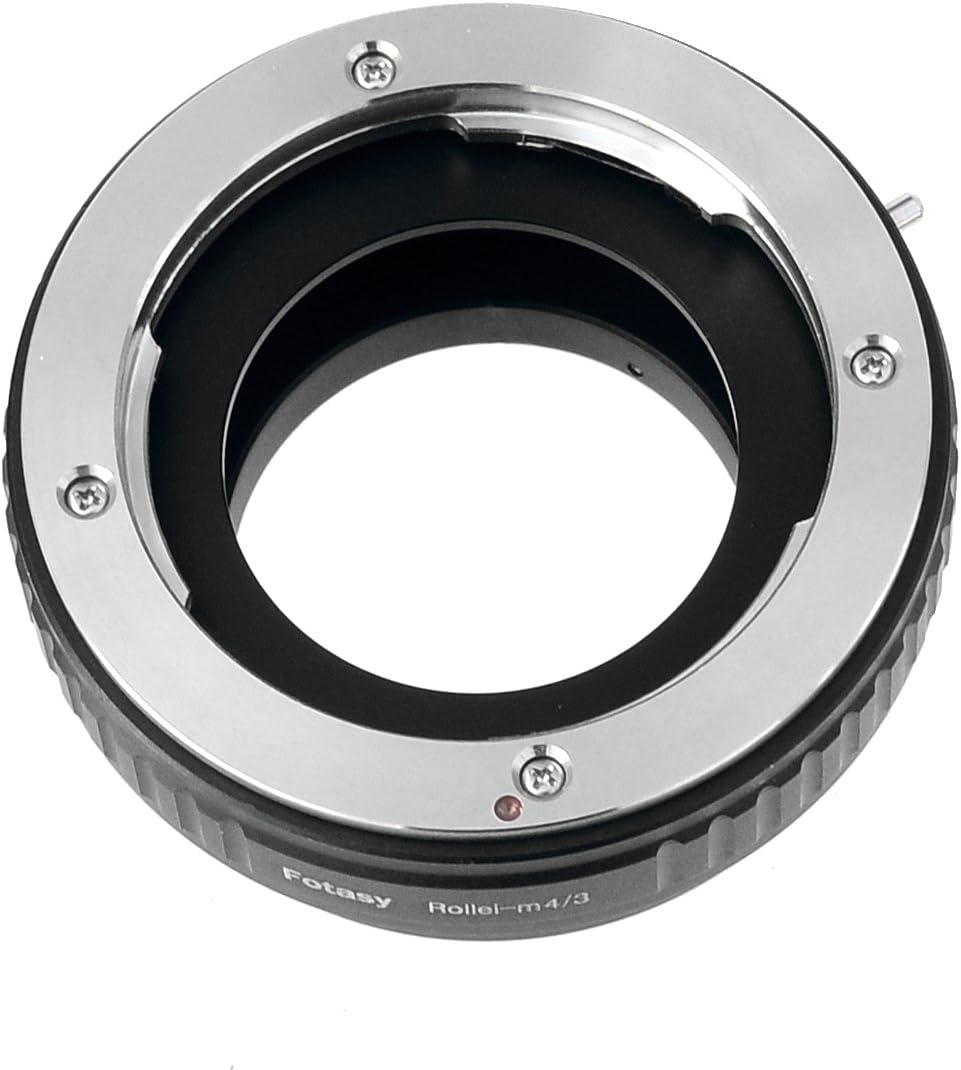
Image: Top view of the Fotasy Rollei QBM to Micro 4/3 adapter, highlighting the lens mounting mechanism.
3.2 Attaching the Adapter (with Lens) to the Camera
To attach the assembled lens and adapter to your Micro Four Thirds camera:
- Align the red dot on the adapter with the red dot on your camera's lens mount.
- Insert the adapter into the camera mount and rotate it clockwise until it locks securely.

Image: Angled view of the Fotasy Rollei QBM to Micro 4/3 adapter, illustrating its compact design and dual mounting surfaces.
3.3 Important Camera Settings
Since this adapter does not have electronic contacts, your camera will not detect a lens. You must enable the 'Shoot Without Lens' or 'Release Shutter Without Lens' setting in your camera's menu. Refer to your camera's instruction manual for the exact location of this setting.
Exposure and focus will need to be adjusted manually on the lens and camera. The camera's metering system will still function, allowing for aperture-priority or manual exposure modes.
4. Operating Instructions
Once the adapter and lens are mounted, you will operate your camera in manual mode or aperture-priority mode. All adjustments for aperture and focus will be made directly on the Rollei QBM lens.
- Focusing: Rotate the focus ring on your Rollei QBM lens until your subject is sharp. Utilize your camera's focus peaking or magnification assist features for precise manual focusing.
- Aperture Control: Adjust the aperture ring on your Rollei QBM lens to control the depth of field and exposure.
- Exposure: In aperture-priority mode, the camera will automatically set the shutter speed based on the aperture you select and the available light. In manual mode, you will set both aperture and shutter speed.
5. Maintenance
To ensure the longevity and optimal performance of your Fotasy adapter:
- Keep the adapter clean and free from dust and debris. Use a soft, dry cloth to wipe the exterior.
- Avoid touching the mounting surfaces to prevent grease or dirt transfer.
- Store the adapter in a dry, cool place when not in use, preferably with front and rear caps attached to prevent dust accumulation.
- Do not use harsh chemicals or abrasive materials for cleaning.
6. Troubleshooting
If you encounter issues with your adapter, consider the following:
- Camera not taking pictures: Ensure the 'Shoot Without Lens' setting is enabled in your camera's menu.
- Difficulty focusing to infinity: While the adapter guarantees infinity focus, slight variations in manufacturing tolerances can sometimes occur. Ensure the lens is securely mounted and that you are using your camera's focus assist features.
- Lens feels loose on adapter: Double-check that the lens is fully rotated and locked into place on the adapter.
- Adapter feels loose on camera: Ensure the adapter is fully rotated and locked into place on the camera body.
7. Specifications
| Attribute | Detail |
|---|---|
| Product Dimensions | 2.36 x 2.36 x 1.38 inches |
| Item Weight | 3 ounces |
| Model Number | MARQ |
| Brand | Fotasy |
| Compatible Mountings | Rollei QBM (Lens Side) to Micro Four Thirds (Camera Side) |
| Manufacturer | Photography Accessories INC |
8. Warranty and Support
Fotasy products are designed for reliability and performance. For information regarding warranty coverage and customer support, please refer to the documentation included with your purchase or visit the official Fotasy website. If you require assistance, please contact the manufacturer directly.
Ask a question about this manual
Ask about setup, troubleshooting, compatibility, parts, safety, or missing instructions. Manuals+ will review the question and use this page’s manual context to help answer it.