
1. Introduction
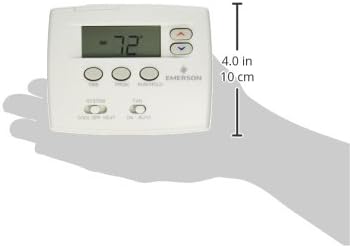
This manual provides comprehensive instructions for the installation, setup, operation, and maintenance of your White-Rodgers Emerson 1F80-0224 Single Stage 24 Hour Programmable Thermostat. Please read this manual thoroughly before beginning installation or operation to ensure proper function and to avoid potential issues.
Key Features
- Large, easy-to-read 2-inch blue display.
- 24-hour programmable schedule for energy efficiency.
- Compatible with most single-stage heating and cooling systems.
- Accurate temperature control within 1 degree Fahrenheit.
- Adjustable temperature display.

2. Safety Information
WARNING: Always turn off power to the heating/cooling system at the main fuse or circuit breaker panel before installing or servicing the thermostat. Failure to do so could result in electrical shock or equipment damage.
- This thermostat is designed for 24-volt and millivolt systems only. Do not use on line voltage applications.
- Installation should be performed by a qualified technician if you are unsure about wiring procedures.
- Ensure all wiring connections are secure and properly insulated.
3. Package Contents
Verify that your package contains the following items:
- White-Rodgers Emerson 1F80-0224 Thermostat
- Mounting Hardware (screws and wall anchors)
- 2 AA Batteries (included)
- User Manual
4. Installation
4.1 Removing the Old Thermostat
- Turn off power to the heating/cooling system at the main fuse or circuit breaker.
- Remove the cover of your old thermostat.
- Take a picture of the existing wiring connections for reference.
- Label each wire with the terminal designation (e.g., R, W, Y, G, C).
- Disconnect the wires and remove the old thermostat base from the wall.
4.2 Mounting the New Thermostat
- Separate the new thermostat from its base.
- Position the thermostat base against the wall where the old thermostat was located.
- Mark the mounting holes. Use the provided wall anchors if mounting into drywall.
- Secure the thermostat base to the wall using the provided screws.
4.3 Wiring
Connect the labeled wires from your system to the corresponding terminals on the new thermostat base. Refer to the wiring diagram below for typical connections. If your old thermostat had a 'C' wire, connect it to the 'C' terminal on the new thermostat for continuous backlight operation. If no 'C' wire is present, the thermostat will operate on battery power, and the backlight will only illuminate when a button is pressed.
| Terminal | Description |
|---|---|
| R | 24V AC Heating Power |
| W | Heating Relay |
| Y | Cooling Relay |
| G | Fan Relay |
| C | 24V AC Common (Optional, for continuous backlight) |
4.4 Battery Installation
- Insert the two AA batteries into the battery compartment on the back of the thermostat, observing the correct polarity (+/-).
- Snap the thermostat onto its mounted base.
- Turn on power to the heating/cooling system at the main fuse or circuit breaker panel.
5. Setup
5.1 Initial Power-Up
Upon initial power-up or after battery replacement, the thermostat will display the current temperature. If the display is blank, check battery installation and power to the system.
5.2 Setting Time and Day
- Press the TIME button. The hour will flash.
- Use the UP or DOWN arrows to adjust the hour. Press TIME again to set the minutes.
- Use the UP or DOWN arrows to adjust the minutes. Press TIME again to set the day of the week.
- Use the UP or DOWN arrows to select the current day.
- Press RUN/HOLD to exit and save settings.
5.3 System Configuration (Installer Settings)
This thermostat has installer settings that may need to be adjusted based on your HVAC system type. Consult your HVAC professional if you are unsure about these settings. Typically, these are set during installation.
6. Operating Instructions
6.1 Basic Operation
The thermostat has a SYSTEM switch and a FAN switch.
- SYSTEM Switch: Selects the operating mode.
COOL: Activates the cooling system.
OFF: Turns off both heating and cooling.
HEAT: Activates the heating system. - FAN Switch: Controls the fan operation.
ON: Fan runs continuously.
AUTO: Fan runs only when heating or cooling is active.
6.2 Adjusting Temperature
Use the UP or DOWN arrow buttons to adjust the desired temperature setpoint. The display will show the new setpoint, and the system will activate if the ambient temperature is outside the set range.
6.3 Programming a Schedule (24-Hour)
The thermostat allows for a single 24-hour program. This means the same schedule repeats every day.
- Press the PRGM button. The display will show the current program period (e.g., 'MORN') and the set temperature.
- Use the UP or DOWN arrows to adjust the start time for the current program period.
- Press PRGM again to adjust the temperature for that period using the UP or DOWN arrows.
- Continue pressing PRGM to cycle through all program periods (MORN, DAY, EVE, NITE) and set their respective times and temperatures.
- After setting all periods, press RUN/HOLD to save and exit programming mode. The thermostat will now follow the programmed schedule.
6.4 Temporary and Permanent Hold
- Temporary Hold: Adjust the temperature using the UP or DOWN arrows while in RUN mode. The new temperature will be held until the next programmed period begins.
- Permanent Hold: Press the RUN/HOLD button once. The word 'HOLD' will appear on the display. Adjust the temperature using the UP or DOWN arrows. The thermostat will maintain this temperature indefinitely until RUN/HOLD is pressed again to resume the program.
7. Maintenance
7.1 Battery Replacement
When the battery icon appears on the display, it indicates that the AA batteries are low and need to be replaced. Replace them promptly to ensure continuous operation.
- Turn off power to the heating/cooling system at the main fuse or circuit breaker panel.
- Remove the thermostat from its wall base.
- Remove the old batteries and insert two new AA alkaline batteries, ensuring correct polarity.
- Snap the thermostat back onto its base.
- Turn on power to the heating/cooling system. You may need to reset the time and day.
7.2 Cleaning
Clean the thermostat's exterior with a soft, damp cloth. Do not use abrasive cleaners or solvents, as they may damage the finish or internal components.
8. Troubleshooting
If you encounter issues with your thermostat, refer to the table below for common problems and solutions.
| Problem | Possible Cause | Solution |
|---|---|---|
| Display is blank | Dead batteries; No power to thermostat (if C-wire used) | Replace batteries; Check circuit breaker and wiring connections. |
| Heating/Cooling system not responding | System switch in OFF position; Incorrect wiring; Blown fuse in HVAC system | Set SYSTEM switch to HEAT or COOL; Verify wiring; Check HVAC system fuse. |
| Temperature reading seems inaccurate | Thermostat exposed to direct sunlight or drafts | Relocate thermostat if possible; Ensure no direct heat/cold sources affect it. |
| Thermostat not holding program | In HOLD mode; Program not saved correctly | Press RUN/HOLD to exit HOLD mode; Re-enter and save program settings. |
9. Specifications
| Feature | Detail |
|---|---|
| Model Number | 1F80-0224 |
| Brand | White-Rodgers / Emerson |
| Compatibility | Single Stage Heating and Cooling Systems (24V and Millivolt) |
| Power Source | 2 AA Batteries (included) or 24V AC (with C-wire) |
| Display Type | Digital with Blue Backlight |
| Temperature Accuracy | ±1°F (±0.5°C) |
| Control Method | Touch buttons |
| Mounting Type | Wall Mount |
| Product Dimensions | 1.5"D x 4.75"W x 3.75"H |
| Item Weight | 3.2 ounces |
| Average Battery Life | Approximately 20,000 hours (depending on usage) |
10. Warranty and Support
For warranty information or technical support, please refer to the documentation included with your purchase or visit the official White-Rodgers/Emerson website. Keep your proof of purchase for warranty claims.
For further assistance, you may contact White-Rodgers customer support directly.


