
Introduction
This instruction manual provides comprehensive guidance for the proper use and care of your Sony CCD-TRV85 Hi8 8mm Hi-Fi Stereo Video Camera Handycam. Please read this manual thoroughly before operating the device to ensure optimal performance and longevity. The Sony CCD-TRV85 is an analog camcorder designed for recording and playing back video on Hi8 8mm tapes, featuring a 3.5-inch LCD monitor for convenient viewing.
Setup
1. Unpacking and Checking Contents
Carefully unpack your camcorder and verify that all components are present. Typical contents include the Sony CCD-TRV85 camcorder, a battery, and an AC power adapter/charger. If any items are missing or damaged, contact your retailer.
2. Charging the Battery
Before initial use, fully charge the supplied Lithium-Ion battery. Connect the AC power adapter to the camcorder and a wall outlet. The charging indicator will illuminate. Charging times may vary. Ensure you have a compatible charger, as some units may be sold without one.

Image: The Sony CCD-TRV85 camcorder displayed with its 3.5-inch LCD monitor open, alongside a removable battery pack and a battery charger. This illustrates the main components for initial setup.
3. Inserting the Battery
With the camcorder powered off, slide the fully charged battery into the battery compartment until it clicks securely into place. Refer to the markings on the battery and camcorder for correct orientation.
4. Loading a Hi8 Cassette
- Open the cassette compartment cover.
- Insert a Hi8 8mm video cassette with the window facing outwards, ensuring the tape is correctly oriented.
- Close the cassette compartment cover firmly until it latches.
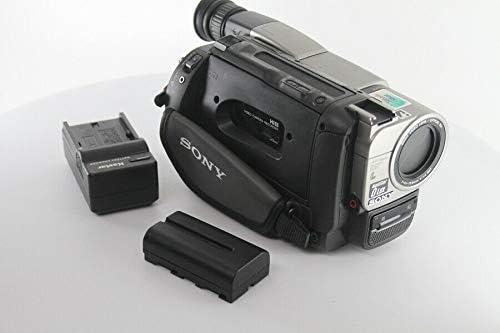
Image: A side view of the Sony CCD-TRV85 camcorder with its LCD monitor closed. This angle highlights the tape compartment area and the hand strap, indicating where a Hi8 cassette would be inserted.
Operating the Camcorder
1. Powering On/Off
To power on the camcorder, slide the POWER switch to the 'CAMERA' or 'VCR' position. To power off, slide the switch to 'OFF'.
2. Basic Recording
- Set the POWER switch to 'CAMERA'.
- Open the LCD monitor or use the viewfinder to frame your shot.
- Press the START/STOP button to begin recording. The REC indicator will appear.
- Press the START/STOP button again to stop recording.
Use the zoom lever to adjust the focal length (up to 37mm optical zoom). The camcorder features a CCD photo sensor for image capture.
3. Using the 3.5-inch LCD Monitor and Viewfinder
The 3.5-inch LCD monitor provides a clear view for framing shots and reviewing recordings. It can be rotated for various shooting angles. Alternatively, use the electronic viewfinder for a more stable viewing experience, especially in bright conditions.
4. Playback
- Set the POWER switch to 'VCR'.
- Use the PLAY/PAUSE, REW, and FF buttons to control tape playback.
- You can view playback on the camcorder's LCD monitor or connect the camcorder to a television using appropriate audio/video cables.
5. Menu System Navigation
The camcorder features an on-screen menu system for adjusting various settings such as exposure, white balance, and special effects. Navigate the menu using the directional buttons and the 'SET' or 'ENTER' button, typically located near the LCD monitor.

Image: The Sony CCD-TRV85 camcorder with its 3.5-inch LCD monitor displaying the on-screen menu. This image demonstrates the user interface for adjusting camera settings.
6. Connecting to a Computer (USB)
The camcorder supports USB connectivity. This feature may be used for transferring still images (if supported by the model) or for specific data communication. For video transfer from Hi8 tapes, an analog-to-digital converter is typically required, as Hi8 is an analog format.
Maintenance
1. Cleaning the Lens and Body
- Use a soft, lint-free cloth to gently wipe the camcorder body.
- For the lens, use a specialized lens cleaning cloth and lens cleaning fluid. Avoid touching the lens surface with your fingers.
- Never use harsh chemicals or abrasive materials.
2. Battery Care and Storage
- Store batteries in a cool, dry place when not in use.
- Avoid fully discharging the battery before recharging to prolong its lifespan.
- If storing for extended periods, charge the battery to approximately 50% capacity.
3. Tape Handling and Storage
- Store Hi8 cassettes in their cases to protect them from dust and physical damage.
- Keep tapes away from strong magnetic fields, direct sunlight, and extreme temperatures.
Troubleshooting
If you encounter issues with your Sony CCD-TRV85, refer to the following common problems and solutions:
1. Power Issues
- Camcorder does not power on: Ensure the battery is fully charged and correctly inserted. Verify the AC adapter is properly connected if using wall power.
- Battery not charging: Check the connection of the AC adapter to both the camcorder and the power outlet. Ensure the charger itself is functional. A faulty battery may need replacement.
2. Recording/Playback Issues
- No image/sound during recording: Check lens cap. Ensure camcorder is in 'CAMERA' mode. Verify microphone is not obstructed.
- Poor picture quality: Clean the lens. Ensure sufficient lighting. Check tape condition.
- Tape not playing: Ensure camcorder is in 'VCR' mode. Check if the tape is properly loaded and not damaged.
3. Other Issues
- LCD monitor not displaying: Ensure it is fully opened and the display settings are correct in the menu.
- Buttons unresponsive: Try removing and reinserting the battery to reset the camcorder.
For persistent issues, consult a qualified service technician.
Specifications
| Feature | Specification |
|---|---|
| Model Number | CCD-TRV85 |
| Brand | Sony |
| Video Capture Format | Hi8 |
| Screen Size | 3.5 Inches |
| Photo Sensor Technology | CCD |
| Maximum Focal Length | 37 Millimeters |
| Maximum Aperture | 1.9 Millimeters |
| Connectivity Technology | USB |
| Batteries Required | 1 Lithium Ion battery |
| Item Weight | 4.85 pounds |
| Package Dimensions | 10.5 x 9.9 x 7.1 inches |
| Date First Available | January 6, 2010 |
| Video Capture Resolution | 1080p (Note: This resolution typically refers to digital output or still image capability, as Hi8 is an analog format.) |
| Flash Memory Type | Memory Stick Duo, SD (Note: This may refer to still image storage or a hybrid function, not primary video recording to tape.) |
| Supported Audio Format | AAC, MP3 (Note: This likely pertains to digital playback or transfer, not direct Hi8 tape recording.) |
Warranty and Support
Warranty Information
This product may be covered by a seller-provided warranty, which typically includes a 14-day satisfaction guarantee and a 90-day parts and labor warranty. For official manufacturer warranty details, please refer to the documentation provided with your original purchase or contact Sony customer support directly.
Customer Support
For technical assistance, service, or to inquire about replacement parts, please contact Sony customer support. You can find contact information on the official Sony website or through your product's original packaging.