Introduction
This manual provides detailed instructions for the safe and effective use of your Sony Cyber-shot DSC-HX5V digital camera. Please read this manual thoroughly before operating the camera and retain it for future reference. The DSC-HX5V is a 10.2 MP CMOS digital camera featuring a 10x wide-angle zoom lens, Optical SteadyShot image stabilization, and a 3.0-inch LCD.
1. Setup
1.1 Unpacking and Initial Inspection
Carefully unpack all items and ensure the following accessories are present:
- Battery charger (BC-CSGD/BC-CSGE)
- Power cord (mains lead) (may not be supplied in USA and Canada)
- Rechargeable battery pack (NP-BG1) / Battery case
- USB, A/V cable for multi-use terminal
- HDMI adaptor
- Wrist strap
- CD-ROM (Cyber-shot application software, Cyber-shot Handbook)
- Instruction Manual (this document)
1.2 Battery Installation and Charging
Insert the NP-BG1 rechargeable battery pack into the camera with the correct orientation. To charge the battery, connect the battery charger (BC-CSGD/BC-CSGE) to a power outlet and insert the battery. The charging indicator will illuminate during charging and turn off when complete. A full charge typically takes approximately 2-3 hours.
1.3 Memory Card Insertion
The camera supports Memory Stick Duo/Memory Stick PRO Duo/Memory Stick PRO-HG Duo media and SD/SDHC media. Open the memory card slot cover, insert the memory card firmly until it clicks into place, ensuring the correct orientation. Close the cover securely.
1.4 Initial Power On and Basic Settings
Press the ON/OFF button to power on the camera. Upon first use, you may be prompted to set the date, time, and language. Follow the on-screen instructions to configure these basic settings.
2. Operating the Camera
2.1 Camera Controls Overview
Familiarize yourself with the camera's buttons and dials for efficient operation.

Figure 1: Rear view of the DSC-HX5V, highlighting the LCD screen and control buttons.
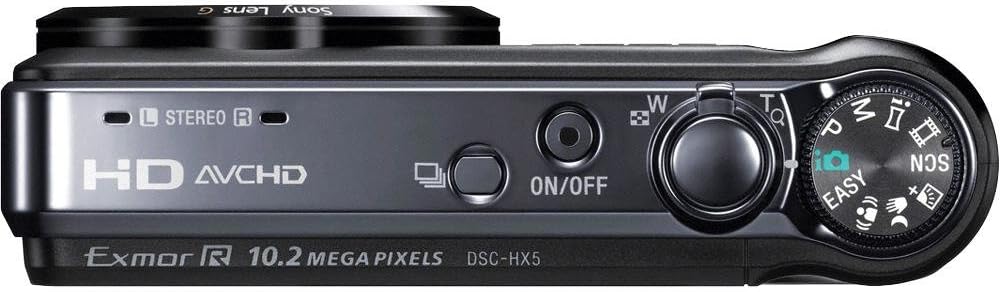
Figure 2: Top view of the DSC-HX5V, illustrating the mode dial, power button, and shutter/zoom controls.

Figure 3: Ergonomic grip of the DSC-HX5V, showing how the camera fits in hand.
2.2 Basic Photography Modes
Turn the mode dial to select your desired shooting mode.
- Intelligent Auto (iAuto) Mode: The camera automatically detects the scene and adjusts settings for optimal results. This mode is recommended for beginners.
- Program Auto Mode: Allows for more control over settings like ISO sensitivity while the camera sets exposure.
- Scene Modes: Select from various scene-specific presets such as High Sensitivity, Twilight, Portrait, Landscape, Beach, Snow, Fireworks, Advanced Sports Shooting, Gourmet, and Pet to optimize settings for specific conditions.
2.3 Advanced Photography Features
- "Exmor R" CMOS Sensor: Enhances low-light performance, reducing noise and improving image clarity.
- 10x Optical Zoom G-Lens: Provides a versatile 25mm wide-angle to 250mm telephoto focal range for capturing various subjects from landscapes to distant objects.
- Optical SteadyShot Image Stabilization: Minimizes blur caused by camera shake, especially useful at longer zoom settings or in low light.
- Intelligent Sweep Panorama Mode: Capture wide panoramic images by sweeping the camera horizontally or vertically. The camera stitches multiple images automatically.
- Handheld Twilight: Captures multiple images and combines them to create a single, clear, low-noise image in low-light conditions without a tripod.
- Anti-Motion Blur Mode: Reduces blur in low-light shots by combining multiple images taken at high shutter speeds.
- High Speed Shooting (10fps): Capture fast-moving subjects with up to 10 frames per second at full 10.2-megapixel resolution.
- Backlight Correction HDR: Takes two exposures and combines them to preserve detail in both bright highlights and dark shadows in high-contrast scenes.
- Face Detection Technology: Automatically detects and optimizes focus, exposure, and white balance for up to eight faces.
- Smile Shutter Technology: Automatically captures a photo when a smile is detected.
- Anti-blink Function: Captures two images and saves the one with less blinking.
- Self-Portrait Timer: Uses Face Detection to trigger a 2-second timer when your face enters the frame.
- GPS and Compass: Records location and direction data for your photos, allowing you to view them on a map with compatible software.
2.4 Video Recording
The DSC-HX5V offers high-definition video recording capabilities.
- 1080i AVCHD Movie Mode: Records high-quality Full HD video at 60i, suitable for playback on Blu-ray Disc players and compatible HDTVs.
- HD MP4 Movie Mode: Records video in a web-friendly MP4 format, ideal for easy transfer to PCs and sharing on social media platforms.
- Optical SteadyShot with Active Mode: Provides enhanced image stabilization during video recording, ensuring smoother footage even while moving.
2.5 Playback and Viewing
- 3.0-inch Clear Photo LCD: View your photos and videos on the bright, anti-reflective LCD screen.
- Viewing Modes: Organize and find your photos using folder or calendar viewing modes.
- In-Camera Retouching Tools: Perform basic edits like trimming, red-eye correction, and unsharp masking directly on the camera.
- PHOTOMUSIC: Create slideshows with music and visual effects using pre-loaded tracks or your own.
- PhotoTV HD: Connect to compatible Sony BRAVIA HDTVs for optimized high-definition photo viewing.
2.6 Connecting to Other Devices
- HDMI Output: Connect the camera to an HDTV using the HDMI adaptor and cable (supplied) for high-definition playback.
- USB Connection: Use the supplied USB cable to connect the camera to a computer for transferring photos and videos.
- TransferJet Technology: Allows for wireless transfer of files between two TransferJet enabled devices by touching them together (requires compatible devices).
- DVDirect DVD Recorder Compatibility: For easy burning of AVCHD footage to DVD (recorder and media sold separately).
- Picture Motion Browser (PMB) Software: Use the included software for managing, editing, and sharing your media on a compatible PC.
3. Maintenance
3.1 Cleaning the Camera
- Lens: Use a soft, dry cloth or a lens brush to gently remove dust. For stubborn smudges, use a lens cleaning solution specifically designed for camera lenses.
- Body: Wipe the camera body with a soft, dry cloth. Do not use organic solvents such as alcohol or thinner.
- LCD Screen: Gently wipe with a soft, lint-free cloth. Avoid pressing hard on the screen.
3.2 Battery Care
- Always use the genuine Sony NP-BG1 battery pack.
- Charge the battery fully before first use and after extended periods of non-use.
- Store the battery in a cool, dry place when not in use.
- Avoid exposing the battery to extreme temperatures.
3.3 Storage
When storing the camera for an extended period, remove the battery and memory card. Store the camera in a dry, well-ventilated area, away from direct sunlight and extreme temperatures.
4. Troubleshooting
If you encounter issues with your camera, refer to the following common problems and solutions.
| Problem | Possible Cause / Solution |
|---|---|
| Camera does not power on. | Battery is depleted. Charge the battery. Battery is inserted incorrectly. Reinsert the battery with correct orientation. |
| Images are blurry. | Camera shake. Use Optical SteadyShot or a tripod. Subject is moving. Use a faster shutter speed or Advanced Sports Shooting mode. Lens is dirty. Clean the lens. |
| Memory card error. | Memory card is full. Delete unnecessary files or use a new card. Memory card is corrupted. Format the card (this will erase all data). Memory card is incompatible. Use a supported Memory Stick or SD card. |
| GPS signal acquisition is slow. | Camera is indoors or in an area with poor satellite reception. Move to an open outdoor area. GPS Assist Data is outdated. Update GPS Assist Data using the Picture Motion Browser software. |
| Flash does not fire. | Flash mode is set to 'Flash Off'. Change the flash mode. Flash is covered. Ensure nothing is obstructing the flash unit. |
5. Specifications
| Feature | Specification |
|---|---|
| Model Name | DSC-HX5V |
| Image Sensor | 10.2 MP "Exmor R" CMOS Sensor |
| Lens | Sony G-Lens, 10x Optical Zoom (25mm-250mm equivalent) |
| Image Stabilization | Optical SteadyShot (with Active Mode for video) |
| LCD Screen | 3.0-inch Clear Photo LCD (230k pixels) |
| Video Recording | 1080i AVCHD (60i), HD MP4 |
| ISO Sensitivity | Auto, 100, 200, 400, 800, 1600, 3200 |
| High Speed Shooting | Up to 10 fps at full resolution |
| Special Features | Intelligent Sweep Panorama, Handheld Twilight, Anti-Motion Blur, Backlight Correction HDR, GPS, Compass, Face Detection, Smile Shutter, TransferJet |
| Storage Media | Memory Stick Duo/PRO Duo/PRO-HG Duo, SD/SDHC |
| Battery Type | NP-BG1 Lithium-ion |
| Dimensions (W x H x D) | 4.13 x 2.38 x 1.2 inches (approx.) |
| Weight | 7.1 ounces (approx.) |
6. Warranty and Support
6.1 Warranty Information
Your Sony Cyber-shot DSC-HX5V camera is covered by a limited warranty. Please refer to the warranty card included in your product packaging for specific terms and conditions, including warranty period and coverage details. Keep your proof of purchase for warranty claims.
6.2 Customer Support
For technical assistance, troubleshooting not covered in this manual, or service inquiries, please contact Sony customer support. Visit the official Sony website for contact information, FAQs, and additional resources.
Online resources may include:


