
Royer Labs R-121
Royer Labs R-121 Studio Ribbon Microphone User Manual
Model: R-121
Introduction
The Royer Labs R-121 Studio Ribbon Microphone is a professional audio device designed for high-quality sound capture in various recording environments. Known for its smooth and natural sound, the R-121 incorporates Royer's patented Offset Ribbon Transducer technology, allowing it to handle high Sound Pressure Levels (SPL) without distortion. This manual provides essential information for the proper setup, operation, maintenance, and troubleshooting of your R-121 microphone.
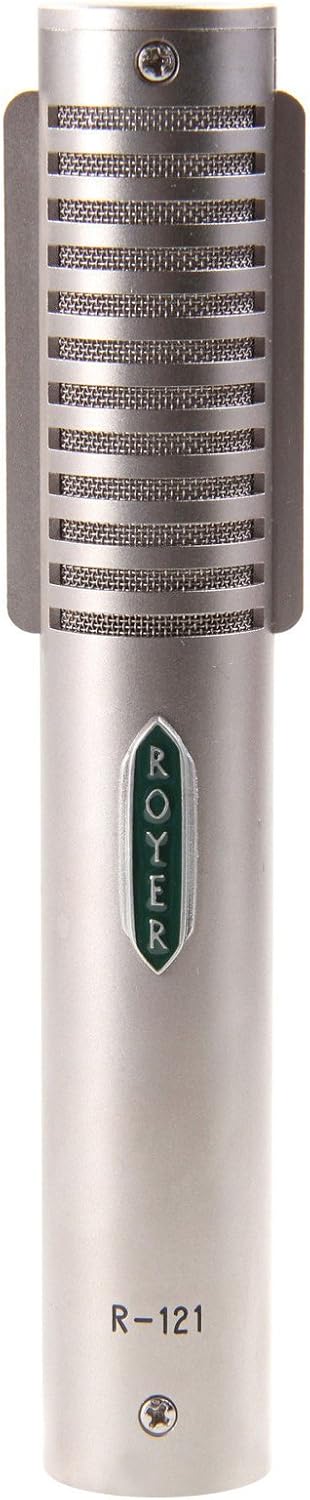
Figure 1: The Royer Labs R-121 Studio Ribbon Microphone, showcasing its sleek design and robust build.
Setup
Proper setup ensures optimal performance and longevity of your R-121 microphone.
Unboxing and Initial Inspection
Your Royer R-121 microphone comes securely packaged in a wooden jeweler's case, accompanied by a microphone clip. Carefully remove the microphone and accessories from the case. Inspect all components for any signs of damage during transit. The R-121 is designed to be rugged, but careful handling is always recommended.

Figure 2: The Royer Labs R-121 microphone presented in its protective wooden jeweler's case, alongside the included microphone clip and soft pouch.
Connecting the Microphone
- Attach the provided microphone clip to a suitable microphone stand.
- Gently insert the R-121 microphone into the clip, ensuring it is securely held.
- Connect a standard XLR cable (not included) to the microphone's XLR output.
- Connect the other end of the XLR cable to your microphone preamplifier, mixing console, or audio interface.
- Ensure phantom power is OFF on your preamplifier or mixer. Ribbon microphones do not require phantom power and can be damaged if it is applied.
Operating the R-121
The R-121 is a versatile microphone suitable for a wide range of recording applications, including electric guitars, drums, brass, choirs, and orchestras. Its unique characteristics provide exceptional sound quality.
Key Features and Usage Tips
- Figure-8 Polar Pattern: The R-121 features a bidirectional (figure-8) polar pattern, meaning it picks up sound equally from the front and back of the element, while rejecting sound from the sides. This makes it ideal for capturing room ambience, recording two sources simultaneously (e.g., two vocalists facing each other), or for specific stereo miking techniques like Blumlein.
- High SPL Capabilities: Thanks to its patented Offset Ribbon Technology, the R-121 can withstand very high Sound Pressure Levels (up to 135 dB Noise Level) without internal active electronics overloading or producing distortion. This makes it an excellent choice for loud sources like guitar cabinets and drum overheads.
- Equal Sensitivity: The R-121 exhibits equal sensitivity from both the front (logo side) and back of the element, providing a consistent frequency response regardless of the distance from the sound source.
- Low Residual Noise: The microphone is designed for extremely low residual noise, ensuring clean and clear recordings.
Video 1: An official promotional video from Royer Labs showcasing the R-121 Studio Ribbon Microphone and its features.
Maintenance
Proper care and maintenance will extend the life and preserve the performance of your R-121 microphone.
General Care
- Handling: While rugged, avoid dropping the microphone or subjecting it to severe impacts.
- Phantom Power: As mentioned, NEVER apply phantom power to the R-121. This can cause irreparable damage to the ribbon element.
- Environmental Conditions: The ribbon element is designed to be unaffected by heat or humidity, making it suitable for various studio and live sound environments. However, always store the microphone in its protective case when not in use to shield it from dust and physical damage.
- Cleaning: Use a soft, dry cloth to wipe down the microphone body. Do not use liquid cleaners or solvents, as these can damage the finish or internal components.
Troubleshooting
If you encounter issues with your R-121 microphone, consider the following common troubleshooting steps:
- No Sound Output:
- Check all cable connections to ensure they are secure.
- Verify that phantom power is turned OFF on your preamplifier or mixer.
- Test the XLR cable with another microphone or replace it to rule out a faulty cable.
- Ensure the input gain on your preamplifier is set appropriately.
- Distorted Sound:
- While the R-121 handles high SPL, ensure your preamplifier's input is not clipping. Reduce the gain if necessary.
- Check for any loose connections or damaged cables.
- Low Output Level:
- Ribbon microphones generally have lower output than condenser microphones. Ensure your preamplifier has sufficient clean gain.
- Consider using a high-quality inline preamp if additional gain is needed for quieter sources.
If these steps do not resolve the issue, please contact Royer Labs customer support for further assistance.
Specifications
General Specifications
| Feature | Detail |
|---|---|
| Model Number | R-121 |
| Brand | Royer Labs |
| Microphone Form Factor | Microphone and clip |
| Polar Pattern | Bidirectional (Figure-8) |
| Connectivity Technology | XLR |
| Frequency Range | 30 Hz - 15 kHz |
| Signal-to-Noise Ratio | 75 dB |
| Noise Level | 135 dB (Max SPL) |
| Audio Sensitivity | 50 dB |
| Item Weight | 2.5 pounds |
| Product Dimensions (L x W x H) | 6.13 x 1 x 1 inches |
| Color | Nickel plate |
| Included Components | Wooden jeweler's case, mic clip |
Key Features
- THE SOUND OF ELECTRIC GUITARS and so much more!
- HIGH SPL CAPABILITIES: No internal active electronics to overload or produce distortion up to maximum SPL rating.
- FIGURE-8 POLAR PATTERN.
- EQUAL SENSITIVITY FROM FRONT OR BACK OF ELEMENT: Consistent frequency response regardless of distance.
- EXTREMELY LOW RESIDUAL NOISE.
- PATENTED OFFSET RIBBON TECHNOLOGY is the first of its kind, positioning the ribbon element closer to the front (logo) side of the microphone. This arrangement gives the ribbon more room to move within the prime magnetic field while maintaining full frequency response during high SPL recordings. It’s an integral piece of the magic of all Royer R-series microphones.
- RIBBON ELEMENT IS NOT AFFECTED BY HEAT OR HUMIDITY.
Warranty and Support
Warranty Information
The Royer Labs R-121 Studio Ribbon Microphone comes with an unprecedented LIFETIME WARRANTY. This warranty covers manufacturing defects and ensures the long-term reliability of your microphone. Please refer to the official Royer Labs website or contact their customer service for full warranty terms and conditions.
Customer Support
For technical assistance, service, or any inquiries regarding your R-121 microphone, please visit the official Royer Labs website or contact their customer support team directly. Contact information can typically be found on their website or on the product packaging.
Related documentsR-121


Ask a question about this manual
Ask about setup, troubleshooting, compatibility, parts, safety, or missing instructions. Manuals+ will review the question and use this page’s manual context to help answer it.