
1. Product Overview
The Kenko 72mm Y2 Professional Multi-Coated Camera Lens Filter is designed to enhance contrast in black and white photography. This yellow filter is particularly effective for adjusting the tonal separation between different shades, making it a valuable tool for photographers working with monochrome images. It can also serve as a protective filter for your lens.
The Y2 filter is widely used for general contrast adjustment in black and white photographs. While yellow and red filters are common for general use, green contrast filters are typically recommended for portraits.

Image 1.1: The Kenko 72mm Y2 Professional Multi-Coated Camera Lens Filter. This image shows the circular yellow filter with a black rim, clearly displaying the "Kenko Y2 PROFESSIONAL" branding.
2. Setup and Installation
To install the Kenko 72mm Y2 filter, ensure your camera lens has a 72mm filter thread. The filter thread size is usually indicated on the front of your lens or in its specifications.
- Prepare your lens: Remove the lens cap and any existing filters from your camera lens.
- Align the filter: Carefully align the Kenko Y2 filter with the filter threads on the front of your lens. Ensure it is straight and not cross-threaded.
- Attach the filter: Gently rotate the filter clockwise until it is securely fastened to the lens. Do not overtighten, as this can make removal difficult.
- Check for security: Lightly tug on the filter to ensure it is firmly attached and will not fall off during use.
The filter is now ready for use. You can attach your lens cap directly onto the filter if it has a compatible thread size.
3. Operating Instructions
The Kenko Y2 yellow filter is primarily used in black and white photography to manipulate tonal contrast. It works by absorbing blue light and transmitting yellow and red light, which affects how different colors are rendered in monochrome.
- Enhancing Skies: The Y2 filter darkens blue skies, making white clouds stand out more prominently. This creates a dramatic effect and adds depth to landscape photographs.
- Increasing Contrast: It generally increases overall contrast in scenes, particularly between blue and green elements. For example, green foliage will appear lighter, while blue water or sky will appear darker.
- Reducing Haze: In some conditions, a yellow filter can help reduce atmospheric haze, leading to clearer images.
- Exposure Compensation: When using a yellow filter, a slight increase in exposure (typically 1 to 2 stops) may be required due to the light absorption. Modern cameras with through-the-lens (TTL) metering will usually compensate automatically, but manual adjustments might be necessary in certain situations.
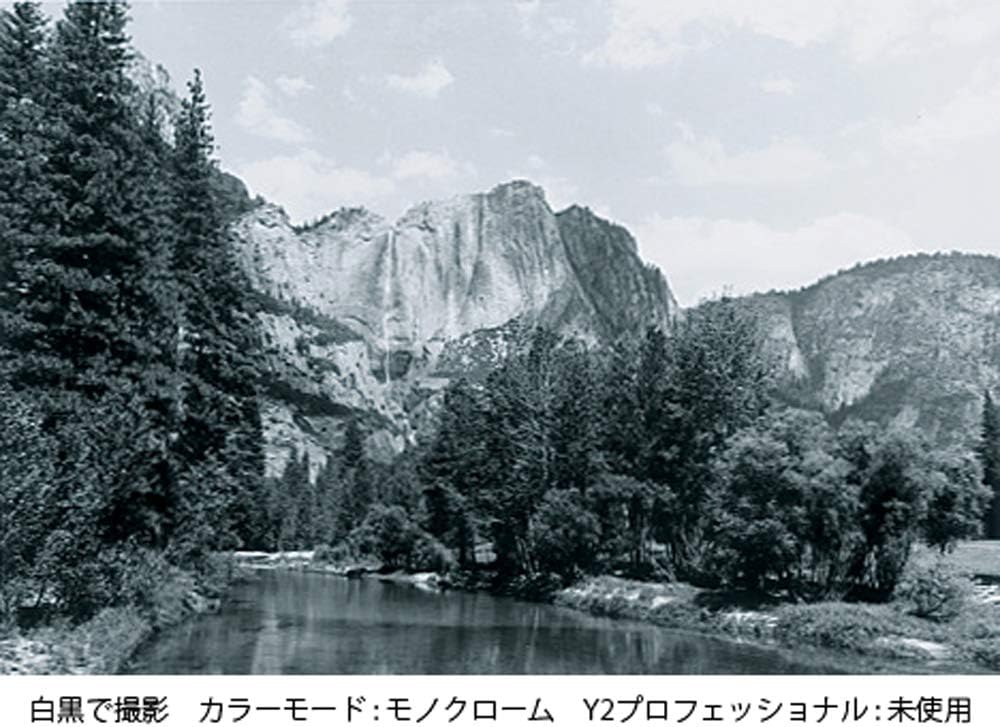
Image 3.1: Black and white landscape photograph taken without the Kenko Y2 filter. Notice the relatively flat contrast in the sky and between the foliage and the distant mountains.

Image 3.2: Black and white landscape photograph taken with the Kenko Y2 filter. Observe the enhanced contrast, particularly the darker sky and more defined clouds, compared to the image without the filter.
4. Maintenance and Care
Proper maintenance ensures the longevity and optimal performance of your Kenko Y2 filter.
- Cleaning:
- Use a soft, clean microfiber cloth specifically designed for optical surfaces to gently wipe away dust and smudges.
- For stubborn marks, apply a small amount of lens cleaning solution to the cloth (not directly to the filter) and wipe gently in a circular motion.
- Avoid using abrasive materials, harsh chemicals, or excessive force, as this can damage the multi-coating.
- Storage:
- When not in use, store the filter in its protective case to prevent scratches and dust accumulation.
- Keep the filter in a cool, dry place, away from direct sunlight and extreme temperatures.
- Handling: Always handle the filter by its edges to avoid leaving fingerprints on the glass surface.
5. Troubleshooting
If you encounter issues with your Kenko Y2 filter, consider the following common solutions:
- Filter difficult to attach/remove:
- Ensure the filter is aligned correctly with the lens threads. Avoid cross-threading.
- If stuck, try using a rubber filter wrench or a piece of rubber (like a jar opener) to get a better grip and gently twist.
- Avoid overtightening during installation.
- Image quality issues (e.g., softness, reflections):
- Check if the filter surface is clean. Dust, smudges, or fingerprints can degrade image quality.
- Ensure the filter is securely attached and not loose.
- While multi-coated, strong light sources directly hitting the filter can still cause reflections or flare. Consider using a lens hood.
- Unexpected contrast results:
- Verify your camera's white balance and picture style settings, especially if shooting in color and converting to black and white later.
- Understand that the Y2 filter primarily affects blue and green tones. Its effect will be less pronounced in scenes lacking these colors.
6. Specifications
| Feature | Detail |
|---|---|
| Brand | Kenko |
| Model Number | 172384 |
| ASIN | B0031KUJ2K |
| Photo Filter Size | 72 Millimeters |
| Material | Optical Glass |
| Coating Description | Multi Coating |
| Photo Filter Effect Type | Color Correcting (for B&W contrast) |
| Product Dimensions | 0.55 x 4.37 x 3.62 inches (Packaging) / 2.83"L x 2.83"W (Filter) |
| Item Weight | 2.56 ounces |
| Water Resistance Level | Not Water Resistant |
| Manufacturer | Kenko Tokina USA, Inc. |
7. Warranty and Support
For warranty information and customer support regarding your Kenko 72mm Y2 Professional Multi-Coated Camera Lens Filter, please refer to the official Kenko website or contact Kenko Tokina USA, Inc. directly. Keep your purchase receipt as proof of purchase for any warranty claims.
Manufacturer: Kenko Tokina USA, Inc.
Website: www.kenko-tokina.co.jp/english/ (General Kenko Tokina website, specific product support may vary by region)