
1. Introduction
The BSS FCS-966 Constant Q Graphic Equalizer is designed for precise audio frequency manipulation, commonly used in professional sound reinforcement, particularly for stage monitors. This unit builds upon the experience gained from the FCS-960, incorporating modern components for high-quality performance. It features 30-band graphic equalization per channel, complemented by separate LF (Low Frequency) and HF (High Frequency) contour filters. These contour filters allow for broad tonal adjustments without affecting the detailed graphic EQ settings, making it ideal for adapting to changing acoustic environments.
2. Safety Information
Please read and understand all safety instructions before operating this equipment.
- Power Supply: Connect the unit only to the specified AC mains voltage. Ensure the power cord is not damaged.
- Ventilation: Do not block ventilation openings. Ensure adequate airflow around the unit to prevent overheating.
- Moisture: Do not expose the unit to rain or moisture. Do not place objects filled with liquids on the unit.
- Servicing: Refer all servicing to qualified service personnel. Do not attempt to service this unit yourself.
- Grounding: Ensure the unit is properly grounded to prevent electric shock.
3. Key Features
- Commonly used for stage monitors.
- Engineered with advanced design principles from the FCS-960.
- General equalization can be performed using faders.
- Includes separate LF and HF contour filters for broad tonal shaping.
- Musical, gentle boost and cut shelving type filters.
4. Controls and Indicators
The front panel of the FCS-966 provides comprehensive controls for precise audio equalization.
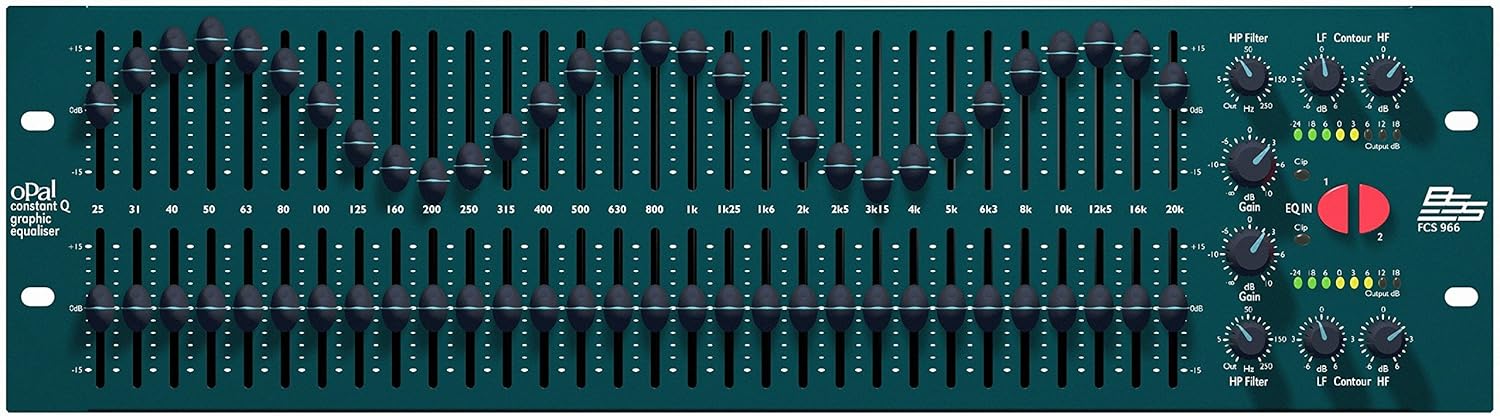
Figure 1: Front Panel Layout of the BSS FCS-966. This image displays the full front panel of the equalizer, featuring two rows of 30 frequency band faders, along with various rotary controls for High Pass Filter, Low Frequency Contour, High Frequency Contour, and Input/Output Gain. LED meters for output level and clip indicators are also visible.
4.1. Graphic Equalizer Faders
The FCS-966 features 30 constant Q frequency bands per channel, ranging from 25Hz to 20kHz. Each band has a dedicated fader allowing for +/-15dB of boost or cut. The constant Q design ensures that the filter bandwidth remains consistent regardless of the amount of boost or cut applied, providing precise and predictable equalization.
- Frequency Bands: 25Hz, 31Hz, 40Hz, 50Hz, 63Hz, 80Hz, 100Hz, 125Hz, 160Hz, 200Hz, 250Hz, 315Hz, 400Hz, 500Hz, 630Hz, 800Hz, 1kHz, 1.25kHz, 1.6kHz, 2kHz, 2.5kHz, 3.15kHz, 4kHz, 5kHz, 6.3kHz, 8kHz, 10kHz, 12.5kHz, 16kHz, 20kHz.
- Range: Each fader provides a +/-15dB adjustment range.
4.2. HP Filter (High Pass Filter)
This rotary control allows you to set a high-pass filter, which attenuates frequencies below a selected cutoff point. Useful for removing unwanted low-end rumble or stage noise.
- Range: Adjustable from 50Hz to 250Hz.
4.3. LF Contour (Low Frequency Contour)
A gentle shelving filter for broad low-frequency adjustments. This allows for overall bass shaping without affecting the detailed settings of the graphic EQ faders.
- Range: Provides up to +/-6dB of boost or cut.
4.4. HF Contour (High Frequency Contour)
Similar to the LF Contour, this is a gentle shelving filter for broad high-frequency adjustments. Useful for adding clarity or reducing harshness across the high end.
- Range: Provides up to +/-6dB of boost or cut.
4.5. Gain Controls
Independent input gain controls for each channel, allowing you to match the input signal level to the equalizer's optimal operating range.
- Range: Adjustable from -10dB to +10dB.
- Clip Indicator: An associated LED illuminates when the input signal is clipping, indicating that the level is too high.
4.6. EQ IN/OUT Buttons
These illuminated buttons (labeled 1 and 2 for each channel) bypass the graphic equalizer section, allowing for A/B comparison between the processed and unprocessed audio signal.
- Function: Engages or bypasses the graphic EQ and contour filters.
4.7. Output dB Indicators
Multi-segment LED meters display the output level of each channel, ranging from -24dB to +18dB. These provide visual feedback on the signal strength and help prevent clipping at the output stage.
- Indicators: -24dB, -18dB, -12dB, -6dB, 0dB, +3dB, +6dB, +12dB, +18dB.
5. Setup
5.1. Connections
The FCS-966 typically connects between a mixing console and an amplifier or powered speaker system.
- Power: Connect the supplied AC power cord to the unit's power inlet and then to a suitable mains outlet.
- Audio Input: Connect the output of your mixing console (or other audio source) to the INPUT connectors on the rear panel of the FCS-966. Use balanced XLR or TRS cables for optimal performance.
- Audio Output: Connect the OUTPUT connectors of the FCS-966 to the input of your amplifier or powered speaker system. Again, use balanced XLR or TRS cables.
5.2. Rack Mounting
The FCS-966 is designed for standard 19-inch rack mounting. Ensure adequate ventilation space above and below the unit when installing in a rack.
6. Operating
6.1. Initial Power-Up
- Ensure all connections are secure.
- Set all graphic EQ faders to the 0dB (center) position.
- Set HP, LF, and HF Contour controls to their center (0dB) positions.
- Set Gain controls to 0dB.
- Power on the FCS-966.
- Power on your amplifier or powered speakers last.
6.2. Setting Input Gain
Play a typical audio signal through the system. Adjust the input Gain control on the FCS-966 until the output dB meters show a healthy signal level (e.g., around 0dB to +6dB) without the Clip indicator illuminating. If the Clip indicator flashes, reduce the input gain.
6.3. Applying Equalization
Use the graphic EQ faders to boost or cut specific frequency bands to shape the sound. For example, to reduce feedback, identify the problematic frequency and cut it using the corresponding fader.
Use the LF and HF Contour controls for broad tonal adjustments. For instance, to add warmth to the overall sound, slightly boost the LF Contour. To add clarity, slightly boost the HF Contour.
6.4. Using the EQ IN/OUT Function
Press the EQ IN/OUT button to bypass the equalization. This allows you to quickly compare the sound with and without the EQ processing, helping you make informed adjustments.
7. Maintenance
- Cleaning: Use a soft, dry cloth to clean the exterior of the unit. Do not use abrasive cleaners or solvents.
- Ventilation: Periodically check that the ventilation openings are clear of dust and debris.
- Connections: Ensure all audio and power connections remain secure.
8. Troubleshooting
| Problem | Possible Cause | Solution |
|---|---|---|
| No audio output | Power off; incorrect connections; EQ IN/OUT button disengaged. | Check power; verify all cables are correctly connected; ensure EQ IN/OUT button is engaged (illuminated). |
| Distorted audio | Input gain too high; output clipping; damaged cables. | Reduce input Gain; check output meters and reduce levels if clipping; inspect and replace faulty cables. |
| Hum or noise | Ground loop; unbalanced cables; faulty equipment in signal chain. | Ensure proper grounding; use balanced cables; isolate other equipment to find source of noise. |
9. Specifications
| Feature | Specification |
|---|---|
| Model Name | FCS-966 |
| Brand | BSS |
| Compatible Devices | Professional Audio Equipment (Mixers, Amplifiers, etc.) |
| Product Dimensions | 18 x 48.3 x 13.3 cm |
| Item Weight | 2.99 kg |
| Audio Output Mode | Stereo |
| Manufacturer | Harman International Industries, Inc |
10. Warranty and Support
For warranty information and technical support, please refer to the official BSS Audio website or contact your authorized BSS Audio dealer. Keep your purchase receipt as proof of purchase.


