1. Introduction
This manual provides essential information for the safe and efficient use of your Lenovo ThinkCentre M58 USDT (Ultra Small Form Factor) Desktop PC, model 8820ANU. Please read this manual thoroughly before operating your computer and retain it for future reference. The ThinkCentre M58 series is designed for robust performance and energy efficiency.
2. Safety Information
Observe the following safety precautions to prevent damage to your computer and ensure personal safety:
- Always disconnect the power cord from the electrical outlet before cleaning or servicing the computer.
- Do not expose the computer to moisture or extreme temperatures.
- Ensure proper ventilation; do not block any ventilation openings.
- Use only the power adapter supplied with your computer or a Lenovo-approved replacement.
- Avoid placing heavy objects on the power cord.
- Refer all servicing to qualified service personnel.
3. Package Contents
Verify that all items are present in your package:
- Lenovo ThinkCentre M58 USDT Desktop PC (Model 8820ANU)
- Power Adapter and Cord
- DVD Drive
- Documentation (Quick Start Guide, Warranty Information)
- Note: Additional peripherals such as a monitor, keyboard, and mouse are typically sold separately.
4. Initial Setup
Follow these steps to set up your ThinkCentre M58 USDT:
4.1 Connecting Peripherals
- Connect Monitor: Connect your monitor to the appropriate video output port (e.g., VGA, DisplayPort) on the rear of the computer.
- Connect Keyboard and Mouse: Plug your USB keyboard and mouse into the available USB ports.
- Connect Network (Optional): For wired internet access, connect an Ethernet cable from your router or modem to the Ethernet port on the computer.
- Connect Power: Plug the power adapter into the computer's power input, then plug the power cord into a grounded electrical outlet.
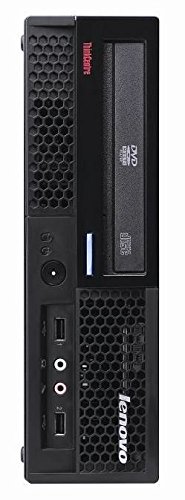
Image: Front view of the Lenovo ThinkCentre M58 USDT, showing typical USB ports and optical drive.
4.2 First Boot-Up
After connecting all peripherals and power:
- Press the power button located on the front of the computer.
- The computer will boot up and guide you through the initial operating system setup (e.g., Windows XP Professional or Windows 7, depending on your configuration). Follow the on-screen instructions to complete the setup process.
5. Operating Instructions
Your ThinkCentre M58 USDT comes equipped with a Windows operating system, providing a familiar user interface for daily tasks.
5.1 Key Features
- Multi-core Technology: Utilizes dual-core processing for enhanced multitasking and performance.
- Dual Channel Memory Architecture: Optimizes memory access for faster data processing.
- Enhanced Intel SpeedStep Technology: Dynamically adjusts processor voltage and frequency to reduce power consumption and heat.
- Intel Execute Disable Bit: Provides hardware-based protection against certain types of malicious software.
- Intel Extended Memory 64 Technology: Supports 64-bit computing for advanced applications and larger memory addressing.
5.2 Shutting Down
To properly shut down your computer, click the "Start" button (or Windows icon), then select "Shut Down" or "Power" > "Shut down". Do not power off the computer directly from the power button unless absolutely necessary to prevent data loss.
6. Maintenance
Regular maintenance helps ensure the longevity and optimal performance of your ThinkCentre M58 USDT.
6.1 Cleaning
- Exterior: Use a soft, lint-free cloth lightly dampened with water or a mild cleaning solution. Avoid harsh chemicals.
- Ventilation Openings: Periodically use compressed air to clear dust from the ventilation openings to maintain proper airflow.
- Screen: For monitors, use a specialized screen cleaner and a microfiber cloth.
6.2 Software Updates
Regularly check for and install operating system updates and driver updates from Lenovo's official support website to ensure security and performance.
6.3 Data Backup
It is highly recommended to regularly back up your important data to an external drive or cloud storage to prevent data loss in case of system failure.
7. Troubleshooting
This section addresses common issues you might encounter.
7.1 No Power
- Ensure the power cord is securely connected to both the computer and the electrical outlet.
- Verify the electrical outlet is functional by plugging in another device.
- Check the power adapter for any visible damage.
7.2 No Display on Monitor
- Confirm the monitor's power cable is connected and the monitor is turned on.
- Ensure the video cable (VGA, DisplayPort) is securely connected to both the computer and the monitor.
- Try connecting the monitor to a different video output port on the computer, if available.
7.3 System is Slow or Unresponsive
- Close unnecessary applications running in the background.
- Run a virus scan to check for malware.
- Ensure your operating system and drivers are up to date.
- Consider restarting the computer.
8. Specifications
Key technical specifications for the Lenovo ThinkCentre M58 USDT (Model 8820ANU):
| Feature | Detail |
|---|---|
| Model Number | 8820ANU |
| Processor | Intel E7500 (2.93 GHz, Dual-Core) |
| Memory (RAM) | 2 GB (Dual Channel Architecture) |
| Storage | 250 GB Hard Disk Drive (Serial ATA, 2.5 Inches) |
| Optical Drive | DVDRW |
| Operating System | Windows XP Professional with Windows 7 upgrade option |
| Connectivity Technology | HDMI |
| Dimensions (L x W x H) | 20 x 13 x 8 inches |
| Item Weight | 15.7 pounds |
| Color | Black |
| Special Feature | Portable |
Note: Specifications are subject to change without notice. For the most current information, please refer to the official Lenovo website.
9. Warranty and Support
Your Lenovo ThinkCentre M58 USDT is covered by a limited warranty. Please refer to the warranty document included with your product for specific terms and conditions, including warranty period and coverage details.
For technical support, driver downloads, or service inquiries, please visit the official Lenovo support website or contact Lenovo customer service. Have your product model number (8820ANU) and serial number ready when contacting support.
Lenovo Support Website: support.lenovo.com


