
Sylvania SRCD243M-PINK
Sylvania SRCD243M Portable CD Player with AM/FM Radio User Manual
Model: SRCD243M-PINK
Introduction
Thank you for purchasing the Sylvania SRCD243M Portable CD Player with AM/FM Radio. This manual provides important information regarding the setup, operation, and maintenance of your new device. Please read it thoroughly before use and retain it for future reference.
Safety Information
- Do not expose the unit to rain or moisture.
- Do not block any ventilation openings.
- Use only attachments/accessories specified by the manufacturer.
- Unplug this apparatus during lightning storms or when unused for long periods of time.
- Refer all servicing to qualified service personnel.
Package Contents
- Sylvania SRCD243M Portable CD Player
- AC Power Cord
- User Manual
Product Overview
Familiarize yourself with the controls and features of your Sylvania SRCD243M unit.
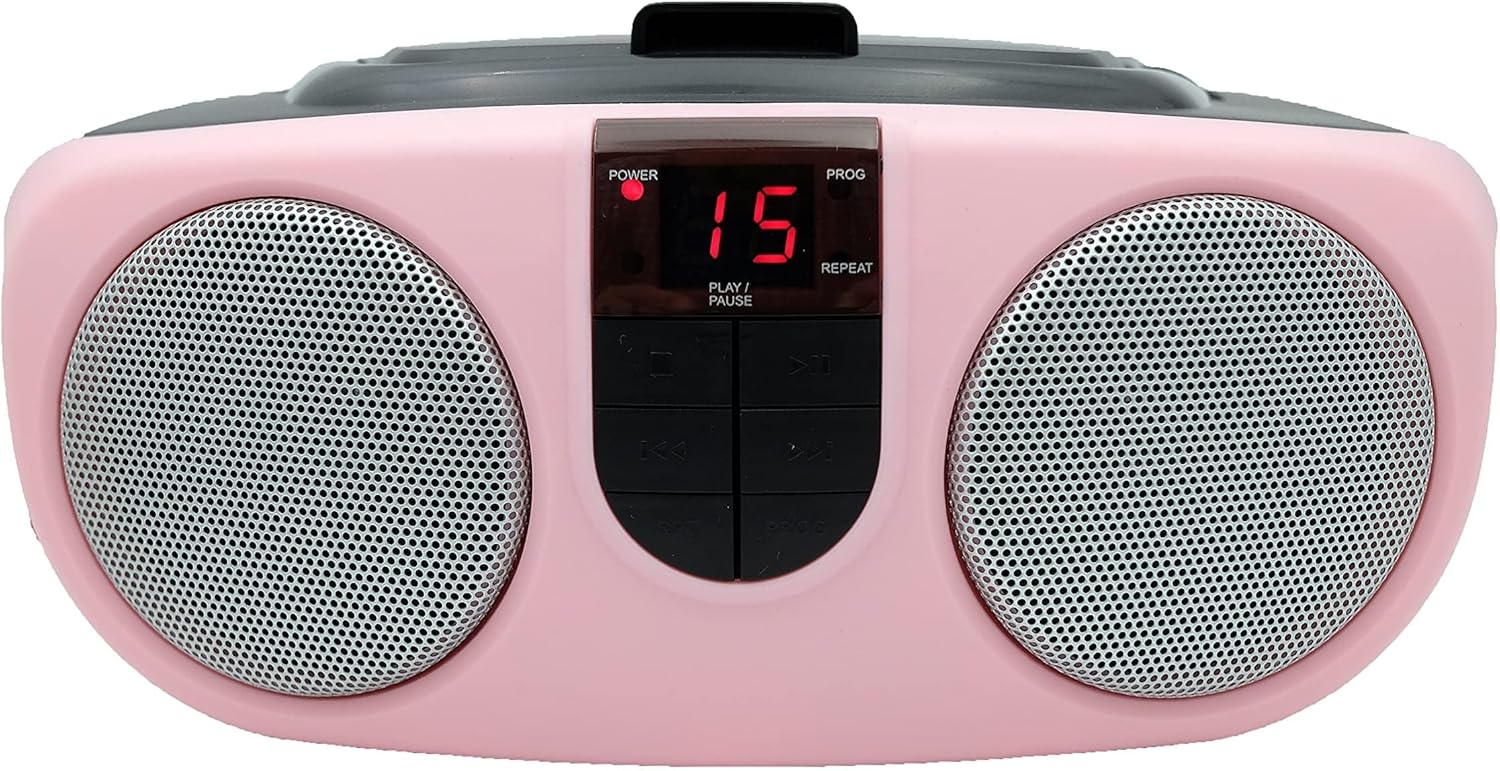
Image: Front view of the Sylvania SRCD243M Portable CD Player. The unit is pink with two circular speaker grilles on either side of a central control panel. The control panel features a red digital display showing '15', with 'POWER' and 'PROG' indicators above it, and 'PLAY/PAUSE' and 'REPEAT' labels below. Below the display are four black control buttons: Stop, Play/Pause, Skip Forward, and Skip Backward. The top of the unit has a black handle.
Control Panel Features:
- POWER Indicator: Illuminates when the unit is powered on.
- PROG Indicator: Illuminates when a CD program is active.
- REPEAT Indicator: Illuminates when repeat function is active.
- Digital Display: Shows track number, radio frequency, or other status information.
- PLAY/PAUSE Button: Starts or pauses CD playback.
- STOP Button: Stops CD playback.
- SKIP FORWARD (▶▶) Button: Skips to the next track on a CD; fast forwards during playback.
- SKIP BACKWARD (◀◀) Button: Skips to the previous track on a CD; fast reverses during playback.
- PROGRAM Button: Used to program CD tracks.
- FUNCTION Switch: Selects between CD, AM, FM, and AUX modes. (Typically located on the side or back)
- VOLUME Control: Adjusts the audio output level. (Typically a rotary knob)
- TUNING Knob: Adjusts radio frequency.
- AM/FM Band Selector: Switches between AM and FM radio bands.
- AUX Input Jack: For connecting external audio devices.
Setup
Powering the Unit:
Your SRCD243M can be powered by AC power or batteries.
AC Power Operation:
- Ensure the unit is turned off.
- Insert the AC power cord into the AC IN jack on the back of the unit.
- Plug the other end of the AC power cord into a standard AC wall outlet (120V ~ 60Hz).
Battery Operation:
The unit requires 2 'C' size batteries (not included).
- Open the battery compartment cover located on the bottom of the unit.
- Insert 2 'C' size batteries, observing the correct polarity (+ and -) as indicated inside the compartment.
- Close the battery compartment cover securely.
Antenna Setup:
- For FM reception, extend the telescopic antenna fully. Adjust its position for optimal reception.
- For AM reception, the unit has a built-in ferrite bar antenna. Rotate the entire unit for best reception.
Operating Instructions
General Operation:
- To turn the unit ON, select the desired function (CD, AM, FM, AUX) using the FUNCTION switch.
- Adjust the VOLUME knob to your desired listening level.
- To turn the unit OFF, set the FUNCTION switch to the OFF position.
CD Player Operation:
- Set the FUNCTION switch to the CD position.
- Open the CD compartment door by gently lifting it.
- Place a CD (or CD-R) onto the center spindle with the label side facing up.
- Close the CD compartment door firmly until it clicks. The display will show the total number of tracks.
- Press the PLAY/PAUSE button to start playback. The POWER indicator will light up, and the track number will be displayed.
- To pause playback, press the PLAY/PAUSE button. Press it again to resume.
- To stop playback, press the STOP button.
- To skip to the next track, press the SKIP FORWARD (▶▶) button.
- To skip to the previous track, press the SKIP BACKWARD (◀◀) button.
- To fast forward or reverse within a track, press and hold the SKIP FORWARD (▶▶) or SKIP BACKWARD (◀◀) button during playback.
Repeat Function:
- Press the REPEAT button once during playback to repeat the current track. The REPEAT indicator will light up.
- Press the REPEAT button a second time to repeat the entire CD. The REPEAT indicator will flash.
- Press the REPEAT button a third time to cancel the repeat function.
Program Play:
- In STOP mode, press the PROGRAM button. The PROG indicator will flash, and the display will show '01'.
- Use the SKIP FORWARD (▶▶) or SKIP BACKWARD (◀◀) buttons to select the desired track.
- Press the PROGRAM button again to confirm the selection. The display will show '02'.
- Repeat steps 2 and 3 to program up to 20 tracks.
- After programming, press the PLAY/PAUSE button to start programmed playback.
- To clear the program, open the CD compartment door or press the STOP button twice.
AM/FM Radio Operation:
- Set the FUNCTION switch to the AM or FM position.
- Select the desired band (AM or FM) using the AM/FM band selector switch.
- Rotate the TUNING knob to tune into your desired radio station.
- Adjust the VOLUME knob to your desired listening level.
AUX Input Operation:
- Set the FUNCTION switch to the AUX position.
- Connect an external audio device (e.g., smartphone, MP3 player) to the AUX IN jack using a 3.5mm audio cable (not included).
- Start playback on your external device.
- Adjust the VOLUME knob on the SRCD243M unit and/or your external device for desired sound level.
Maintenance
Cleaning:
- Wipe the exterior of the unit with a soft, damp cloth. Do not use abrasive cleaners or solvents.
- For the CD lens, use a specialized CD lens cleaner disc. Do not touch the lens directly.
Storage:
- If storing the unit for an extended period, remove the batteries to prevent leakage.
- Store in a cool, dry place away from direct sunlight and extreme temperatures.
Troubleshooting
| Problem | Possible Cause | Solution |
|---|---|---|
| No power | AC cord not plugged in; Batteries depleted or incorrectly inserted. | Check AC connection; Replace batteries or ensure correct polarity. |
| CD not playing / "NO" displayed | CD inserted incorrectly; CD is dirty or scratched; CD compartment not closed; Unit in wrong function mode. | Insert CD label-side up; Clean or replace CD; Close compartment firmly; Set FUNCTION switch to CD. |
| Poor radio reception | Antenna not extended/positioned correctly; Weak signal. | Extend and adjust FM antenna; Rotate unit for AM reception; Try a different location. |
| No sound from AUX input | Cable not connected properly; Unit in wrong function mode; Volume too low on unit or external device. | Ensure cable is fully inserted; Set FUNCTION switch to AUX; Increase volume on both devices. |
Specifications
- Model: SRCD243M-PINK
- Brand: Sylvania (Manufacturer) / Curtis (Brand on product page)
- Color: Pink
- Power Source: AC 120V ~ 60Hz or 2 x 'C' Batteries
- Supported Audio Formats: CD, CD-R, MP3 (via AUX)
- Connectivity: Auxiliary Input
- Radio Bands: AM/FM
- Weight: Approximately 2.64 lbs (1.2 kg)
- Compatible Devices: Smartphone (via AUX)
- UPC: 058465823481
Warranty and Support
Sylvania products are designed for reliability and performance. For warranty information or technical support, please refer to the warranty card included with your purchase or visit the official Sylvania support website. Keep your purchase receipt as proof of purchase for any warranty claims.