
KUFATEC 36810
KUFATEC E-MFA Add-On User Manual
Model: 36810
1. Introduction
The KUFATEC E-MFA Add-On (Model 36810) is designed to enhance your vehicle's multi-function display (FIS/MFA) by providing additional instrument readings. This module allows for the display of crucial vehicle data such as boost pressure, oil temperature, and more, directly within your existing red multi-function indicator.
This manual provides comprehensive instructions for the installation, operation, and troubleshooting of your E-MFA Add-On. Please read it thoroughly before installation and use to ensure proper functionality and safety.
2. Safety Information
- Always disconnect the vehicle's battery before performing any electrical installation to prevent short circuits and damage.
- Ensure all connections are secure and properly insulated to avoid electrical hazards.
- If you are unsure about any step of the installation process, it is recommended to seek assistance from a qualified automotive technician.
- Do not attempt to modify the E-MFA module or its wiring, as this may void the warranty and cause damage to your vehicle.
- Keep the module and its components away from moisture and extreme temperatures.
3. Compatibility
The KUFATEC E-MFA Add-On is compatible with the following Volkswagen and Skoda vehicle models, provided they are equipped with a red multi-function indicator (FIS display):
- Volkswagen Golf 5
- Volkswagen Jetta (1K0)
- Volkswagen Tiguan (5N)
- Volkswagen Touran (1T0)
- Volkswagen EOS (1F)
- Volkswagen Passat 3C (3C0)
- Volkswagen Scirocco (1K8)
- Skoda Octavia II (1Z)
Important Compatibility Notes:
- Boost Pressure Indicator: This function only works if it is already supported by your vehicle's existing systems. There is no display regarding boost pressure for the following vehicle variants: 2.0 TDI with 170 HP or 2.0 TFSI Golf 5.
- Foreign Brand Adapters: If your vehicle is equipped with adapters from foreign brands, unrestricted function cannot be guaranteed.
- Mobile Phone Preparation: This module cannot be used in conjunction with mobile phone preparations that display telephone information in the instrument cluster (e.g., "Premium rSAP").
- FISCON Bluetooth Hands-Free System: The E-MFA cannot be used in conjunction with the FISCON hands-free kit.
4. Package Contents
Upon opening the package, please verify that all components are present and undamaged:

Image: The KUFATEC E-MFA Add-On module with its integrated wiring harness and connectors.
- KUFATEC E-MFA Add-On Module (Model 36810)
- Vehicle-specific wiring harness with Quadlock connector
- Installation instructions (this manual)

Image: A detailed view of one of the connectors, showing the pin configuration and locking tabs.
5. Installation Guide
The E-MFA Add-On features a Plug & Play installation. Follow these steps carefully:

Image: Visual guide for the installation process, detailing steps to access and connect the module behind the car's radio unit.
- Step 1: In a VW Golf V, carefully pry off the trim panel in front of the sun sensor at the top. Loosen the screw.
- Step 2: Use a nylon tool to pry off the trim panel with the air vents. Disconnect and remove the sensor.
- Step 3: Press and pull out the lower release buttons for the passenger airbag light.
- Step 4: At the top, pull out and disconnect the green release slider on the hazard warning light switch.
- Step 5: Unscrew the two screws (Tx20) at the top of the radio and carefully pry around the radio with a nylon tool.
- Step 6: Loosen four screws (Tx20). Pull the radio out from the top guide and remove it.
- Step 7: After loosening the lock, pull out the plugs for the radio and navigation antennas.
- Step 8: Slightly lift the bracket on the Quadlock connector in the middle, fold it over, and secure it.
- Step 9: Attach the vehicle-specific wiring harness including the E-MFA interface to the radio slot and secure it by snapping it into place.
Once the module is physically installed, ensure all connections are firm before reassembling the dashboard components.
6. Operating Instructions
After successful installation, the E-MFA Add-On will integrate with your vehicle's red multi-function display (FIS display). The module allows you to view various additional parameters.
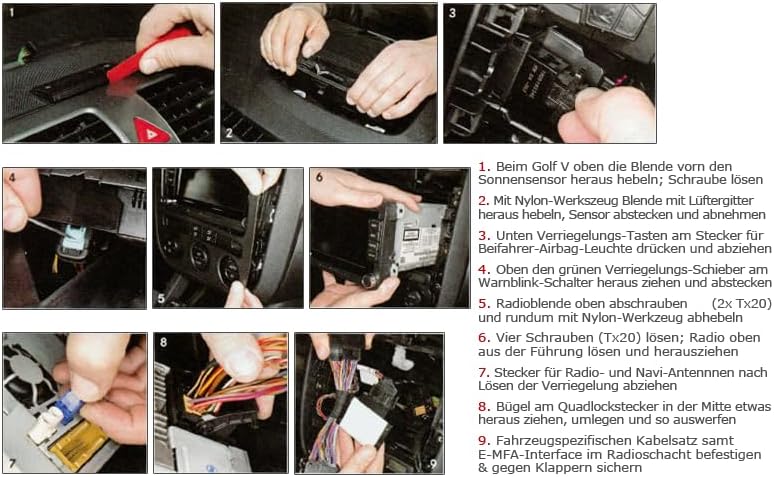
Image: Example of the E-MFA display, showing various parameters such as oil temperature, water temperature, boost pressure (LD bar), and battery voltage (UBat-V).
6.1 Displayed Information
The E-MFA Add-On can display a range of additional information, including but not limited to:
- Oil Temperature (Oel °C)
- Water Temperature (Wasser °C)
- Boost Pressure (LD bar) - Note: See compatibility section for limitations.
- Engine Speed (DZ U/min)
- Battery Voltage (UBat-V)
- Fuel Tank Level (Tank l)
- Current Speed (km/h)
- Trip Distance (trip)
6.2 Changing Settings and Display Modes
You can typically switch between different display modes and adjust settings using your vehicle's existing controls:
- Wiper Lever: Utilize the buttons or rocker switch on your wiper lever to navigate through the E-MFA menus and select desired readings.
- Multifunction Steering Wheel: If your vehicle is equipped with a multifunction steering wheel, you can use its controls to interact with the E-MFA display.
Refer to your vehicle's owner's manual for specific instructions on how to operate the multi-function display and steering wheel controls.
7. Maintenance
The KUFATEC E-MFA Add-On is designed to be maintenance-free. Once installed, no regular servicing is required. To ensure longevity:
- Avoid exposing the module to excessive moisture or extreme temperatures.
- Do not attempt to open the module casing.
- Keep the vehicle's electrical system in good condition.
8. Troubleshooting
If you encounter issues with your E-MFA Add-On, please review the following common problems and solutions:
| Problem | Possible Cause / Solution |
|---|---|
| No display or incorrect readings. |
|
| Boost pressure not displayed or incorrect. |
|
| Interference with other vehicle systems (e.g., mobile phone). |
|
| Functionality issues with foreign brand adapters. |
|
If the problem persists after trying these solutions, please contact KUFATEC customer support for further assistance.
9. Specifications
| Attribute | Value |
|---|---|
| Brand | KUFATEC |
| Model Number | 36810 |
| Manufacturer | KUFATEC |
| Item Weight | 200 g (0.2 Kilograms) |
| Package Dimensions | 27.5 x 16.8 x 4.8 cm |
| ASIN | B002UOIAEM |
| Material | Cotton (Note: This might refer to packaging or a small component, not the main module material) |
10. Warranty and Support
KUFATEC products are manufactured to high quality standards. For information regarding warranty coverage, please refer to the warranty policy provided at the time of purchase or visit the official KUFATEC website.
For technical support, installation assistance, or any other inquiries, please contact KUFATEC customer service. Contact details can typically be found on the official KUFATEC website or on your purchase documentation.
Online Resources:
- Official KUFATEC Website: www.kufatec.com
Ask a question about this manual
Ask about setup, troubleshooting, compatibility, parts, safety, or missing instructions. Manuals+ will review the question and use this page’s manual context to help answer it.