
Pyle PT504
PyleHome PT504 Portable Rack Mount Digital AM/FM Tuner User Manual
Model: PT504
1. Introduction
Thank you for purchasing the PyleHome PT504 Portable Rack Mount Digital AM/FM Tuner. This unit is designed to provide high-quality radio reception with convenient features such as 60 AM/FM station storage, a clock display, and an alarm with an auto-start feature. This manual provides detailed instructions for the proper installation, operation, and maintenance of your tuner. Please read this manual thoroughly before use to ensure optimal performance and safety.
2. Important Safety Instructions
- Read Instructions: All safety and operating instructions should be read before the appliance is operated.
- Retain Instructions: The safety and operating instructions should be retained for future reference.
- Heed Warnings: All warnings on the appliance and in the operating instructions should be adhered to.
- Follow Instructions: All operating and use instructions should be followed.
- Cleaning: Unplug this product from the wall outlet before cleaning. Do not use liquid cleaners or aerosol cleaners. Use a damp cloth for cleaning.
- Attachments: Do not use attachments not recommended by the product manufacturer as they may cause hazards.
- Water and Moisture: Do not use this product near water (e.g., near a bathtub, washbowl, kitchen sink, laundry tub, in a wet basement, or near a swimming pool).
- Power Sources: This product should be operated only from the type of power source indicated on the marking label. If you are not sure of the type of power supply to your home, consult your product dealer or local power company.
- Power-Cord Protection: Power-supply cords should be routed so that they are not likely to be walked on or pinched by items placed upon or against them, paying particular attention to cords at plugs, convenience receptacles, and the point where they exit from the product.
- Lightning: For added protection for this product during a lightning storm, or when it is left unattended and unused for long periods of time, unplug it from the wall outlet and disconnect the antenna or cable system. This will prevent damage to the product due to lightning and power-line surges.
- Overloading: Do not overload wall outlets, extension cords, or integral convenience receptacles as this can result in a risk of fire or electric shock.
- Object and Liquid Entry: Never push objects of any kind into this product through openings as they may touch dangerous voltage points or short-out parts that could result in a fire or electric shock. Never spill liquid of any kind on the product.
- Servicing: Do not attempt to service this product yourself as opening or removing covers may expose you to dangerous voltage or other hazards. Refer all servicing to qualified service personnel.
3. Package Contents
Upon opening the package, please ensure all items are present and in good condition:
- PyleHome PT504 Rack-mount AM/FM Receiver
- Remote Control (batteries not included)
- AM Loop Antenna
- FM Wire Antenna
4. Product Overview
4.1 Front Panel
The front panel features the digital display, power button, tuning controls, preset buttons, and other function buttons for easy operation.

Figure 4.1: Front view of the PyleHome PT504 digital AM/FM tuner with its remote control. The tuner features a central digital display, numerous illuminated buttons for station selection and control, and rack-mount ears. The remote control, held in a hand, provides convenient access to the tuner's functions from a distance.
4.2 Rear Panel
The rear panel provides all necessary connections for antennas, audio output, and power input.
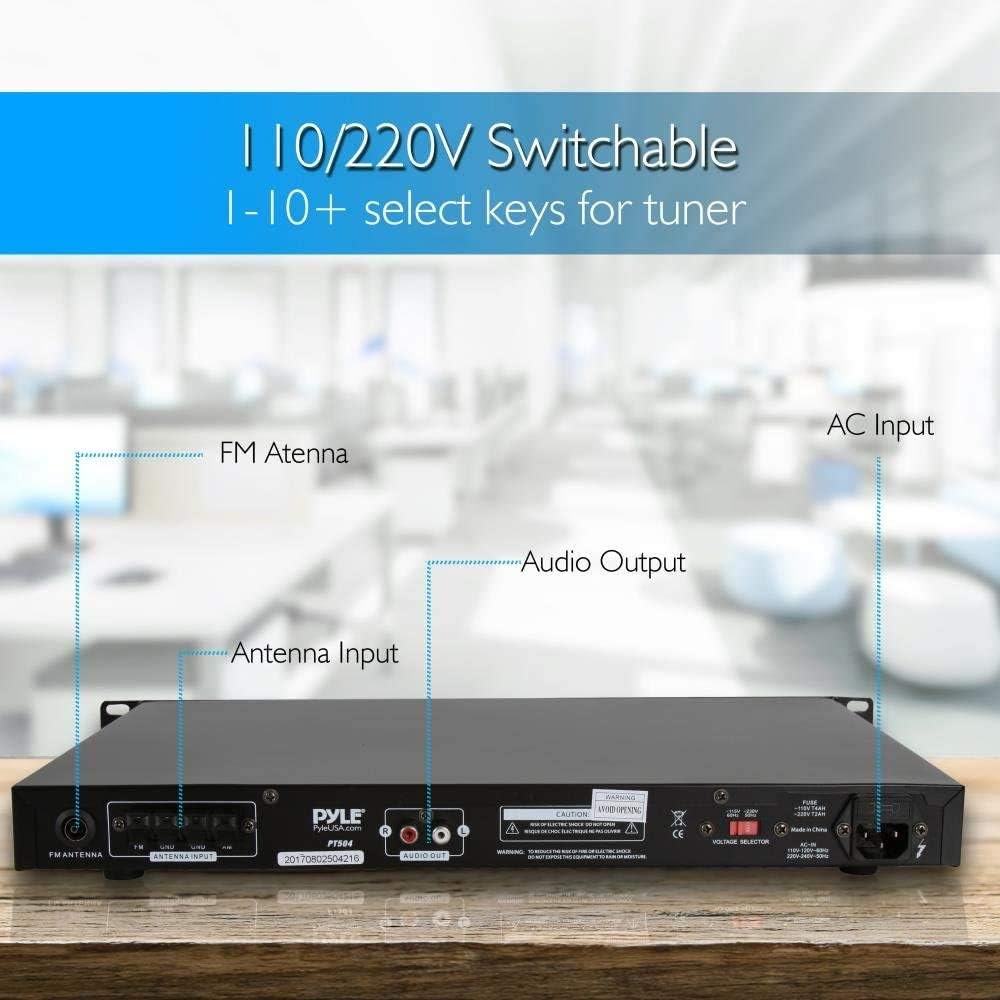
Figure 4.2: Rear panel of the PyleHome PT504 digital AM/FM tuner, showing input and output connections. From left to right, it includes an FM antenna input, AM antenna input, audio output (RCA L/R), and an AC power input with a 110V/220V voltage selector switch. Labels clearly indicate each port's function, essential for proper setup and connectivity.
4.3 Remote Control
The included remote control allows for convenient operation of the tuner from a distance. It requires two AAA batteries (not included).

Figure 4.3: Close-up of the PyleHome PT504 remote control, showing the battery compartment. The image illustrates the process of inserting two AAA batteries (not included) into the remote, which is necessary for its operation. The remote features various buttons for power, volume, tuning, and preset selection.
5. Setup and Installation
5.1 Rack Mounting
The PT504 is designed for standard rack mounting. Secure the unit into a 19-inch equipment rack using appropriate rack screws (not included). Ensure adequate ventilation around the unit.
5.2 Antenna Connection
Proper antenna connection is crucial for good reception.
- FM Antenna: Connect the supplied FM wire antenna to the 'FM ANTENNA' terminal on the rear panel. For improved reception, you may connect an external FM antenna. Note that the FM antenna connector may be a PAL type; an adapter may be required for standard coaxial cables.
- AM Antenna: Connect the supplied AM loop antenna to the 'AM ANTENNA INPUT' terminals on the rear panel. Position the AM loop antenna for best reception.
5.3 Audio Output Connection
Connect the 'AUDIO OUT' RCA jacks on the rear panel to the audio input of your amplifier, receiver, or powered speakers using standard RCA cables.
5.4 Power Connection
Before connecting to power, ensure the voltage selector switch on the rear panel is set to your local power supply (110V or 220V). Connect the AC power cord to the 'AC INPUT' on the rear panel and then to a suitable wall outlet.

Figure 5.1: The PyleHome PT504 digital AM/FM tuner integrated into a home entertainment system, positioned below a television. The tuner features a sleek black design with a digital display and illuminated buttons. An AM loop antenna is visible next to the unit, indicating its radio reception capabilities. The image emphasizes the tuner's role in providing radio station storage.
6. Operating Instructions
6.1 Power On/Off
Press the POWER button on the front panel or the remote control to turn the unit on or off.
6.2 Selecting AM/FM Band
Press the AM/FM button on the front panel or remote control to switch between AM and FM radio bands.
6.3 Tuning Radio Stations
- Manual Tuning: Use the TUNE + or TUNE - buttons to manually adjust the frequency step by step.
- Auto Scan Tuning: Press and hold the TUNE + or TUNE - buttons to automatically scan for the next available strong station.
6.4 Storing and Recalling Presets
The PT504 can store up to 60 AM/FM radio stations (30 AM, 30 FM).
- To Store a Station:
- Tune to the desired station.
- Press the MEMORY button. The preset number will flash on the display.
- Use the PRESET + or PRESET - buttons to select the desired preset number.
- Press the MEMORY button again to confirm and save the station.
- To Recall a Station: Use the PRESET + or PRESET - buttons to cycle through stored stations, or use the numeric keypad on the remote control to directly enter a preset number.
6.5 Clock and Alarm Settings
Refer to the specific instructions in the full manual for detailed steps on setting the clock and configuring the alarm with auto-start features. These functions are typically accessed via dedicated buttons on the remote control or front panel.
7. Maintenance
7.1 Cleaning
To clean the unit, unplug it from the power outlet. Use a soft, dry cloth to wipe the exterior surfaces. Do not use liquid or abrasive cleaners, as they may damage the finish.
7.2 Antenna Care
Ensure antennas are not bent or damaged. For optimal reception, keep antennas away from other electronic devices that may cause interference.
8. Troubleshooting
| Problem | Possible Cause | Solution |
|---|---|---|
| No power | Power cord not connected; Power outlet faulty; Voltage selector incorrect. | Ensure power cord is securely connected. Test outlet with another device. Verify voltage selector switch is set correctly (110V/220V). |
| Poor radio reception | Antenna not connected or positioned correctly; Weak signal; Interference. | Check antenna connections. Adjust antenna position for best reception. Try an external antenna. Move unit away from other electronic devices. |
| Remote control not working | Batteries depleted or incorrectly inserted; Obstruction between remote and unit. | Replace remote control batteries (2x AAA). Ensure batteries are inserted with correct polarity. Remove any obstructions. Point remote directly at the unit's IR sensor. |
| Cannot store presets | Incorrect procedure followed. | Follow the 'Storing a Station' steps carefully (Section 6.4). |
9. Specifications
- Model: PT504
- Brand: Pyle
- Product Dimensions (L x W x H): 19.78 x 12.35 x 3.97 inches
- Item Weight: 3.49 pounds
- Radio Bands: AM/FM
- Station Presets: 60 (30 AM, 30 FM)
- Features: Clock Display, Alarm with Auto Start Feature, Remote Control
- Power Input: 110V/220V Switchable
- Audio Output: RCA L/R
- Date First Available: October 27, 2009
10. Warranty Information
Pyle products are designed and manufactured to the highest quality standards. For specific warranty details, including coverage period and terms, please refer to the warranty card included with your product or visit the official Pyle website. Keep your purchase receipt as proof of purchase for any warranty claims.
11. Customer Support
If you have any questions, require technical assistance, or encounter issues not covered in this manual, please contact Pyle customer support. Contact information can typically be found on the official Pyle website or on the product packaging.
- Online Support: Visit the Pyle website for FAQs, product registration, and support resources.
- Phone Support: Refer to the Pyle website for current customer service phone numbers and operating hours.
Related documentsPT504


Ask a question about this manual
Ask about setup, troubleshooting, compatibility, parts, safety, or missing instructions. Manuals+ will review the question and use this page’s manual context to help answer it.