
1. Important Safety Instructions
Please read all instructions carefully before using this heater. Failure to follow these instructions may result in fire, electric shock, injury to persons, or property damage.
- Electrical Safety: Always plug heaters directly into a wall outlet/receptacle. Never use with an extension cord or relocatable power tap (outlet/power strip).
- Placement: Place the heater on a firm, level surface. Maintain at least 3 feet (0.9 meters) clearance from walls, furniture, curtains, and other combustible materials. Do not use in wet or damp locations like bathrooms or laundry areas.
- Overheat Protection: This heater is equipped with an automatic overheat protection system. If the heater overheats, it will automatically shut off. Unplug the heater, wait 10 minutes for it to cool, then plug it back in.
- Tip-Over Switch: A safety tip-over switch automatically shuts off the heater if it is accidentally knocked over. Place the heater on a stable surface to prevent accidental tipping.
- Supervision: Do not leave the heater unattended, especially when children or pets are present.
- Power Cord: Do not run the power cord under carpeting or cover it with throw rugs, runners, or similar coverings. Arrange the cord away from traffic areas where it will not be tripped over.
- Maintenance: Always unplug the heater before cleaning or performing any maintenance.
- Intended Use: This heater is intended for indoor, residential use only. Do not use for commercial or industrial applications.
2. Product Overview
The Comfort Zone CZ499R is an electric oscillating ceramic tower space heater designed to provide efficient and targeted warmth for small to medium-sized rooms. It features a digital display, remote control, and multiple safety functions.

Figure 2.1: Front view of the Comfort Zone CZ499R Tower Heater with remote control.
Key Features:
- Ceramic PTC Heating Element: Provides rapid and efficient heating.
- 80-Degree Oscillation: Distributes warmth evenly across the room.
- Digital Thermostat & Display: Allows precise temperature control and clear temperature readings.
- Multiple Heat Settings: Offers 750W (Low), 1500W (High), and Fan Only modes for versatile use.
- 12-Hour Auto-Off Timer: For convenient and energy-saving operation.
- Safety Features: Includes overheat protection sensor and tip-over auto-off switch.
- Remote Control: Full-function remote for convenient operation from a distance.
- Stay-Cool Body and Handle: Ensures safe handling and portability.

Figure 2.2: The heater's 80-degree oscillation feature distributes warmth throughout the room.

Figure 2.3: Overview of the heater's intelligent safety features, including overheat sensor, tip-over auto-off switch, stay-cool body, and stay-cool handle.

Figure 2.4: The CZ499R heater is ideal for small to medium rooms such as living rooms, bedrooms, offices, and kitchens.
3. Setup
The Comfort Zone CZ499R heater requires no assembly and is ready for use directly out of the box.
- Unpack: Carefully remove the heater from its packaging. Retain packaging for future storage if desired.
- Placement: Place the heater on a firm, level, and stable surface. Ensure there is at least 3 feet (0.9 meters) of clear space around the heater from any walls, furniture, or combustible materials.
- Power Connection: Plug the power cord directly into a 120V AC, 60Hz wall outlet. Ensure the outlet is not overloaded with other appliances.
4. Operating Instructions
The heater can be operated using the control panel on the unit or the included remote control.
4.1 Control Panel
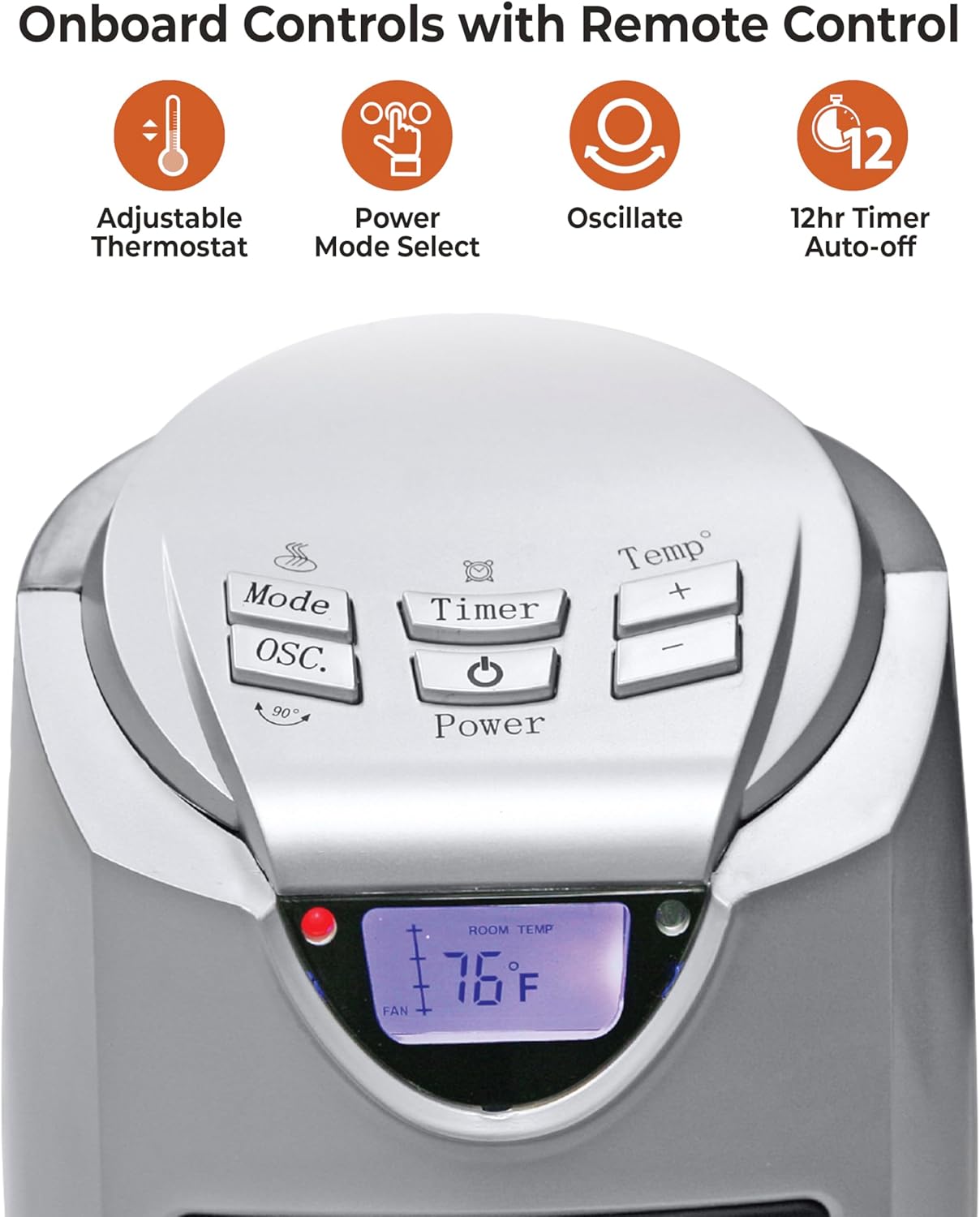
Figure 4.1: Detailed view of the onboard control panel with buttons for Mode, Oscillation, Timer, Power, and Temperature adjustment.
- Power Button (⏻): Press to turn the heater ON or OFF.
- Mode Button (MODE): Press to cycle through heat settings: High (1500W), Low (750W), and Fan Only.
- Oscillation Button (OSC): Press to activate or deactivate the oscillation function.
- Temperature Up/Down Buttons (TEMP +/-): Press to adjust the desired temperature setting. The temperature range is typically 59°F to 90°F (15°C to 32°C).
- Timer Button (TIMER): Press to set the auto-off timer from 1 to 12 hours. Each press increases the timer by one hour.
4.2 Remote Control

Figure 4.2: Layout of the remote control, showing buttons for Power, Temperature Up/Down, Oscillation, Mode, and Timer.
The remote control duplicates the functions of the control panel for convenient operation.
- Ensure the remote has working batteries (2 x AAA, not included).
- Point the remote control directly at the heater's display panel for optimal response.
4.3 Setting the Desired Temperature
- Turn the heater ON using the Power button.
- Press the MODE button until the desired heat setting (High or Low) is selected.
- Use the TEMP +/- buttons to set your desired room temperature. The display will show the set temperature.
- The heater will cycle ON and OFF to maintain the set temperature.
4.4 Using the Timer Function
- With the heater ON, press the TIMER button.
- Each press of the TIMER button will increase the auto-off time by one hour, up to a maximum of 12 hours.
- The display will show the set timer duration. The heater will automatically turn off once the set time has elapsed.
5. Maintenance
Regular cleaning and proper storage will help ensure the longevity and efficient operation of your heater.
5.1 Cleaning
- Always unplug the heater from the power outlet and allow it to cool completely before cleaning.
- Wipe the exterior surfaces of the heater with a soft, damp cloth. Do not use abrasive cleaners or solvents.
- Do not immerse the heater in water or allow water to drip into the interior of the heater.
- Gently vacuum the air intake and exhaust grilles to remove dust and lint.
5.2 Storage
- Unplug the heater and allow it to cool completely.
- Clean the heater as described in Section 5.1.
- Store the heater in its original packaging in a cool, dry place when not in use.
6. Troubleshooting
If your heater is not operating correctly, please refer to the following common issues and solutions:
| Problem | Possible Cause | Solution |
|---|---|---|
| Heater does not turn on. | No power to the unit. Overheat protection activated. Tip-over switch activated. | Ensure the power cord is securely plugged into a working outlet. Unplug, wait 10 minutes, then plug back in. Ensure the heater is on a flat, stable surface. |
| Heater stops heating. | Desired temperature reached. Overheat protection activated. | The heater will cycle on/off to maintain the set temperature. Unplug, wait 10 minutes, then plug back in. Check for obstructions. |
| Oscillation not working. | Oscillation function deactivated. | Press the OSC button to activate oscillation. |
| Remote control not responding. | Dead batteries. Obstruction between remote and heater. | Replace batteries (2 x AAA). Ensure a clear line of sight to the heater's display panel. |
7. Specifications

Figure 7.1: Dimensions of the CZ499R heater: 23.3 inches height, 10.3 inches width, 10.3 inches depth.
| Feature | Detail |
|---|---|
| Brand | Comfort Zone |
| Model Number | CZ499R |
| Type | Electric Oscillating Ceramic Tower Space Heater |
| Power Settings | 750W (Low), 1500W (High), Fan Only |
| Voltage | 120V AC, 60Hz |
| Amperage | 12.5 Amps |
| Heating Coverage | Up to 300 sq. ft. |
| Product Dimensions (D x W x H) | 8.46" x 9.25" x 21.46" (21.5 cm x 23.5 cm x 54.5 cm) |
| Item Weight | 6.61 pounds (3 kg) |
| Temperature Range | 59°F - 90°F (15°C - 32°C) |
| Special Features | Digital Display, On/Off Timer, Overheat Protection, Portable, Programmable Thermostat, Oscillation |
| Included Components | CZ499R Space Heater, Power Cord, Product Manual, Remote Control |
| Batteries Required for Remote | Yes (2 x AAA, not included) |
8. Warranty and Support
8.1 Warranty Information
This Comfort Zone CZ499R Electric Oscillating Ceramic Tower Space Heater comes with a 1 Year Limited Warranty against manufacturer defects from the date of purchase. This warranty covers defects in materials and workmanship under normal use.
The warranty does not cover damage resulting from misuse, abuse, accident, alteration, or unauthorized repair. Proof of purchase is required for all warranty claims.
8.2 Customer Support
For technical assistance, warranty claims, or general inquiries regarding your Comfort Zone CZ499R heater, please contact Comfort Zone customer support. Refer to the contact information provided on the product packaging or the official Comfort Zone website.
When contacting support, please have your model number (CZ499R) and proof of purchase readily available.