
Introduction
This manual provides detailed instructions for the safe and proper installation, operation, and maintenance of your AVF EL101B-A Adjustable Tilt TV Wall Mount. Please read all instructions carefully before beginning installation and retain this manual for future reference.
Safety Information
WARNING: Failure to read and follow these instructions may result in personal injury, property damage, or voiding of your warranty. If you have any questions, please contact AVF customer support.
- Ensure the mounting surface can safely support the combined weight of the mount and your television.
- Do not exceed the maximum weight capacity of 33 lbs (15 kg).
- This mount is designed for TVs between 12 and 25 inches.
- Always use a stud finder to locate wall studs for secure mounting. If mounting to concrete or brick, use appropriate anchors (not always included).
- Do not overtighten screws, as this may cause damage.
- Keep children and pets away during installation.
- Verify all connections are secure before releasing the TV.
Package Contents
Before installation, ensure all components are present and undamaged. If any parts are missing or defective, do not proceed with installation and contact customer support.
- TV Wall Mount (Model EL101B-A)
- Mounting Hardware Kit (various screws, washers, spacers)
- Instruction Manual
Note: Specific hardware may vary. Refer to the included hardware pack for exact contents.
Specifications
| Model Number | EL101B-A |
| Compatible TV Sizes | 12" to 25" |
| Maximum Load Capacity | 33 lbs (15 kg) |
| Mounting Profile | 1.08 inches (from wall) |
| VESA Compatibility | 75x75mm, 100x100mm |
| Tilt Angle | Up to 14 degrees downward |
| Material | Steel |
| Color | Black |
| Product Dimensions (Mount) | 1.08 x 4.72 x 4.72 inches |
| Item Weight | 11.2 ounces |
 Image: VESA compatibility diagram for the EL101B-A mount, illustrating 75x75mm and 100x100mm patterns.
Setup and Installation
This mount features a 2-piece design for simplified installation. Follow these steps carefully.
Tools Required (Not Included):
- Phillips head screwdriver
- Drill with appropriate drill bits (for wood studs or masonry)
- Stud finder (for wood stud installation)
- Level
- Pencil
- Measuring tape
Step-by-Step Installation:
Attach TV Plate to Television:
Carefully place your TV face down on a soft, clean surface. Identify the VESA mounting holes on the back of your TV. Select the appropriate screws, washers, and spacers from the hardware kit that fit your TV's mounting holes. Secure the TV plate (the smaller bracket) to the back of your TV using these fasteners. Ensure it is centered and securely tightened without overtightening.
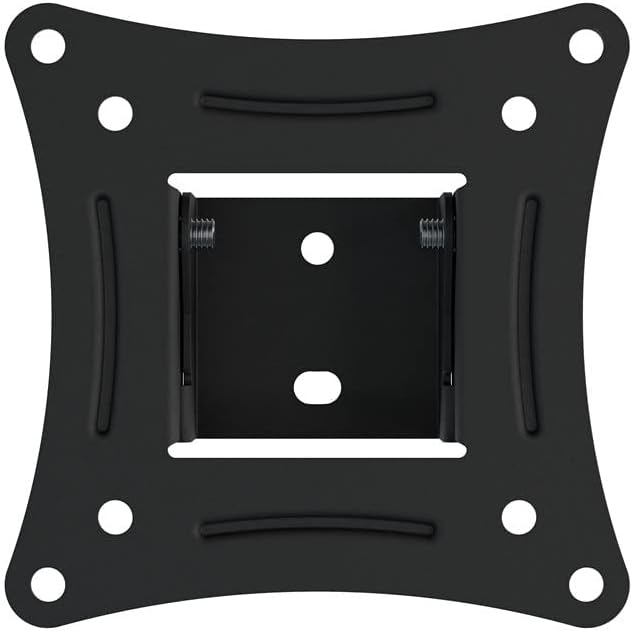 Image: The TV plate (smaller bracket) secured to the back of a television.
Attach Wall Plate to Wall:
Determine the desired height and location for your TV. Use a stud finder to locate a wood stud in the wall. Mark the drill holes for the wall plate (the larger bracket) using a pencil and a level to ensure it is straight. Drill pilot holes into the stud. Secure the wall plate to the wall using the provided lag bolts and washers. If mounting to concrete or brick, use appropriate masonry anchors and bolts (sold separately).
 Image: Step-by-step installation diagram, showing attaching the TV plate, then the wall plate, and finally hanging the TV.
Hang and Secure Television:
With assistance, carefully lift the TV with the attached TV plate. Align the TV plate with the wall plate and hook the TV onto the top edge of the wall plate. Gently lower the TV until the two parts engage and click into place. The yellow plastic tabs on the bottom of the wall plate should secure the TV. Ensure the TV is level and fully seated on the mount.
 Image: Side view of the mount illustrating the secure screw lock and tilt feature.
Operating Instructions
Adjusting Tilt:
The AVF EL101B-A mount allows for a downward tilt of up to 14 degrees to optimize viewing angles and reduce glare. To adjust the tilt:
- Gently push the bottom of the TV forward or pull it back to achieve the desired tilt angle.
- The mount is designed to hold its position once adjusted. If the TV does not hold its tilt, ensure the tilt mechanism screws are adequately tightened (refer to installation steps for securing the TV plate).
Image: Side view of the mount highlighting the tilt capability.
Maintenance
Regular maintenance ensures the longevity and safe operation of your TV mount.
- Cleaning: Wipe the mount with a soft, dry cloth. Do not use abrasive cleaners or solvents.
- Periodic Check: Periodically check all screws and bolts to ensure they remain tight and secure. Retighten if necessary.
- Weight Limit: Do not hang additional items or exceed the maximum weight capacity of the mount.
Troubleshooting
| Problem | Possible Cause | Solution |
|---|---|---|
| TV is not level after installation. | Wall plate was not installed level. | Remove the TV, loosen the wall plate screws, adjust with a level, and retighten. |
| TV feels loose or wobbly on the mount. | Screws are not fully tightened; mount not properly engaged. | Ensure all screws securing the TV plate to the TV and the wall plate to the wall are tight. Verify the TV plate is fully seated and locked onto the wall plate. |
| TV does not tilt or hold its position. | Tilt mechanism screws are loose. | Check and tighten the screws associated with the tilt mechanism on the TV plate. |
| Cannot attach TV plate to TV. | Incorrect screws or VESA pattern mismatch. | Ensure you are using the correct screws for your TV's VESA pattern (75x75mm or 100x100mm). Consult your TV manual for VESA specifications. |
Warranty Information
AVF products are designed and manufactured to high standards. For specific warranty details, please refer to the warranty card included with your product or visit the official AVF website. Keep your purchase receipt as proof of purchase for any warranty claims.
Support
If you require further assistance or have questions regarding your AVF EL101B-A TV Wall Mount, please contact AVF customer support. Contact information can typically be found on the AVF website or on the product packaging.
Online Resources: www.avf.com


