
Introduction
This manual provides essential information for the proper installation, maintenance, and troubleshooting of your MTD Genuine Parts 754-04060 or 954-04060 Replacement V-Belt. This V-belt is designed for use with various MTD, Yardman, and Yard Machines lawn mowers, ATVs, and other machinery. Adhering to these instructions will help ensure optimal performance and longevity of the belt and your equipment.

The official MTD logo, representing quality and genuine parts.
Product Overview
The MTD Genuine Parts 754-04060 / 954-04060 V-Belt is a critical component for transmitting power in your outdoor equipment. Manufactured by Pix, this black V-belt is engineered for durability and precise fit.

Image of the MTD Genuine Parts 754-04060 / 954-04060 Replacement V-Belt.
Compatible Devices:
- Lawn Mowers
- ATVs
- Other machinery from MTD, Yardman, and Yard Machines
Safety Information
Always prioritize safety when working with power equipment. Failure to follow safety precautions can result in serious injury.
- Disconnect Power: Before performing any maintenance or installation, ensure the equipment is turned off and the spark plug wire is disconnected to prevent accidental starting.
- Wear Protective Gear: Use appropriate personal protective equipment, including gloves and eye protection.
- Allow Cooling: If the equipment has been recently operated, allow sufficient time for hot components to cool down before handling.
- Secure Equipment: Ensure the equipment is stable and cannot move or tip over during the installation process.
- Read Equipment Manual: Refer to your specific equipment's owner's manual for detailed safety instructions and belt replacement procedures.
Setup and Pre-Installation
Proper preparation is crucial for a smooth belt replacement. Follow these steps before attempting to install the new V-belt.
- Park on a Level Surface: Position your lawn mower or equipment on a flat, stable surface.
- Engage Parking Brake: If applicable, engage the parking brake to prevent movement.
- Turn Off Engine: Shut down the engine completely.
- Disconnect Spark Plug: For gasoline-powered equipment, disconnect the spark plug wire to prevent accidental engine starting.
- Access the Belt Area: Depending on your equipment model, you may need to remove the mower deck, guards, or other components to gain access to the belt system. Refer to your equipment's manual for specific instructions.
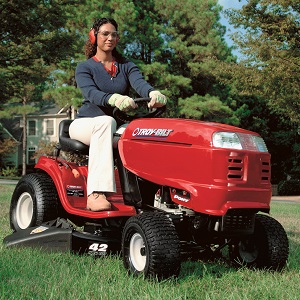
A Troy-Bilt riding mower, an example of compatible equipment where this belt may be used.
Installation Instructions
Follow these general steps for installing your new MTD replacement V-belt. Specific procedures may vary by equipment model; always consult your equipment's owner's manual.
- Remove Old Belt: Carefully remove the old, worn, or broken belt from the pulleys. Note the routing path of the old belt before removal, as this will be essential for installing the new one correctly. Taking a photo can be helpful.
- Inspect Pulleys: Check all pulleys for wear, damage, or debris. Clean any dirt or grass buildup that could affect belt performance. Ensure all pulleys spin freely.
- Route New Belt: Begin routing the new MTD V-belt according to the path of the old belt. Start with the largest pulley or the most difficult-to-reach pulley first. Ensure the V-side of the belt sits correctly in the V-grooves of the pulleys.
- Engage Tensioners: If your system uses tensioner pulleys or idlers, carefully maneuver the belt around them. You may need to release tension on a spring-loaded idler to fit the belt.
- Verify Seating: Once the belt is fully routed, double-check that it is properly seated in all pulley grooves and that there are no twists or kinks in the belt.
- Reassemble Components: Reinstall any guards, covers, or the mower deck that were removed to access the belt.
Important Note: Incorrect belt installation is a common cause of premature belt failure. Ensure the belt is routed precisely as specified in your equipment's manual and that it is not pinched or rubbing against any components.
Operating (Post-Installation Check)
After installing the new belt, perform these checks before resuming full operation.
- Reconnect Spark Plug: Reconnect the spark plug wire.
- Initial Start-up: Start the equipment and allow it to run at a low idle for a few moments. Listen for any unusual noises or vibrations.
- Engage System (Carefully): If applicable, slowly engage the system that uses the belt (e.g., mower blades). Observe the belt's movement and ensure it runs smoothly without slipping or excessive wobbling.
- Check for Proper Function: Verify that the equipment operates as expected. If any issues arise, immediately shut down the equipment and refer to the troubleshooting section or your equipment's manual.
Maintenance
Regular inspection and proper care will extend the life of your MTD replacement V-belt.
- Regular Inspection: Periodically inspect the belt for signs of wear, cracking, fraying, glazing, or stretching. Replace the belt if any significant damage is observed.
- Keep Clean: Keep the belt and pulleys free from dirt, grass clippings, oil, and other debris. Contaminants can cause the belt to slip or wear prematurely.
- Proper Storage: When not in use for extended periods, store equipment in a dry, cool place. Avoid exposing the belt to extreme temperatures or direct sunlight, which can degrade the material.
- Avoid Overloading: Do not overload your equipment, as this can put excessive strain on the belt and lead to premature failure.
Troubleshooting
If you encounter issues with your new belt, consider the following common problems and solutions.
| Problem | Possible Cause | Solution |
|---|---|---|
| Belt slipping | Incorrect tension, worn pulleys, oil/grease on belt, incorrect belt size. | Adjust tension, clean pulleys/belt, replace worn pulleys, verify correct belt part number. |
| Premature belt wear | Improper installation (twists/pinches), misaligned pulleys, worn pulleys, excessive load, debris. | Re-install correctly, check pulley alignment, replace worn pulleys, reduce load, clean belt path. |
| Unusual noise (squealing, grinding) | Belt slipping, worn bearings in pulleys, foreign object in belt path. | Check tension, inspect pulleys for wear, remove debris. |
If troubleshooting steps do not resolve the issue, consult a qualified service technician or contact MTD customer support.
Specifications
- Brand: MTD Genuine Parts
- Belt Style: V Belt
- Compatible Devices: Lawn Mowers, ATVs, and other machinery from MTD, Yardman, and Yard Machines
- Color: BLACK
- Manufacturer: Pix
- UPC: 671958627825
- ASIN: B002G8S8U
Warranty and Support
MTD Genuine Parts are designed for quality and reliability. For specific warranty information regarding your replacement V-belt, please refer to the documentation included with your purchase or visit the official MTD website.
For further assistance, technical support, or to locate authorized service centers, please visit the MTD Genuine Parts Store or consult your equipment's owner's manual for contact information.


