
1. Introduction
This manual provides essential information for the safe and effective use of your Leica D-Lux 4 Safari Special Edition Digital Camera. Please read it thoroughly before using your camera and keep it for future reference. The Leica D-Lux 4 Safari is a limited edition digital camera featuring a distinctive Safari Green color and a special case, designed for high-quality digital photography.
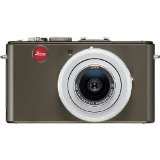
Figure 1: Leica D-Lux 4 Safari Special Edition Digital Camera. This image displays the compact digital camera with its distinctive green finish and lens.
2. Setup
2.1. Battery Installation
- Ensure the camera is powered off.
- Locate the battery compartment cover on the bottom of the camera.
- Slide the latch to open the cover.
- Insert the provided battery, ensuring the correct orientation as indicated inside the compartment.
- Close the battery compartment cover securely until it clicks into place.
2.2. Memory Card Insertion
The camera supports SD and SDXC memory cards for storing photos and videos.
- With the camera powered off, open the battery/memory card compartment cover.
- Insert the memory card into the designated slot with the label facing the correct direction (usually towards the front of the camera). Push until it clicks into place.
- Close the compartment cover.
2.3. Initial Power On
Press the power button to turn on the camera. Follow any on-screen prompts to set the date, time, and language.
3. Operating Instructions
3.1. Basic Photography (Point & Shoot)
- Power On: Press the power button.
- Select Mode: Use the mode dial to select "Automatic" for general use.
- Focus: Point the camera at your subject. The camera will automatically focus using contrast detection.
- Capture: Press the shutter button halfway to focus, then press fully to take a picture.
3.2. Video Recording
- Select Mode: Turn the mode dial to "Movie" mode.
- Start/Stop Recording: Press the dedicated video record button to start and stop recording. The camera records in 1080p at 30 frames per second.
- Digital Image Stabilization: The camera features digital image stabilization to reduce blur during video recording.
3.3. Zoom Functionality
The camera features 2.5x optical zoom. Use the zoom lever (typically around the shutter button) to zoom in or out. Digital zoom is also available up to 16x.
3.4. Advanced Shooting Modes
Explore various modes via the mode dial:
- Landscape Mode: Optimized for wide scenic shots.
- Manual Exposure Control: For experienced users to manually adjust aperture and shutter speed.
- White Balance Settings: Customize white balance for accurate color reproduction under different lighting conditions.
3.5. Connectivity
- Wi-Fi: Connect your camera to a Wi-Fi network for wireless transfer of images and remote control via a compatible smartphone app. Refer to the camera's on-screen menu for Wi-Fi setup.
4. Maintenance
4.1. Cleaning the Camera
- Camera Body: Use a soft, dry cloth to wipe the camera body. For stubborn dirt, slightly dampen the cloth with water. Avoid harsh chemicals.
- Lens: Use a lens brush to remove dust, then gently wipe with a microfiber lens cloth. For smudges, use a specialized lens cleaning solution.
- Screen: Wipe the LCD screen with a soft, dry microfiber cloth.
4.2. Battery Care
- Always use the original Leica charger and battery.
- Avoid exposing the battery to extreme temperatures.
- Store the battery in a cool, dry place when not in use.
5. Troubleshooting
5.1. Camera Not Powering On
- Ensure the battery is fully charged and correctly inserted.
- Try using a different, fully charged battery if available.
5.2. Poor Image Quality
- Check if the lens is clean and free from smudges or dust.
- Ensure adequate lighting for your shot.
- Adjust shooting modes or exposure settings if necessary.
5.3. Wi-Fi Connectivity Issues
- Verify that Wi-Fi is enabled on the camera and your smartphone.
- Ensure the camera is within range of the Wi-Fi network.
- Restart both the camera and your smartphone.
6. Specifications
| Feature | Detail |
|---|---|
| Brand | Leica |
| Model Name | D Lux4 Safari |
| Total Still Resolution | 12 MP |
| Photo Sensor Technology | CMOS |
| Optical Zoom | 2.5x |
| Digital Zoom | 16x |
| Maximum Aperture | 2.8 Millimeters |
| Image Stabilization | Digital |
| Supported File Format | JPEG, RAW |
| Video Resolution | 1080p |
| Frame Rate | 30 FPS |
| Screen Size | 3 Inches |
| Wireless Technology | Wi-Fi |
| Enclosure Material | Metal |
| Color | Green |
| Batteries Included | Yes |
7. Warranty & Support
7.1. Warranty Information
The Leica D-Lux 4 Safari Special Edition Digital Camera comes with a 3-year manufacturer's warranty. This warranty covers defects in materials and workmanship under normal use. Please retain your proof of purchase for warranty claims.
7.2. Customer Support
For technical assistance, troubleshooting, or service inquiries, please visit the official Leica website or contact their customer support. You can find detailed contact information on the Leica website or in the documentation included with your camera.