
Introduction
This manual provides essential instructions for the proper setup, operation, and maintenance of your Soundcast OutCast Junior OCJ-420 Wireless Outdoor Stereo Speaker. Please read this manual thoroughly before using the product to ensure optimal performance and longevity. Keep this manual for future reference.
Product Overview
The Soundcast OutCast Junior OCJ-420 is a portable, wireless outdoor stereo speaker designed to deliver high-quality audio in various outdoor environments. It features an integrated subwoofer for enhanced bass and robust wireless connectivity.
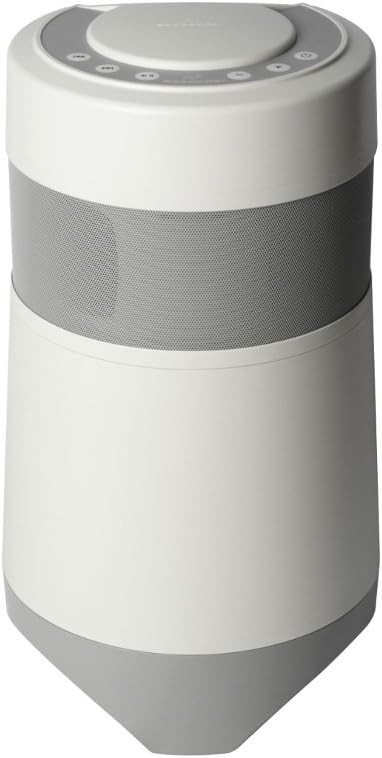
Figure 1: Front view of the Soundcast OutCast Junior OCJ-420 speaker, showcasing its cylindrical design and speaker grille.

Figure 2: Top view of the speaker, illustrating the control panel with power, volume, and playback buttons.

Figure 3: Bottom view of the speaker, showing the base and connection ports.
Setup
Unpacking
Carefully remove the speaker and all accessories from the packaging. Verify that all components are present.
Charging the Battery
The speaker is equipped with an internal rechargeable battery. Before first use, fully charge the speaker. Connect the provided power adapter to the speaker's charging port (refer to Figure 3 for port location) and then to a standard electrical outlet. The charging indicator will illuminate during charging and change status when fully charged.
Initial Placement
Place the speaker on a stable, flat surface. For optimal sound dispersion, ensure there are no obstructions directly around the speaker. While designed for outdoor use, avoid prolonged exposure to extreme weather conditions.
Operating Instructions
Power On/Off
To power on the speaker, press and hold the Power button (refer to Figure 2) until the indicator light illuminates. To power off, press and hold the Power button again until the indicator light turns off.
Wireless Connection
- Ensure the speaker is powered on and in pairing mode. The indicator light may flash to indicate pairing readiness.
- On your audio source device (e.g., smartphone, tablet), enable Bluetooth and search for available devices.
- Select "Soundcast OutCast Junior" from the list of detected devices.
- Once connected, the speaker's indicator light will change to a solid state, confirming a successful connection.
The speaker offers a maximum wireless range of approximately 350 feet (106 meters) in open environments. Obstacles and interference may reduce this range.
Volume Control
Use the + and - buttons on the top control panel (Figure 2) to adjust the speaker's volume. You can also control the volume from your connected audio source device.
Playback Controls
The top control panel (Figure 2) includes buttons for playback control:
- Play/Pause: Press the Play/Pause button to start or pause audio playback.
- Next Track: Press the Next Track button to skip to the next song.
- Previous Track: Press the Previous Track button to go back to the beginning of the current song or to the previous song.
Maintenance
Cleaning
Wipe the speaker's exterior with a soft, damp cloth. Do not use abrasive cleaners, solvents, or harsh chemicals, as these can damage the finish. Ensure all ports are dry before connecting any cables.
Battery Care
To maximize battery life, avoid fully discharging the battery frequently. If storing the speaker for an extended period, charge it to approximately 50% every few months. Do not expose the battery to extreme temperatures.
Storage
When not in use, store the speaker in a cool, dry place, away from direct sunlight and extreme temperatures. Ensure the speaker is powered off before storage.
Troubleshooting
- No Power: Ensure the speaker is fully charged. Connect the power adapter and verify the charging indicator. If the issue persists, try a different power outlet.
- No Sound: Check that the speaker is powered on and successfully connected to your audio source. Verify that the volume on both the speaker and the audio source is turned up and not muted.
- Bluetooth Connection Issues: Ensure the speaker is within the 350-foot range of your audio source. Move the speaker closer to the source and away from potential interference sources (e.g., Wi-Fi routers, other wireless devices). Try unpairing and re-pairing the speaker with your device.
- Poor Sound Quality: Check the audio source for proper playback. Ensure the speaker is placed on a stable surface and not obstructed.
- Battery Not Holding Charge: If the battery life significantly decreases over time, it may indicate the battery is nearing the end of its lifespan. Contact Soundcast support for potential service options.
Specifications
- Model Number: SDCOCJ420
- Brand: Soundcast
- Speaker Size: 6.5 Inches
- Connectivity Technology: Wireless
- Speaker Maximum Output Power: 50 Watts
- Maximum Wireless Range: 350 Feet (approx. 106 meters)
- Product Dimensions: 10.43 x 10.43 x 19.29 inches (26.5 x 26.5 x 49 cm)
- Item Weight: 16.5 pounds (7.5 Kilograms)
- Batteries: 1 Product Specific battery required (included)
Warranty and Support
For warranty information and technical support, please refer to the documentation provided with your purchase or visit the official Soundcast website. Keep your proof of purchase for any warranty claims.


