
PHOENIX CONTACT QUINT-PS/1AC/24DC/10
PHOENIX CONTACT QUINT-PS/1AC/24DC/10 Power Supply User Manual
Model: QUINT-PS/1AC/24DC/10 (Part No. 2866763)
1. Introduction
This manual provides essential information for the safe and efficient installation, operation, and maintenance of the PHOENIX CONTACT QUINT-PS/1AC/24DC/10 power supply. Please read this manual thoroughly before installing or operating the device.
The QUINT-PS/1AC/24DC/10 is a high-performance DIN rail mountable power supply designed to convert single-phase AC voltage into a stable 24 VDC output, suitable for various industrial applications.
2. Safety Instructions
WARNING: Risk of electric shock. Only qualified personnel should install, operate, or maintain this device.
- Always disconnect power before performing any installation, wiring, or maintenance work.
- Ensure proper grounding of the device and associated equipment.
- Protect against accidental contact with live parts.
- Do not operate the device in environments with explosive gases or vapors.
- Observe all local and national electrical codes and regulations.
- Ensure adequate ventilation to prevent overheating.
3. Product Overview
The PHOENIX CONTACT QUINT-PS/1AC/24DC/10 is a robust power supply unit featuring a compact design for DIN rail mounting. It provides a stable 24 VDC output at 10 Amperes, making it suitable for demanding industrial control applications. Key features include:
- Input: 1-phase 100-240 VAC, 50/60 Hz
- Output: 24 VDC, 10 A
- DIN Rail Mounting
- Screw Connection Terminals
- High efficiency and reliability
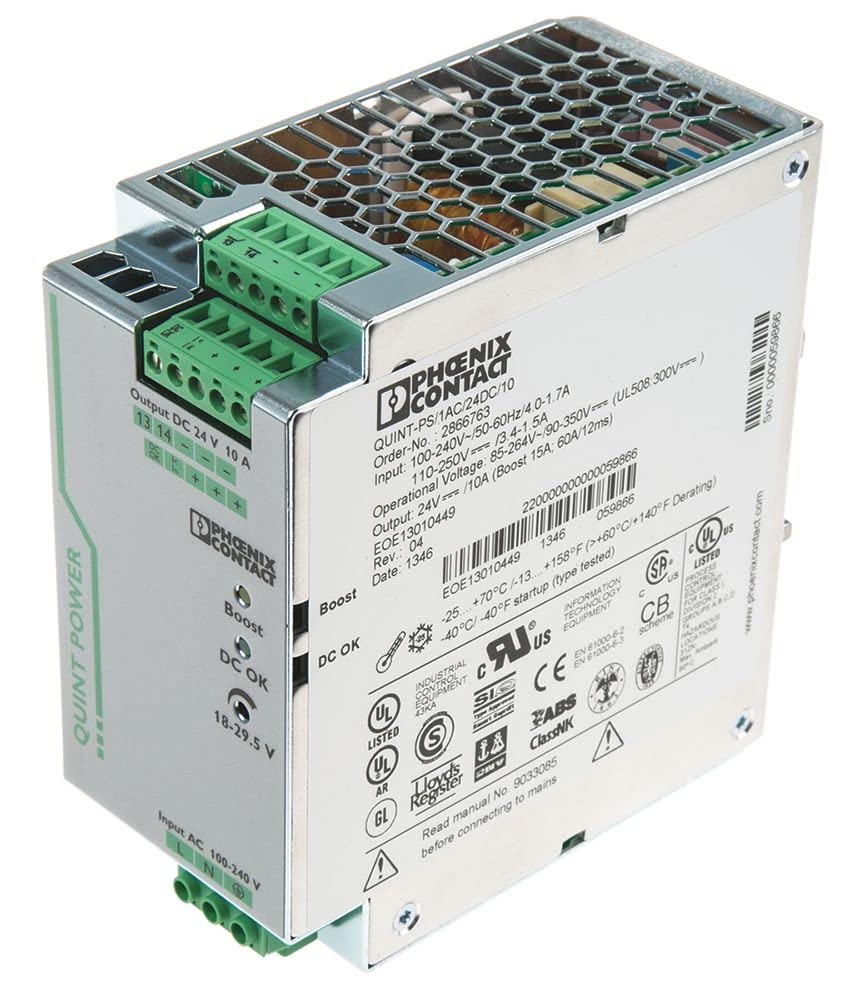
Figure 1: PHOENIX CONTACT QUINT-PS/1AC/24DC/10 power supply unit. This image shows the compact design and terminal block locations for input and output connections, typical for DIN rail mounted devices.
4. Setup
4.1. Mounting
The QUINT-PS/1AC/24DC/10 is designed for mounting on a standard 35 mm DIN rail (EN 60715). Ensure the mounting surface is stable and provides adequate space for ventilation around the unit.
- Hook the top edge of the power supply onto the DIN rail.
- Press the bottom edge of the power supply firmly against the DIN rail until it clicks into place.
- Verify that the unit is securely fastened and cannot be easily dislodged.
4.2. Wiring
All connections are made via screw terminals. Use appropriate wire gauges for the input and output currents to ensure safe and reliable operation. Refer to local electrical codes for wire sizing.
4.2.1. Input Connection (AC)
- Connect the Line (L) wire to the designated 'L' terminal.
- Connect the Neutral (N) wire to the designated 'N' terminal.
- Connect the Protective Earth (PE) wire to the designated 'PE' terminal.
- Ensure all input connections are tight and secure.
4.2.2. Output Connection (DC)
- Connect the positive (+) load wire to the designated '+' terminal.
- Connect the negative (-) load wire to the designated '-' terminal.
- Ensure all output connections are tight and secure.
5. Operating Instructions
5.1. Powering On
After ensuring all connections are correctly made and secured, apply the specified AC input voltage (100-240 VAC) to the power supply. The unit will automatically begin to supply 24 VDC to the output terminals.
5.2. Indicators
Refer to the device's front panel for any status indicators (e.g., LED for output voltage present, overload). A green LED typically indicates normal operation and stable output voltage.
5.3. Powering Off
To power off the device, disconnect the AC input voltage. The output voltage will cease immediately.
6. Maintenance
The PHOENIX CONTACT QUINT-PS/1AC/24DC/10 is designed for maintenance-free operation under normal conditions. However, periodic checks are recommended to ensure optimal performance and longevity.
- Cleaning: Keep the unit free from dust and debris. Use a dry, soft cloth for cleaning. Do not use liquid cleaners or solvents.
- Inspection: Periodically inspect the terminals for secure connections. Check for any signs of discoloration, damage, or loose wiring.
- Ventilation: Ensure that the ventilation openings are not obstructed to allow for proper airflow and heat dissipation.
WARNING: Disconnect all power before performing any maintenance or cleaning.
7. Troubleshooting
If the power supply is not functioning as expected, perform the following basic checks:
| Problem | Possible Cause | Solution |
|---|---|---|
| No output voltage / No LED indicator |
|
|
| Output voltage too low or unstable |
|
|
| Unit is hot to the touch |
|
|
For issues not resolved by the above steps, please contact PHOENIX CONTACT technical support.
8. Technical Specifications
| Parameter | Value |
|---|---|
| Model Number | QUINT-PS/1AC/24DC/10 (2866763) |
| Input Voltage Range | 100-240 VAC (1-phase) |
| Input Frequency | 50/60 Hz |
| Input Current | 2.8-1.2 A |
| Output Voltage | 24 VDC |
| Output Current | 10 A |
| Output Power | 240 Watts |
| Mounting Type | DIN Rail |
| Connection Type | Screw Connection |
| Product Dimensions (L x W x H) | 4.92 x 2.36 x 5.12 inches (125 x 60 x 130 mm) |
| Item Weight | 2.64 pounds (1.2 kg) |
| Cooling Method | Air |
| Manufacturer | PHOENIX CONTACT |
9. Warranty and Support
PHOENIX CONTACT products are manufactured to high-quality standards and come with a manufacturer's warranty. For specific warranty terms and conditions, please refer to the documentation provided with your product or visit the official PHOENIX CONTACT website.
For technical assistance, troubleshooting beyond this manual, or to inquire about repairs, please contact PHOENIX CONTACT customer support:
- Website: www.phoenixcontact.com
- Contact Information: Refer to the 'Contact Us' section on the official website for regional support details (phone, email).
When contacting support, please have your product model number (QUINT-PS/1AC/24DC/10) and serial number (if applicable) ready.
Ask a question about this manual
Ask about setup, troubleshooting, compatibility, parts, safety, or missing instructions. Manuals+ will review the question and use this page’s manual context to help answer it.