
Introduction
This manual provides essential information for the safe and effective use of your Panasonic KX-TCA1 9V 350mA AC/DC Power Adapter. This adapter is designed to convert alternating current (AC) from a wall outlet to direct current (DC) suitable for compatible electronic devices. Please read this manual thoroughly before use and retain it for future reference.
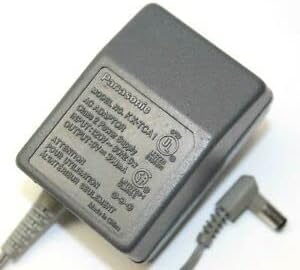
Image showing the Panasonic KX-TCA1 AC/DC power adapter. The adapter is gray with the Panasonic logo and model number KX-TCA1 visible on its label. The label also indicates input and output specifications, along with safety certifications. A barrel connector cable extends from the adapter.
Safety Information
To ensure safe operation and prevent damage, observe the following precautions:
- Use the adapter only with devices that require a 9V DC output and a maximum current draw of 350mA. Exceeding these specifications can damage the adapter or the connected device.
- Ensure the input voltage of your power outlet is within the adapter's specified range (100-240VAC, 50-60Hz).
- Do not expose the adapter to water, moisture, or extreme temperatures.
- Avoid dropping or subjecting the adapter to strong impacts.
- Do not attempt to open, modify, or repair the adapter. Refer all servicing to qualified personnel.
- Unplug the adapter from the power outlet when not in use for extended periods.
- Keep out of reach of children.
Setup
- Verify Compatibility: Before connecting, confirm that your device requires a 9V DC power input and uses a barrel connector compatible with this adapter. Check your device's specifications or existing power supply.
- Connect to Device: Carefully insert the barrel connector of the adapter into the power input port of your electronic device. Ensure a snug and secure fit.
- Connect to Power Outlet: Plug the AC prongs of the adapter into a standard wall power outlet (100-240VAC, 50-60Hz).
- Power On Device: Once connected, power on your device as usual.
The adapter is designed for indoor use only.
Operating Instructions
The Panasonic KX-TCA1 power adapter operates automatically once connected to a compatible device and a power outlet. It provides a stable 9V DC output to power your device.
- Ensure the adapter is placed in a well-ventilated area to prevent overheating.
- Do not cover the adapter during operation.
- If the adapter feels excessively hot, disconnect it immediately and check for proper ventilation or device compatibility.
Maintenance
Proper maintenance ensures the longevity of your power adapter:
- Cleaning: Disconnect the adapter from both the power outlet and the device before cleaning. Use a soft, dry cloth to wipe the exterior. Do not use liquid cleaners or solvents.
- Storage: When not in use, store the adapter in a cool, dry place, away from direct sunlight and extreme temperatures. Avoid tightly winding the cable to prevent damage.
- Cable Care: Regularly inspect the power cord and connector for any signs of damage, such as fraying or bending. If damage is observed, discontinue use and replace the adapter.
Troubleshooting
If you experience issues with your power adapter, consider the following:
- No Power to Device:
- Ensure the adapter is securely plugged into a working wall outlet. Test the outlet with another device.
- Verify that the barrel connector is fully inserted into your device's power port.
- Confirm that your device is turned on and functioning correctly.
- Check if the device's power requirements (voltage and amperage) match the adapter's output specifications (9V DC, 350mA).
- Adapter is Hot:
- A slight warmth is normal during operation. If the adapter is excessively hot, disconnect it immediately.
- Ensure adequate ventilation around the adapter.
- Verify that the connected device is not drawing more current than the adapter's maximum output (350mA).
If problems persist after checking these points, discontinue use and contact the seller or manufacturer for assistance.
Specifications
| Feature | Specification |
|---|---|
| Model Number | KX-TCA1 |
| Input Voltage | 100-240VAC (50-60Hz) |
| Output Voltage | 9V DC |
| Output Current (Amperage) | 350mA (0.35 Amp) |
| Wattage | 3.15 watts |
| Connector Type | Barrel Connector |
| Included Components | 1 adapter |
| Item Weight | 8 ounces |
| Package Dimensions | 4 x 4 x 3 inches |
Warranty and Support
This product is an equivalent replacement power adapter. For specific warranty information, please refer to the terms provided by the seller at the time of purchase. As of the last update, the seller is TeKswamp.
For technical support or inquiries regarding this power adapter, please contact the seller directly through the platform where the purchase was made. Provide your order details for faster assistance.
For general information about Panasonic products, you may visit the official Panasonic website, though this specific adapter is an equivalent part.


