
Introduction
The HON 685LQ 600 Series 5-Drawer Lateral File Cabinet is engineered for demanding office environments, providing robust and secure storage for your documents. This manual provides essential information for the proper setup, operation, maintenance, and troubleshooting of your file cabinet.

Image: The HON 685LQ 5-Drawer Lateral File Cabinet, featuring five drawers and a light gray finish.
Safety Information
Adhering to these safety guidelines is crucial for preventing injury and ensuring the longevity of your file cabinet:
- Always ensure the cabinet is level and stable before use.
- Distribute weight evenly within the drawers to prevent the cabinet from tipping.
- Do not overload drawers or the cabinet beyond its intended capacity.
- Exercise caution when opening and closing drawers to avoid pinch points.
- Do not climb on or lean heavily on open drawers.
Setup and Installation
The HON 685LQ file cabinet requires assembly and is designed for standalone, floor-mount installation. Follow these steps for proper setup:
- Unpacking: Carefully remove all packaging materials. Inspect the cabinet for any shipping damage. Report any damage to your supplier immediately.
- Placement: Choose a level, stable surface for the cabinet. Ensure adequate clearance around the cabinet for full drawer extension.
- Assembly: Refer to the separate assembly instructions provided with your unit. Ensure all components are securely fastened. The double-walled base is designed to keep the cabinet frame aligned and stable.
- Leveling: Once assembled and in its final position, verify the cabinet is level. Adjust any leveling glides if present, or use shims under the base if necessary, to ensure stability and proper drawer operation.
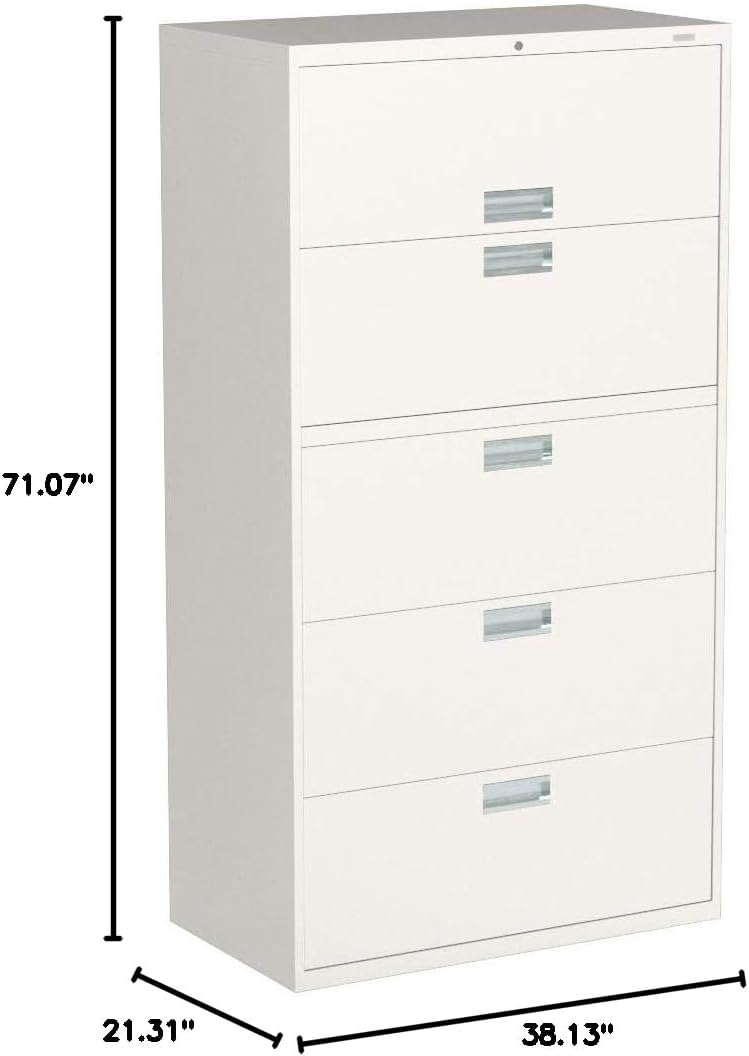
Image: Diagram illustrating the dimensions of the HON 685LQ 5-Drawer Lateral File Cabinet: 21.31 inches deep, 38.13 inches wide, and 71.07 inches high.
Operating Instructions
The HON 685LQ cabinet is designed for efficient and secure document storage.
- Drawer Operation: Each of the five drawers operates on smooth slides. Pull the bright aluminum handle to open a drawer and push firmly to close it until it latches.
- Filing Documents: The drawers are designed to accept both letter and legal-sized hanging file folders. Ensure folders are properly seated on the rails.
- Locking Mechanism: The cabinet features a two-sided lock mechanism to resist tampering. Insert the key into the lock cylinder located on the top drawer. Turn the key to the locked position to secure all drawers simultaneously. Turn the key to the unlocked position to release the drawers. Remove the key after locking or unlocking.
- Anti-Tip Feature: For safety, only one drawer should be opened at a time. The cabinet is equipped with an interlock system that prevents more than one drawer from being fully extended, reducing the risk of tipping.
Maintenance
Regular maintenance ensures optimal performance and extends the life of your file cabinet.
- Cleaning: Wipe exterior surfaces with a soft, damp cloth and mild soap. Avoid abrasive cleaners or solvents that could damage the finish. Dry thoroughly.
- Drawer Slides: Periodically check drawer slides for smooth operation. If a drawer becomes stiff, clean the slides and apply a small amount of silicone-based lubricant. Do not use oil-based lubricants as they can attract dust.
- Lock Mechanism: Keep the lock cylinder clean. If the key becomes difficult to turn, a small amount of graphite lubricant can be applied to the key and inserted into the lock.
- Stability Check: Regularly verify that the cabinet remains level and stable. Re-level if necessary.
Troubleshooting
Refer to the following common issues and solutions:
| Problem | Possible Cause | Solution |
|---|---|---|
| Drawer sticks or is difficult to open/close. | Overloaded drawer, uneven cabinet, obstruction in slide, dirty slides. | Reduce drawer contents, ensure cabinet is level, check for obstructions, clean and lubricate slides. |
| Cabinet feels unstable or wobbly. | Uneven floor, cabinet not level. | Adjust leveling glides or use shims to ensure the cabinet is level on all corners. |
| Lock mechanism does not engage or disengage. | Key not fully inserted, obstruction in lock, damaged mechanism. | Ensure key is fully inserted and turned correctly. Check for debris in the lock. If issues persist, contact customer support. |
| Cannot open multiple drawers simultaneously. | This is a safety feature. | The cabinet is designed with an anti-tip interlock system. Only one drawer can be fully extended at a time to prevent tipping. This is normal operation. |
Specifications
| Brand | HON |
| Model Number | 685LQ |
| Color | Light Gray |
| Product Dimensions (D x W x H) | 21.31" x 38.13" x 71.07" |
| Item Weight | 247 Pounds |
| Number of Drawers | 5 |
| Frame Material | Alloy Steel |
| Handle Material | Aluminum |
| Assembly Required | Yes |
| Installation Type | Standalone, Floor Mount |
| Country of Origin | United States |
| UPC | 089192113798 |
Warranty and Support
For specific warranty information regarding your HON 685LQ 600 Series 5-Drawer Lateral File Cabinet, please refer to the warranty documentation included with your purchase or visit the official HON website. For technical support, replacement parts, or further assistance, please contact HON customer service directly.
You can find more information and contact details by visiting the HON Store on Amazon.


