
Product Overview
The ViewHD VHD-3X1P3FT is a premium quality 3-port HDMI switcher designed to connect up to three HDMI source devices to a single HDMI display. This device features intelligent automatic switching, allowing it to detect and switch to an active input source. It also includes a key-press-switching function for manual control. The switcher comes with a fixed 3-foot HDMI pigtail cable for convenient connection to your display.
It supports HD Audio, HDMI 1.3b, and is HDCP compliant. The switcher supports 12-bit Deep Color and resolutions up to 1080p, 2k, and computer resolutions up to 1920 x 1200.
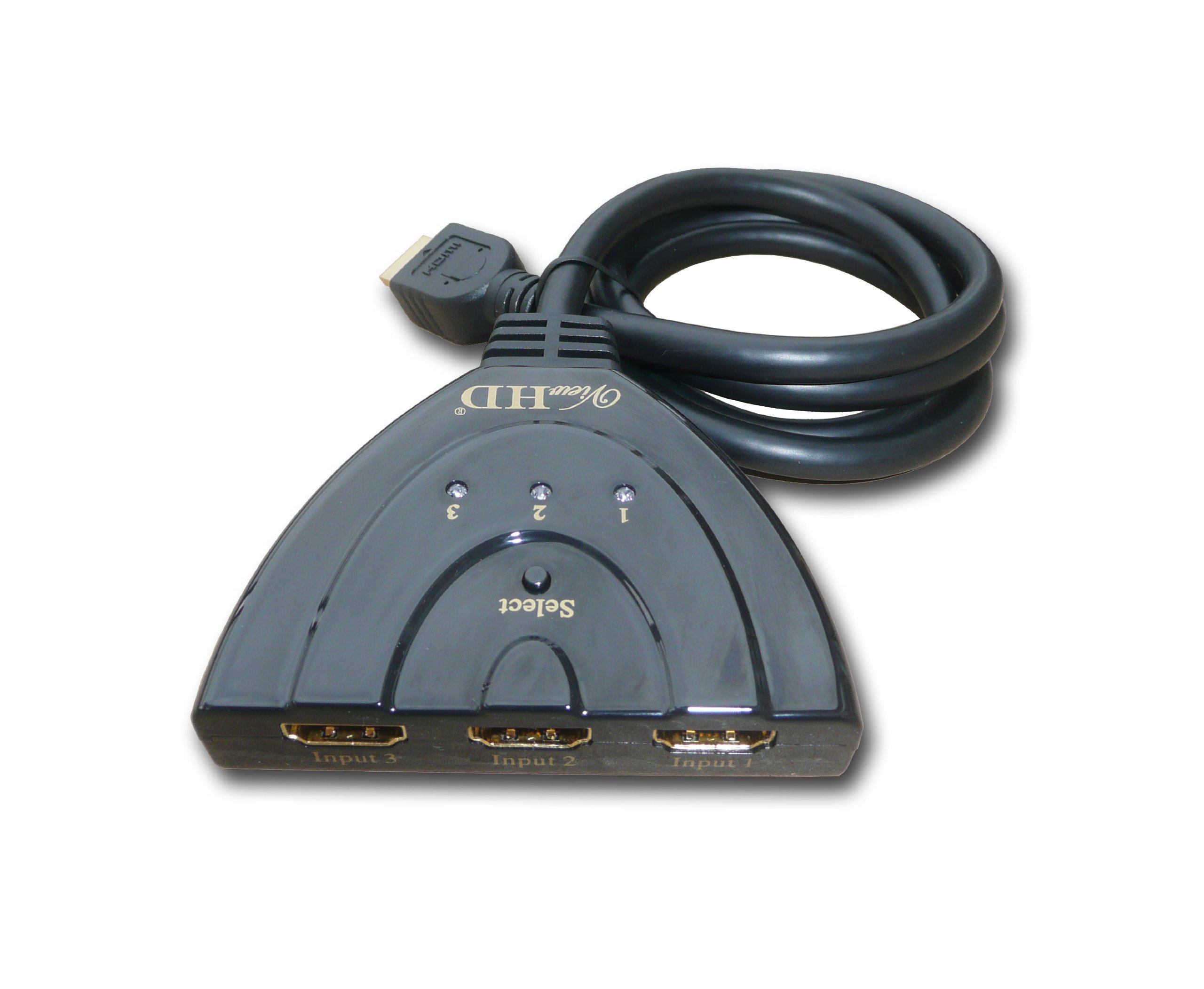
Image: The ViewHD 3 Port HDMI Switcher (VHD-3X1P3FT) showing its three input ports, a 'Select' button, LED indicators for each input, and the integrated 3-foot HDMI pigtail output cable.
Setup Instructions
- Connect HDMI Sources: Connect up to three HDMI source devices (e.g., Blu-ray player, cable box, PS3, Xbox 360) to the 'Input 1', 'Input 2', and 'Input 3' ports on the ViewHD HDMI switcher.
- Connect to Display: Connect the integrated 3-foot HDMI pigtail cable from the switcher to the HDMI input port on your television or display.
- Power On Devices: Ensure all connected HDMI source devices and your display are powered on.
- Automatic Detection: The switcher will automatically detect and switch to the active HDMI input source. If multiple sources are active, it will typically default to the lowest numbered input or the last active input.
Operating Instructions
- Automatic Switching: The VHD-3X1P3FT is designed for intelligent, automatic operation. When a new HDMI source is activated, the switcher will automatically detect it and switch the display to that input.
- Manual Switching: To manually switch between connected HDMI sources, press the 'Select' button located on the top of the switcher. Each press will cycle through the available inputs (Input 1, Input 2, Input 3).
- LED Indicators: Three LED indicators, labeled '1', '2', and '3', correspond to the respective HDMI input ports. The illuminated LED indicates which input source is currently active and being displayed.
- Supported Features: This switcher supports 3D content, 12-bit Deep Color, and high-definition resolutions up to 1080p and 2k for HDTVs, and up to 1920 x 1200 for computer monitors.
Maintenance
- Cleaning: Use a soft, dry cloth to clean the exterior of the switcher. Avoid using liquid cleaners or solvents, as they may damage the device.
- Environment: Keep the switcher in a cool, dry place away from direct sunlight, heat sources, and excessive moisture.
- Cable Care: Avoid bending or kinking the integrated pigtail HDMI cable excessively to prevent internal damage.
- Ventilation: Ensure the device has adequate ventilation and is not covered, though passive devices like this typically generate minimal heat.
Troubleshooting
- No Signal on Display:
- Ensure all HDMI cables are securely connected to both the source devices, the switcher, and the display.
- Verify that the correct input is selected on your display (e.g., HDMI 1, HDMI 2).
- Try pressing the 'Select' button on the switcher to cycle through inputs manually.
- Test each HDMI source device by connecting it directly to the display to confirm it is functioning correctly.
- Flickering or Intermittent Signal:
- Check for loose HDMI cable connections.
- Ensure the HDMI cables used are of good quality and meet the specifications for your resolution (e.g., High-Speed HDMI).
- Reduce the cable length if possible, especially for very high resolutions.
- Automatic Switching Not Working:
- Ensure only one source device is active at a time for optimal automatic switching.
- If multiple sources are active, manual switching via the 'Select' button may be required.
- Some source devices may not provide sufficient power over HDMI for reliable auto-switching; ensure they are fully powered.
- No Audio:
- Verify audio settings on your source device and display.
- Ensure the HDMI cable supports audio transmission.
Specifications
| Brand | ViewHD |
| Model Number | VHD-3X1P3FT |
| Connector Type | HDMI |
| Number of Ports | 3 (Input) |
| Cable Type | HDMI (integrated 3FT pigtail output) |
| Supported HDMI Version | HDMI 1.3b |
| HDCP Compliance | Yes |
| Supported Resolutions | Up to 1080p, 2k (HDTV); up to 1920 x 1200 (Computer) |
| Color Depth | 12-bit Deep Color |
| Audio Support | HD Audio |
| Compatible Devices | Gaming Consoles, Televisions, Blu-Ray Players, Cable Boxes, etc. |
| Item Weight | 3.52 ounces |
Warranty Information
ViewHD products typically come with a manufacturer's warranty. For specific details regarding the warranty period and terms for your VHD-3X1P3FT HDMI Switcher, please refer to the documentation included with your purchase or visit the official ViewHD website. Keep your proof of purchase for warranty claims.
Customer Support
If you encounter any issues or have questions not covered in this manual, please visit the official ViewHD support website for further assistance. You may find FAQs, additional troubleshooting guides, and contact information for technical support there.