
1. Introduction
This manual provides essential instructions for the safe and effective use of your OMRON Body Composition Monitor and Scale, Model HBF-514C. This device is designed to measure various body composition metrics, offering comprehensive insights into your physical health. Please read this manual thoroughly before using the device and retain it for future reference.

Image 1.1: OMRON HBF-514C Body Composition Monitor and Scale. This image displays the full body composition monitor, featuring a dark grey platform with four silver electrode pads for feet, and a handheld unit with a digital display and control buttons connected by a coiled cord.
2. Important Safety Information
To ensure correct use, basic safety precautions should always be observed when using electrical products.
- Do not use this device if you have a pacemaker or other implanted medical device.
- Pregnant women should consult their physician before using this device.
- Keep the device dry. Do not use in wet environments or with wet feet.
- Place the device on a hard, flat surface for accurate measurements.
- Do not attempt to disassemble or repair the device. Refer to qualified service personnel.
- Keep batteries out of reach of children.
3. Package Contents
Upon opening the package, verify that all items are present and undamaged:
- OMRON Body Composition Monitor & Scale (HBF-514C)
- 4 x AA Batteries
- Instruction Manual (this document)
4. Parts Identification
Familiarize yourself with the components of your OMRON Body Composition Monitor:

Image 4.1: Diagram of OMRON HBF-514C components. This image highlights the digital display, control buttons (Memory, Set, Guest, On/Off), and the four foot electrodes on the scale platform.
- Display Unit: Shows measurements and settings.
- Handle Electrodes: Used for hand-to-hand bioelectrical impedance analysis.
- Foot Electrodes: Used for foot-to-foot bioelectrical impedance analysis.
- Control Buttons:
- ON/OFF: Powers the device on or off.
- SET: Confirms selections and enters user data.
- MEMORY: Accesses stored measurement data.
- GUEST: Allows a guest user to take a measurement without storing data.
- UP/DOWN Arrows: Navigate menus and adjust values.
- Battery Compartment: Located on the underside of the scale.
5. Setup
5.1 Battery Installation
- Turn the scale over to access the battery compartment.
- Open the battery cover.
- Insert the 4 AA batteries, ensuring correct polarity (+/-).
- Close the battery cover securely.
5.2 Setting Up User Profiles (P1-P4)
The device can store up to 4 user profiles. Follow these steps to set up a profile:
- Press the ON/OFF button to turn on the device.
- Press the SET button. The user number (P1-P4) will flash. Use the UP/DOWN arrows to select a profile number, then press SET.
- Set Age: Use UP/DOWN arrows to enter your age (10-80 years), then press SET.
- Set Height: Use UP/DOWN arrows to enter your height (3'4" - 6'6.75" or 100-199.5 cm), then press SET.
- Set Gender: Use UP/DOWN arrows to select Male or Female, then press SET.
- Set Measurement Unit: Use UP/DOWN arrows to select lb/inch or kg/cm, then press SET.
- The device will display "0.0 lb" or "0.0 kg" and is ready for measurement.
6. Operating Instructions
6.1 Taking a Measurement
For accurate results, take measurements at the same time of day under similar conditions. Avoid measuring immediately after intense exercise, bathing, or consuming large meals.
- Press the ON/OFF button.
- Select your user profile (P1-P4) by pressing the corresponding button, or press GUEST for a one-time measurement.
- Step onto the scale barefoot, ensuring your feet are centered on the foot electrodes.
- Hold the display unit with both hands, extending your arms straight out at a 90-degree angle to your body. Ensure your thumbs are on the top electrodes and fingers are wrapped around the bottom electrodes.
- Remain still until the measurement is complete and results are displayed. This typically takes a few seconds.
- The device will first display your weight, then cycle through other body composition metrics.
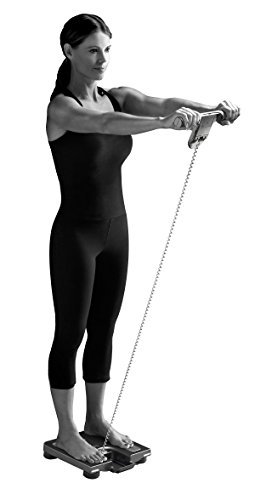
Image 6.1: Proper posture for using the OMRON HBF-514C. A woman stands barefoot on the scale with arms extended forward, holding the handheld unit, demonstrating the correct measurement technique.
6.2 Viewing Stored Data
The device stores up to 90 days of measurement data for each user profile.
- Press the ON/OFF button.
- Select your user profile (P1-P4).
- Press the MEMORY button. The device will display your last measurement.
- Use the UP/DOWN arrows to scroll through previous measurements.
7. Understanding Your Measurements
The OMRON HBF-514C provides 7 key body composition indicators:

Body Fat Percentage: The proportion of fat to total body weight. High body fat can increase health risks.

Skeletal Muscle Mass: The weight of muscle attached to bones. Maintaining or increasing skeletal muscle mass is important for strength and metabolism.

BMI (Body Mass Index): A ratio of weight to height, used to classify underweight, normal weight, overweight, and obesity.

Resting Metabolism: The minimum number of calories required to maintain basic bodily functions at rest. Higher muscle mass generally leads to a higher resting metabolism.

Visceral Fat: Fat surrounding internal organs. High levels are associated with increased health risks.

Body Age: An estimate of your body's physiological age based on your body composition metrics compared to average data for your chronological age group.

Weight: Your total body weight.
8. Maintenance
8.1 Cleaning
- Wipe the device with a soft, dry cloth.
- For stubborn dirt, use a cloth lightly dampened with water and a mild detergent, then wipe dry.
- Do not use abrasive cleaners, alcohol, or benzene, as these may damage the device.
8.2 Storage
- Store the device in a clean, dry place away from direct sunlight and extreme temperatures.
- If the device will not be used for an extended period, remove the batteries to prevent leakage.
9. Troubleshooting
| Problem | Possible Cause | Solution |
|---|---|---|
| Device does not turn on. | Batteries are dead or incorrectly installed. | Replace batteries or re-install them with correct polarity. |
| Inaccurate readings. |
|
|
| "Err" or other error message displayed. | Measurement error, movement during measurement, or device malfunction. | Step off the scale, wait a few seconds, and try again. Ensure you remain still. If the error persists, contact customer support. |
10. Specifications
| Model: | HBF-514C |
| Product Dimensions: | 11.87 x 2.12 x 12.87 inches |
| Weight: | 4.63 Pounds |
| Power Source: | 4 x AA Batteries (included) |
| Measurement Range (Weight): | Up to 330 pounds (150 kg) |
| Height Range: | 3'4" - 6'6.75" (100 - 199.5 cm) |
| Age Range: | 10 to 80 years |
| User Profiles: | 4 users with 90-day memory |
| Display Type: | LCD |
| Date First Available: | March 24, 2009 |
| Manufacturer: | Omron |
11. Warranty and Support
11.1 Warranty Information
Specific warranty details for the OMRON HBF-514C are typically provided with the product packaging or on the manufacturer's official website. Please refer to these resources for the most current warranty terms and conditions.
11.2 Customer Support
For technical assistance, troubleshooting beyond this manual, or warranty claims, please contact OMRON customer support.
- OMRON Healthcare Website: www.omronhealthcare.com
- Refer to your product packaging for specific contact numbers or email addresses for your region.


